A bull's eye diagram does one thing better than almost any other visual tool: it forces a team to stop debating and commit. By limiting what fits in the center ring, it removes the comfortable illusion that everything is equally important.
If you're drowning in competing priorities, working through a product decision, or building an information security policy, the bull's eye diagram gives you a structured way to separate the critical from the merely useful. This guide covers what the diagram is, how it works across different fields, how to build one, and what a usable template looks like.
What Is a Bull's Eye Diagram?
A bull's eye diagram is a prioritization framework made up of three or more concentric circles—like a target. Each ring represents a level of importance, with the innermost circle holding the highest-priority items and each outer ring containing progressively less critical ones.
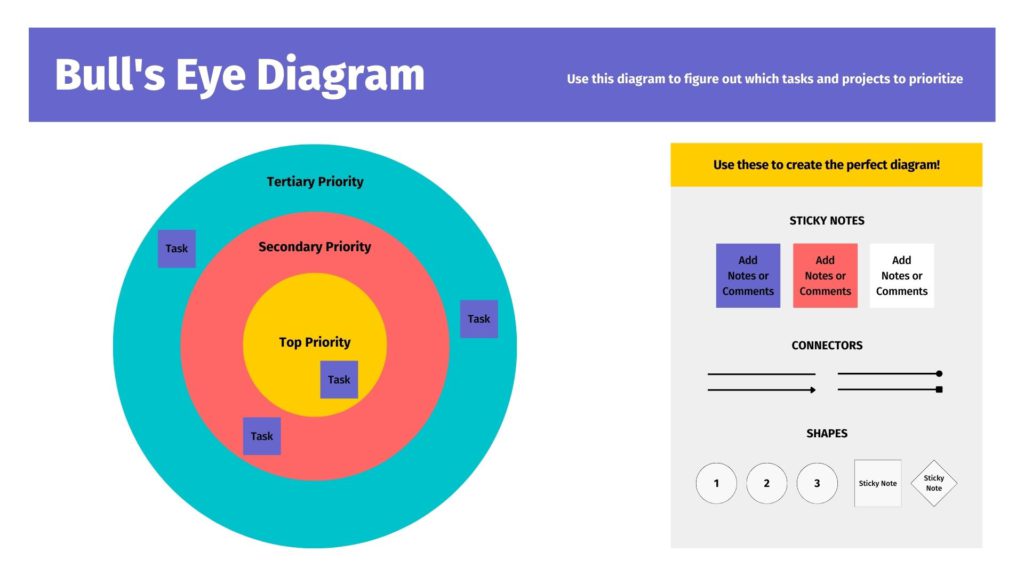
The defining feature isn't the shape—it's the constraint. Because the center ring is small, you can only place a limited number of items there. That physical limitation forces genuine prioritization. You can't label everything "most important" and move on.
The standard three-ring structure works like this:
-
Inner ring (bull's eye): Must-haves. Non-negotiable items without which the goal cannot be achieved.
-
Middle ring: Should-haves. Important items that move the project forward but aren't immediately blocking.
-
Outer ring: Nice-to-haves. Items worth keeping on the list but not worth blocking progress over.
Some versions use four or five rings for finer granularity—particularly common in information security applications, which we'll cover below. But the three-ring version handles most business use cases cleanly.
How Does a Bull's Eye Diagram Work?
The diagram works because of what it won't let you do. In a standard list or spreadsheet, it's easy to assign "high priority" to a dozen items. The concentric structure of a bull's eye prevents this: the center ring fills up quickly, forcing the team to make real trade-off decisions rather than deferring them.

The process typically runs like this: a team generates a list of all relevant tasks, requirements, or concerns. Then—through discussion and explicit trade-off reasoning—they sort those items into rings. Items in the center get addressed first. Items in the outer ring may be deferred indefinitely or dropped without consequence.
That sorting process is where the real value happens. Two team members arguing about whether a feature belongs in the inner or middle ring are actually having the most important conversation in the project: what are we actually building this for, and what will we sacrifice to get there?
Bull's Eye Diagram Use Cases
Product Development and Feature Prioritization
Product teams use bull's eye diagrams to scope releases. Core features that define the product's value go in the center. Supporting features that improve the experience go in the middle. Enhancement requests and nice-to-haves fill the outer ring. This structure helps product managers communicate scope decisions to engineers and stakeholders without lengthy justification—the diagram is the justification.
Project Management
When a project has more tasks than time, a bull's eye diagram makes the prioritization conversation explicit. Unlike a simple ranked list, the diagram makes it visually obvious when the center ring is overloaded—which is often a sign that scope needs to be cut. It also pairs naturally with other frameworks: teams frequently use a bull's eye diagram alongside a MoSCoW method analysis or an action priority matrix to cross-check their prioritization logic from multiple angles.

Strategic Planning
Leadership teams use bull's eye diagrams to align on what the organization is actually optimizing for. Company vision goes in the center; annual initiatives go in the middle ring; opportunistic bets and exploratory ideas fill the outer ring. The diagram makes strategic trade-offs visible in a way that a slide deck or word document cannot. For teams working through broader strategic alignment, a strategy map can serve as a useful complement—where the bull's eye defines priorities, a strategy map connects those priorities to outcomes.
Brainstorming and Ideation
During ideation sessions, teams often generate more ideas than they can act on. Running a bull's eye exercise at the end of a brainstorm helps separate ideas worth pursuing immediately from those worth revisiting later—without losing them entirely. The outer ring becomes a parking lot that the team can return to rather than a discard pile.
Information Security: The Bull's Eye Model
In cybersecurity, the "bull's eye model" refers to a specific implementation framework for information security policy. It uses the same concentric structure but maps organizational security layers from the outside in:
-
Outer ring (Perimeter Security): External defenses—firewalls, intrusion detection systems, network boundary controls.
-
Second ring (Network Security): Internal network protections—segmentation, internal firewalls, access controls.
-
Third ring (Host Security): Device-level protections—operating system hardening, endpoint security, patch management.
-
Inner ring (Data Security): The most critical layer—encryption, access controls on sensitive data, data loss prevention.
The model emphasizes "defense in depth": even if the outer layer is breached, inner layers maintain protection. Security policies, procedures, and controls are designed to address the specific risks of each ring rather than applying a uniform approach across the entire organization. The innermost ring—data—always receives the most stringent controls because it represents the asset that matters most.
Bull's Eye Diagram Templates
The right template depends on what you're prioritizing. Here are the most common configurations:
3-Ring Template (Standard Prioritization)
The most widely used format. Label the rings from inside out: Critical / Important / Nice to Have, or Must Do / Should Do / Could Do. Works well for product sprints, project scoping, and brainstorm triage. Aim to place no more than 3–5 items in the center ring—if you have more, the exercise hasn't done its job yet.
4-Ring Template (Feature or Strategy Planning)
Add a fourth outer ring for items that are explicitly out of scope for the current cycle. Label from inside out: Core / High Value / Supplementary / Out of Scope. The "out of scope" ring is useful for teams that need to communicate scope boundaries to stakeholders—it shows that items were considered and deliberately deferred, not forgotten.
5-Ring Template (Information Security)
Designed for security policy work. From inside out: Data / Host / Network / Perimeter / Policy & Governance. Some organizations add a fifth outer ring for governance, compliance frameworks, and audit requirements. This template follows the structure of the bull's eye model in InfoSec and helps security teams communicate layered defense strategies to leadership and auditors.
Collaborative Voting Template
A variation used in workshops: team members are each given a fixed number of "votes" (dots, stickers, or digital markers) and independently place items they consider highest priority in the center ring. After individual placement, the team discusses conflicts—items that some placed in the center and others placed in the outer ring—and reaches consensus. This version surfaces hidden disagreements about priorities that rarely emerge in verbal discussion.
How to Create a Bull's Eye Diagram: Step by Step
Step 1: Define the Goal
Every bull's eye diagram answers one specific question: given a fixed amount of time, resources, or attention, what do we prioritize? Agree on that question before placing a single item. A diagram built around "what features should we ship in Q3" is a different exercise from "what risks do we need to address this quarter"—even if some items appear on both lists.
Step 2: Generate the Full List
Before sorting, get everything on the table. Have each team member independently write down the items they think belong in the exercise—tasks, features, risks, requirements. Combine these into a single master list without filtering or ranking yet. The goal at this stage is breadth, not judgment.
Step 3: Fill the Outer Ring First
Start with the lowest-stakes decision: what's clearly a nice-to-have? Filling the outer ring first removes obvious candidates from contention and makes the harder decisions about the inner rings more manageable. It also prevents the common failure mode of treating every item as potentially critical, which defeats the purpose of the exercise.
Step 4: Work Inward
With the outer ring populated, move to the middle ring. Ask: which of the remaining items are important but not immediately blocking? Move those in. What's left—the items that genuinely cannot be deferred—goes in the center. If the center ring is overloaded, that's a signal: either scope needs to be cut, or the team needs to have a harder conversation about what "critical" actually means in this context.
Step 5: Build and Iterate on a Shared Canvas
A bull's eye diagram is most useful when the whole team can see and edit it simultaneously. Vibe Canvas lets you draw the concentric rings on an infinite canvas, then drag items between rings as the prioritization discussion evolves—no redrawing required. Team members working remotely can contribute in real time on the same board, so the diagram reflects the team's actual consensus rather than whoever was holding the marker.

For in-room sessions, Vibe Board S1 brings the canvas to a 55″ or 75″ touchscreen display. Team members can write directly on the board, move sticky notes between rings by touch, and see the full diagram at presentation scale—making it easy to step back and evaluate whether the center ring is genuinely focused or quietly overloaded.
Step 6: Document the Decisions, Not Just the Diagram
The finished diagram is useful, but the reasoning behind each placement is often more valuable. Why did the team decide that item X belongs in the center rather than the middle ring? What trade-off did they make? Capturing that reasoning—especially for strategic planning or security policy work—creates a record that makes future reviews faster and more honest.
For teams using bull's eye diagrams in governance, security policy, or strategic planning sessions, Vibe Bot captures the in-room discussion and generates a structured summary automatically. When the diagram gets revisited in the next quarter, the team has a clear record of what was decided and why—not just the final ring assignments.
Common Mistakes to Avoid
Overloading the Center Ring
The most common failure. If the center ring holds eight items, it's not a prioritization framework—it's a slightly reorganized list. The center ring should be uncomfortable to fill. If it feels easy, the team probably hasn't made any real decisions yet.
Filling the Diagram Alone
A bull's eye diagram built by one person in a meeting room reflects that person's priorities. Its value comes from the team discussion that happens during placement. Skipping the collaborative process produces a diagram that looks decided but isn't.
Treating It as Permanent
Priorities change. A diagram built at the start of a sprint should be revisited when new information arrives—not treated as a locked contract. The outer rings in particular are designed to be fluid; items move inward as circumstances change.
Confusing the Business and Security Versions
The general bull's eye diagram and the information security bull's eye model have the same shape but different semantics. In the business version, the center holds the highest priority. In the security model, the center holds the most critical asset (data), and the outer rings represent the layers of defense around it—which are addressed from the outside in during implementation, not the inside out. Mixing up this directionality causes confusion when using the diagram in a security context.
Bull's Eye Diagram vs. Other Prioritization Tools
The bull's eye diagram isn't the only way to prioritize. Here's how it compares to common alternatives:
The MoSCoW method uses four labeled categories (Must, Should, Could, Won't) instead of concentric rings. It's more explicit in its language—"Won't" is a harder commitment than "outer ring"—but it doesn't constrain quantity the way a physical ring does. Teams that find MoSCoW too open-ended often find the bull's eye's spatial constraint more effective.
The action priority matrix prioritizes based on two axes: effort and impact. It's better suited to operational task management where you need to estimate work involved. The bull's eye diagram doesn't consider effort—only importance—making it faster for strategic or conceptual prioritization where effort estimates aren't yet available.
FAQs
What is a bull's eye diagram used for?
A bull's eye diagram is used to prioritize tasks, features, requirements, or risks by sorting them into concentric rings based on importance. It's commonly used in product development, project management, strategic planning, and information security policy design. The physical constraint of the center ring forces teams to make genuine prioritization decisions rather than treating everything as equally important.
What is the bull's eye model in information security?
In information security, the bull's eye model is a layered defense framework that maps security controls across four concentric rings: data (innermost), host, network, and perimeter (outermost). It emphasizes "defense in depth"—designing security policies and controls for each layer independently, so that a breach of the outer layer doesn't automatically compromise the inner ones. Security teams use it to structure policy development and communicate layered security architecture to leadership.
How many rings should a bull's eye diagram have?
Three rings is the standard for most business applications—critical, important, and nice-to-have. Four rings work well when you need an explicit "out of scope" category. Five rings are common in information security work. Adding more than five rings typically reduces clarity without adding precision; the exercise works because of its constraints, not despite them.
What is the primary purpose of the bull's eye tool in a collaborative setting?
In a team setting, the bull's eye diagram's primary purpose is to surface disagreements about priorities before they become problems. When two people independently place the same item in different rings, that conflict is the most valuable output of the exercise—it identifies an assumption that needs to be made explicit. The diagram doesn't just produce a priority list; it produces a shared understanding of why the list looks the way it does.
How is a bull's eye diagram different from a Venn diagram?
Both use overlapping or concentric circles, but their purpose is different. A Venn diagram shows relationships and overlaps between distinct sets—what two things have in common. A bull's eye diagram shows hierarchy—which items are most central or important. The circles in a bull's eye aren't separate sets; they're nested priority tiers.
Can I create a bull's eye diagram template for free?
Yes. The simplest approach is three concentric circles drawn on a whiteboard, digital canvas, or in a presentation tool. Vibe Canvas lets you draw and label the rings freely on an infinite canvas, then drag and reposition items as the team discussion evolves—making it easy to run collaborative bull's eye sessions with both in-room and remote participants on the same board.