Every team has more tasks than time. The impact effort matrix is one of the simplest tools for deciding what to work on first — and what to deprioritize without guilt.
This guide covers what the matrix is, how each of its four quadrants works, when to use it, how to run a session with your team, and how it compares to similar prioritization frameworks. There’s also a worked example and a template walkthrough you can apply immediately.
What Is an Impact Effort Matrix?
An impact effort matrix (also called an impact vs. effort matrix or effort impact matrix) is a 2×2 prioritization grid. Every task or initiative your team is considering gets placed in one of four quadrants based on two dimensions:
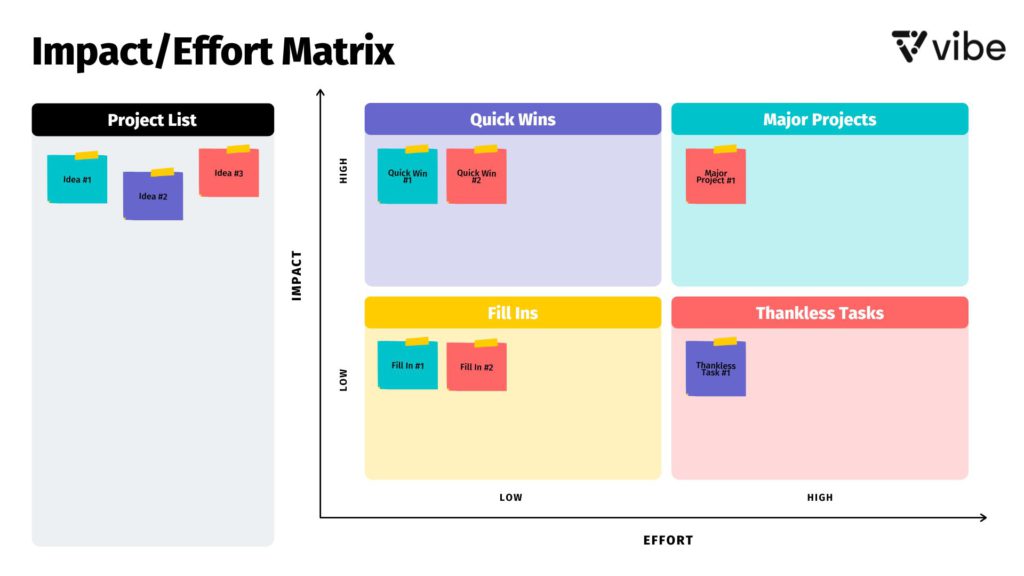 Impact/effort matrix template – Vibe
-
Impact (Y-axis): How much value will this task deliver? Impact can mean revenue, customer satisfaction, risk reduction, time saved, or any outcome your team cares about.
-
Effort (X-axis): How much time, money, and resources will this task require to complete?
The result is a visual map that makes trade-offs obvious. Tasks in the top-left are easy wins. Tasks in the bottom-right are drains. Everything else falls somewhere in between, and the matrix forces an honest conversation about where each item actually belongs.
The framework is widely used in sprint planning, product roadmap reviews, marketing strategy sessions, and any scenario where a team needs to triage a long list of competing priorities.
The 4 Quadrants of the Impact Effort Matrix
The four quadrants each represent a distinct category of task. Using consistent names for each quadrant helps teams build a shared vocabulary across projects.
Quadrant 1: Quick Wins (High Impact, Low Effort)
Do these first.
Quick wins deliver significant results without consuming much time or resources. They’re the highest-priority tasks on any impact effort matrix because they give the team momentum and demonstrate progress quickly. In product development, a Quick Win might be fixing a UX bug that causes significant drop-off. In marketing, it might be updating a high-traffic landing page headline that’s been underperforming.
Quick Wins tend to be underestimated. Teams sometimes assume that if something is easy, it can’t be that valuable. The matrix corrects that assumption by making the high-impact/low-effort combination visible.
Quadrant 2: Major Projects (High Impact, High Effort)
Plan carefully and resource properly.
Major Projects are the initiatives that define long-term strategy. They’re worth doing — the impact justifies the investment — but they require careful planning, dedicated resources, and realistic timelines. Examples include building a new product feature, launching into a new market, or redesigning a core workflow.
The risk with Major Projects is over-commitment. Teams that load up on high-effort work without quick wins in the mix tend to lose momentum and struggle to demonstrate short-term value to stakeholders.
Quadrant 3: Fill-Ins (Low Impact, Low Effort)
Do when capacity allows; never prioritize over the top two quadrants.
Fill-ins are low-stakes tasks that take little time but don’t move the needle much. They’re not worthless — sometimes they’re necessary maintenance, goodwill tasks, or contributions that compound over time — but they should never displace Quick Wins or Major Projects. Good examples: updating an internal wiki page, responding to a minor feature request, cleaning up a spreadsheet.
The danger of Fill-ins is that they’re comfortable. They’re easy to start, easy to finish, and create a false sense of productivity. Teams that default to Fill-ins when they’re avoiding harder work tend to discover this pattern in retrospectives.
Quadrant 4: Thankless Tasks (Low Impact, High Effort)
Eliminate, delegate, or deprioritize.
Thankless Tasks consume significant resources and deliver little in return. They’re the most dangerous quadrant — not because they’re actively harmful, but because they displace work that actually matters. Before committing to a Thankless Task, the team should ask: can this be eliminated entirely? Can it be automated? Can it be handed off to someone for whom it would be a different kind of task?
Sometimes Thankless Tasks are unavoidable (compliance requirements, contractual obligations). When that’s the case, the goal is to complete them as efficiently as possible and prevent them from crowding out higher-value work.
Impact Effort Matrix vs. Similar Frameworks
The impact effort matrix is one of several 2×2 prioritization tools. Understanding how it differs from related frameworks helps teams choose the right tool for each situation.
|
Framework |
X-Axis |
Y-Axis |
Best used for |
|---|---|---|---|
|
Impact Effort Matrix |
Effort |
Impact |
Prioritizing a task list or backlog |
|
Urgency |
Importance |
Personal time management; scheduling | |
|
Effort |
Impact |
Individual task prioritization; nearly identical to Impact Effort Matrix | |
|
Multiple weighted criteria |
Multiple weighted criteria |
Comparing options across several dimensions simultaneously |
The Impact Effort Matrix and Action Priority Matrix are nearly identical in structure. The primary difference is naming convention: Action Priority Matrix uses the same four quadrant labels (Quick Wins, Major Projects, Fill-ins, Thankless Tasks) and is often attributed to the MindTools framework. Either name refers to the same underlying tool.
When to Use an Impact Effort Matrix
The matrix is most useful at specific moments in a team’s workflow — not as a permanent tracking system, but as a periodic prioritization exercise.
Good times to run an impact effort session:
-
Before sprint planning, when a backlog has grown too large to address in full
-
At the start of a quarter, when the team is setting priorities across multiple initiatives
-
When a project is off track and the team needs to triage what to cut
-
During a brainstorming debrief, when a session has generated more ideas than capacity allows
-
When stakeholder requests are competing for the same resources
When it’s less useful:
-
For highly technical decisions where effort estimates require deep engineering input — in those cases, a more structured estimation process (story points, T-shirt sizing) is more appropriate
-
When tasks are genuinely incomparable in scope — the matrix works best on tasks of roughly similar scale
-
As a substitute for strategic planning — the matrix helps execute strategy, not define it
How to Create an Impact Effort Matrix: Step-by-Step

Step 1: Assemble the right people
The matrix only works if the people placing tasks on it actually understand the work. That typically means the team leads, project owners, and anyone with direct knowledge of effort estimates and business impact. Stakeholders without operational context can skew estimates; keep the session focused on practitioners.
Step 2: Define what "impact" and "effort" mean for this session
Before placing a single task, the team needs shared definitions. Impact might mean revenue, user retention, risk reduction, or internal efficiency — but it should mean the same thing to everyone in the room. Effort is usually time and resources, but the team should agree on whether "effort" includes implementation complexity, coordination overhead, or just raw hours.
If these definitions aren’t set upfront, the matrix becomes a Rorschach test — everyone reads their own meaning into each placement.
Step 3: List all tasks or initiatives under consideration
Write every item being considered on a separate sticky note or digital card. Don’t filter yet — the point of the exercise is to make the full picture visible before prioritizing. Aim for specificity: "improve checkout flow" is more useful than "work on UX."
Step 4: Score each item individually before discussing
Ask each participant to silently rate every item on both dimensions (high/low impact, high/low effort) before any group discussion begins. Silent individual scoring prevents anchoring — the well-known dynamic where the first person to speak sets the frame for the entire conversation.
Step 5: Place items on the matrix and discuss disagreements
Plot each item based on the group’s ratings. Focus discussion time on items where scoring diverged significantly — those disagreements are where the most valuable alignment happens. A task that one person rates low-effort and another rates high-effort usually means someone has information the other doesn’t.
Step 6: Build the action plan
Once the matrix is populated, the prioritization logic follows naturally:
-
Quick Wins → schedule immediately
-
Major Projects → plan with dedicated resources and realistic timelines
-
Fill-ins → batch for low-priority time slots or delegate
-
Thankless Tasks → eliminate, automate, or deprioritize
Document the output. A matrix that isn’t captured and shared after the session tends to be forgotten within a week. See how project management boards can help teams track decisions and progress after a prioritization session.
Impact Effort Matrix Example
A SaaS product team is heading into Q3 planning with the following backlog items under consideration:

-
Fix the login error affecting 12% of mobile users
-
Build a new analytics dashboard for enterprise customers
-
Update the onboarding email sequence
-
Migrate the database to a new infrastructure provider
-
Add dark mode to the app
-
Write documentation for the API
-
Rebuild the billing module from scratch
-
Add social sharing buttons to the blog
After the team scores each item, they place them on the matrix:
|
Quadrant |
Tasks |
Decision |
|---|---|---|
|
Quick Wins (High impact, low effort) |
Fix login error; Update onboarding email sequence |
Schedule in the next sprint |
|
Major Projects (High impact, high effort) |
New analytics dashboard; Database migration |
Plan for Q3 with dedicated engineering capacity |
|
Fill-ins (Low impact, low effort) |
API documentation; Social sharing buttons |
Assign to available capacity; not sprint priorities |
|
Thankless Tasks (Low impact, high effort) |
Rebuild billing module; Add dark mode |
Defer billing rebuild (explore patch instead); deprioritize dark mode |
The login error fix lands in Quick Wins because it’s a targeted bug affecting a measurable percentage of users and can likely be resolved in a day or two. The analytics dashboard lands in Major Projects — high strategic value, but requires weeks of design and engineering work. Dark mode gets deprioritized: real user demand exists, but implementation complexity is high relative to the business impact at this stage.
Common Mistakes When Using an Impact Effort Matrix
Letting the loudest voice anchor placements
Silent individual scoring before group discussion isn’t optional — it’s the mechanism that prevents one person’s framing from overriding everyone else’s independent assessment. Skip it and the matrix reflects whoever spoke first, not the team’s actual collective judgment.
Conflating "urgent" with "high impact"
Urgency and impact are different dimensions. A task can be urgent and low-impact (a squeaky wheel from a low-value account) or non-urgent and high-impact (a strategic initiative with a six-month runway). The Eisenhower Matrix is the better tool when urgency is the primary sorting dimension.
Using vague task descriptions
"Improve performance" or "work on marketing" can’t be accurately scored. Each item on the matrix needs to be specific enough that everyone in the room understands exactly what work is being evaluated.
Treating the matrix as a one-time exercise
Priorities shift. A Quick Win from last quarter may have already been completed; a Thankless Task may have become strategically important due to a market change. Run the exercise periodically — at the start of each planning cycle — rather than treating one session’s output as permanent.
Ignoring disagreement instead of investigating it
When two team members place the same task in different quadrants, that’s signal, not noise. The disagreement usually means one person has context the other doesn’t — about effort, dependencies, or business impact. Surface those conversations; they’re where the most valuable alignment happens.
How to Run an Impact Effort Matrix Session Remotely or Hybrid
The matrix was originally a physical exercise — sticky notes on a whiteboard. Remote and hybrid teams need a digital equivalent that preserves the collaborative, visual nature of the process without requiring everyone to be in the same room.

The key requirements for a remote impact effort session:
-
A shared canvas where all participants can simultaneously place and move items
-
Enough visual space to accommodate all tasks without crowding
-
The ability to annotate and comment on individual items during discussion
-
A persistent record of the final matrix that can be shared and referenced after the session
The Vibe Board S1 is well-suited for this use case: its 55″ or 75″ 4K touchscreen gives in-room teams a large shared surface for the matrix, while remote participants connect through built-in video conferencing and contribute to the same canvas in real time via Vibe Canvas. Items can be placed, moved, and annotated simultaneously, and the session is saved automatically to the cloud so the output is available immediately after the meeting ends.
Impact Effort Matrix FAQs
What is the impact effort matrix used for?
The impact effort matrix is used to prioritize a list of tasks or initiatives by plotting each one on a 2×2 grid based on the value it will deliver (impact) and the resources required to complete it (effort). It helps teams decide what to work on first, what to plan carefully, what to defer, and what to eliminate.
What are the 4 quadrants of the impact effort matrix?
The four quadrants are: Quick Wins (high impact, low effort) — do first; Major Projects (high impact, high effort) — plan and resource carefully; Fill-ins (low impact, low effort) — do when capacity allows; and Thankless Tasks (low impact, high effort) — eliminate, delegate, or deprioritize.
What is the difference between impact vs effort and effort vs impact?
There is no meaningful difference — both phrases refer to the same matrix. "Impact vs effort" and "effort vs impact" are simply different ways of naming the same 2×2 prioritization tool. Some teams also call it the effort impact matrix, the impact effort grid, or the action priority matrix.
Is there an impact effort matrix template I can use?
Yes. The matrix is straightforward to draw manually: a simple 2×2 grid with impact on the Y-axis (low at the bottom, high at the top) and effort on the X-axis (low on the left, high on the right). Digital tools including Vibe Canvas, Miro, FigJam, and most whiteboarding platforms offer ready-made templates. For physical sessions, a whiteboard with four quadrants drawn in marker works equally well.
How is the impact effort matrix different from the Eisenhower Matrix?
The Eisenhower Matrix plots tasks on urgency vs. importance. The impact effort matrix plots tasks on effort vs. impact (or value). They address different questions: the Eisenhower Matrix helps decide when to do something; the impact effort matrix helps decide whether to do it and in what order relative to other options.
How often should a team run an impact effort matrix session?
Most teams benefit from running the exercise at the start of each planning cycle — quarterly or per sprint — and whenever a significant influx of new requests arrives. It’s a periodic calibration tool, not a permanent tracking system. Using it too infrequently means priorities drift; using it too frequently creates process overhead that slows teams down.
What is a high impact low effort task example?
Classic examples include: fixing a known bug that’s causing user drop-off, updating a high-traffic page with a better call to action, re-enabling a previously disabled feature that users have been requesting, or sending a re-engagement email to a lapsed customer segment. These tasks are Quick Wins: the investment is low and the return is immediate and measurable.