Quick answer: The best architecture software in 2026 spans four categories — BIM (Revit, Archicad, Vectorworks), CAD/drafting (AutoCAD, DraftSight), 3D modeling (SketchUp Pro, Rhino, Blender), and rendering/visualization (Lumion, Enscape, V-Ray, Twinmotion). For most architects the anchor is a BIM platform; the right supporting tools depend on whether you focus on residential design, large commercial projects, or photorealistic visualization. Below we compare all 15, then break them down by use case.
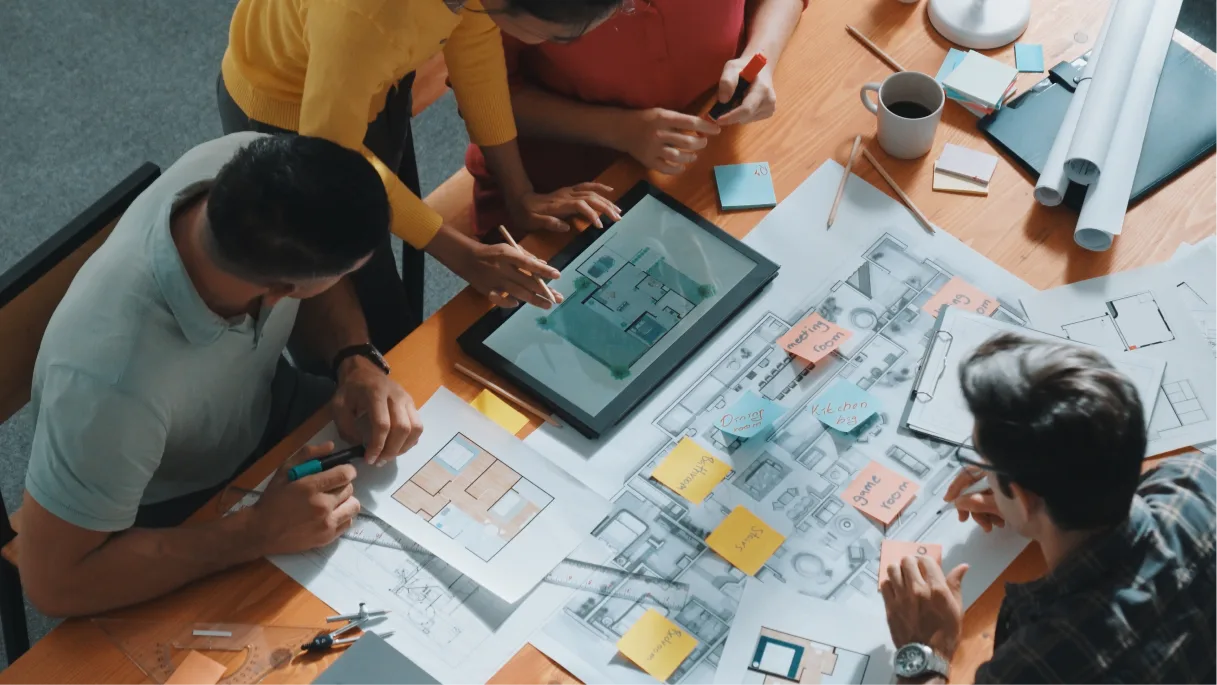
 Architect presenting CAD floor plans on Vibe Board S1 Pro during a team design review meeting
The architectural design process has changed beyond recognition. What once required drafting tables, T-squares, and countless hours of manual work now runs on software that streamlines everything from concept sketches to construction documentation. And this isn’t a fringe shift — industry research from the American Institute of Architects (AIA) shows that BIM has become standard practice across the profession, now used by the large majority of mid-sized and large firms. Choosing the right tools is no longer just a technical question; it’s a core business decision that shapes a firm’s efficiency, collaboration, and competitiveness.
Choosing the right tools is now a core business decision, not just a technical one — the American Institute of Architects frames a firm’s pace of technology adoption as a direct driver of profitability and competitiveness. This guide compares the 15 best architecture software tools of 2026 by category, with dedicated picks for the questions architects actually search: the best software for residential design, for visualization, for CAD, and for small firms.
- Architecture software falls into four overlapping categories — BIM, CAD/drafting, 3D modeling, and rendering — and most firms run a stack that combines several.
- Your anchor tool should match your work: BIM platforms (Revit, Archicad) for documentation-heavy practice; modeling tools (SketchUp, Rhino) for concept and form-finding.
- Adoption — not the software itself — separates firms that gain efficiency from those that buy licenses and stall, a point AIA research underlines repeatedly.
What Is Architecture Software?
Architecture software is any digital tool that helps architects and designers create, visualize, document, and manage building designs — from initial concept through construction. Modern architecture software generally falls into four categories:
-
BIM (Building Information Modeling): Intelligent, data-rich 3D models where every element carries information (Revit, Archicad, Vectorworks).
-
CAD / drafting: Precise 2D and 3D technical drawing and construction documentation (AutoCAD, DraftSight).
-
3D modeling: Conceptual form-finding and design exploration (SketchUp, Rhino, Blender).
-
Rendering / visualization: Turning models into photorealistic images, animations, and walkthroughs (Lumion, Enscape, V-Ray, Twinmotion).
The terms overlap — "architectural design software," "architecture modeling software," and "building design platform" all describe tools in this space — and most firms combine several into a workflow.
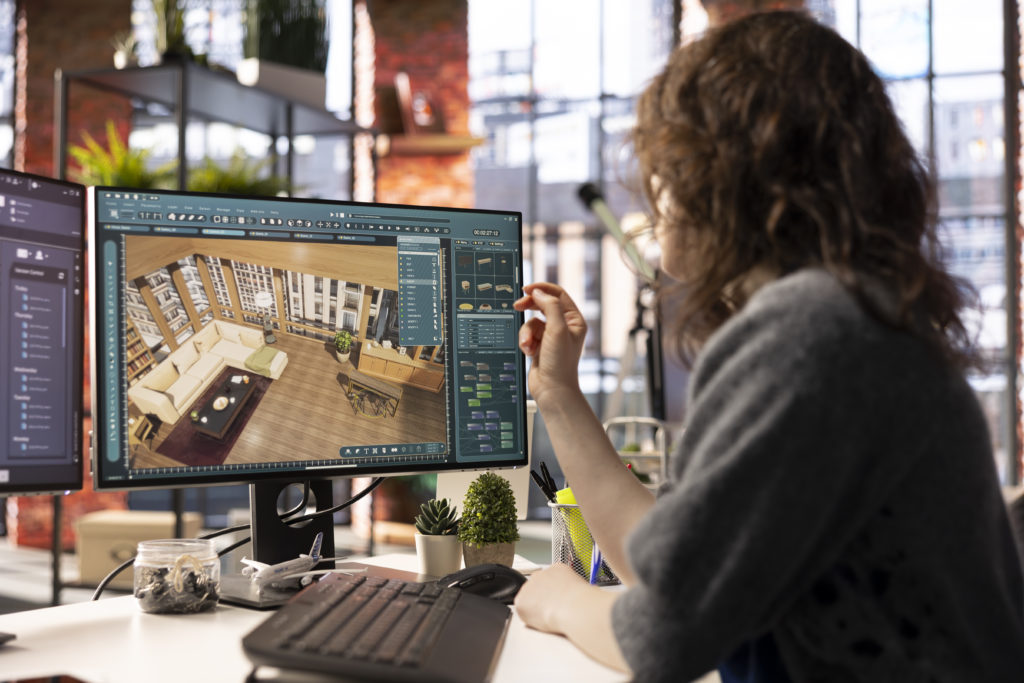 Designer working on 3D interior visualization using architecture rendering software
Key Features to Look for in Architecture Software
-
BIM and parametric capability for intelligent, data-connected models.
-
Documentation tools that generate construction-ready drawings and schedules from the model.
-
Interoperability (IFC, DWG, and clean import/export) so tools in your stack talk to each other.
-
Rendering and visualization for client-ready imagery, native or via plug-in.
-
Collaboration and cloud for real-time, multi-location teamwork — now used by eight in ten construction professionals, per NBS.
-
Learning curve and ecosystem — training cost, community, and available plug-ins.
The 15 Best Architecture Software Tools Compared
|
# |
Tool |
Category |
Best for |
Pricing model |
|---|---|---|---|---|
|
1 |
Autodesk Revit |
BIM |
Large-scale, documentation-heavy projects |
Subscription |
|
2 |
Archicad |
BIM |
Architect-first BIM workflows |
Subscription / perpetual |
|
3 |
Vectorworks Architect |
BIM |
Designers wanting flexibility + BIM |
Subscription / perpetual |
|
4 |
AutoCAD |
CAD |
2D drafting & construction docs |
Subscription |
|
5 |
SketchUp Pro |
3D modeling |
Fast conceptual modeling |
Subscription |
|
6 |
Rhino (Rhinoceros) |
3D modeling |
Complex geometry & parametric (Grasshopper) |
Perpetual |
|
7 |
Blender |
3D modeling |
Free modeling & animation |
Free |
|
8 |
Lumion |
Rendering |
Fast, beautiful real-time renders |
Subscription |
|
9 |
Enscape |
Rendering |
Real-time rendering inside Revit/SketchUp |
Subscription |
|
10 |
V-Ray |
Rendering |
Maximum photorealism control |
Subscription |
|
11 |
Twinmotion |
Rendering |
Affordable real-time visualization |
Subscription / free tier |
|
12 |
DraftSight |
CAD |
Budget-friendly 2D CAD |
Subscription |
|
13 |
Chief Architect |
BIM/CAD |
Residential & home design |
Subscription / perpetual |
|
14 |
Cedreo |
3D / cloud |
Quick residential client concepts |
Subscription |
|
15 |
BricsCAD |
CAD/BIM |
DWG-compatible CAD alternative |
Subscription / perpetual |
Verify current pricing and editions on each vendor’s site; plans and tiers change frequently.
15 Top Architecture Software Design and Visualization Tools
The architecture software landscape offers a diverse array of tools to meet different needs and workflows. Here’s a comprehensive look at 15 leading solutions that are shaping architectural practice in 2026:
1. AutoCAD
AutoCAD remains one of the most widely used drafting tools in the architecture industry, providing a robust platform for 2D and 3D design. Developed by Autodesk, this versatile software has been a staple in architectural offices for decades, continuously evolving to meet the changing needs of professionals.
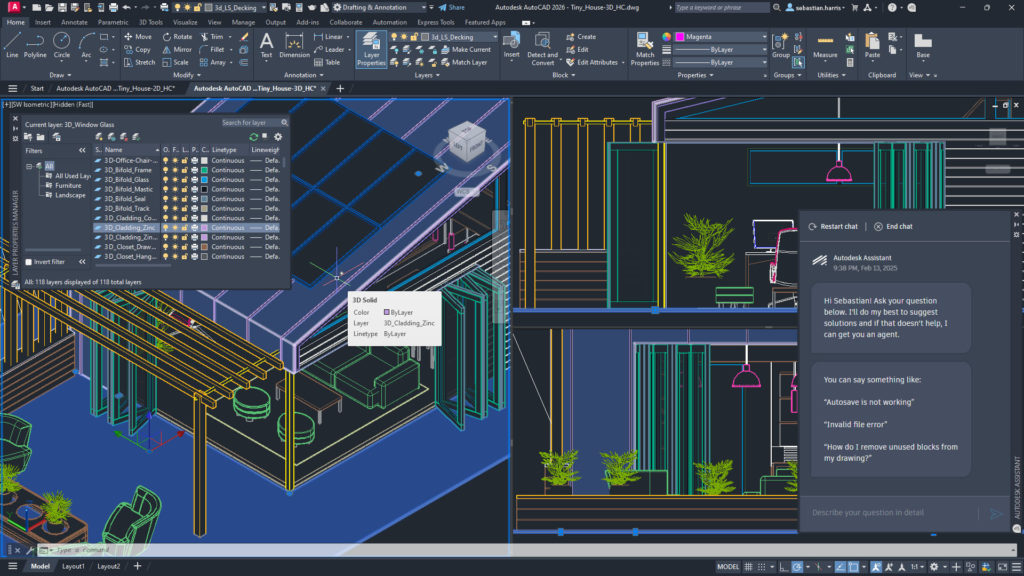 Screenshot of AutoCAD software displaying a colorful wireframe architectural model.
Best For: Precise 2D drafting, construction documentation, and technical drawings.
Key Features:
-
Comprehensive 2D drafting tools for creating floor plans, elevations, and sections
-
3D modeling capabilities for conceptual design and visualization
-
Extensive customization options through AutoLISP and other programming interfaces
-
Industry-specific toolsets for architecture, mechanical design, electrical, and more
-
Cloud connectivity for file sharing and collaboration
Limitations: While powerful for drafting, AutoCAD lacks the intelligent object-based modeling and data management capabilities of dedicated BIM platforms. It also requires significant training to master its extensive feature set.
2. SketchUp Pro
SketchUp Pro has earned a reputation for its intuitive interface and ease of use, making it a favorite for conceptual design and quick 3D modeling. Originally developed by @Last Software and later acquired by Trimble, SketchUp offers a balance of simplicity and power that appeals to architects at various stages of the design process.
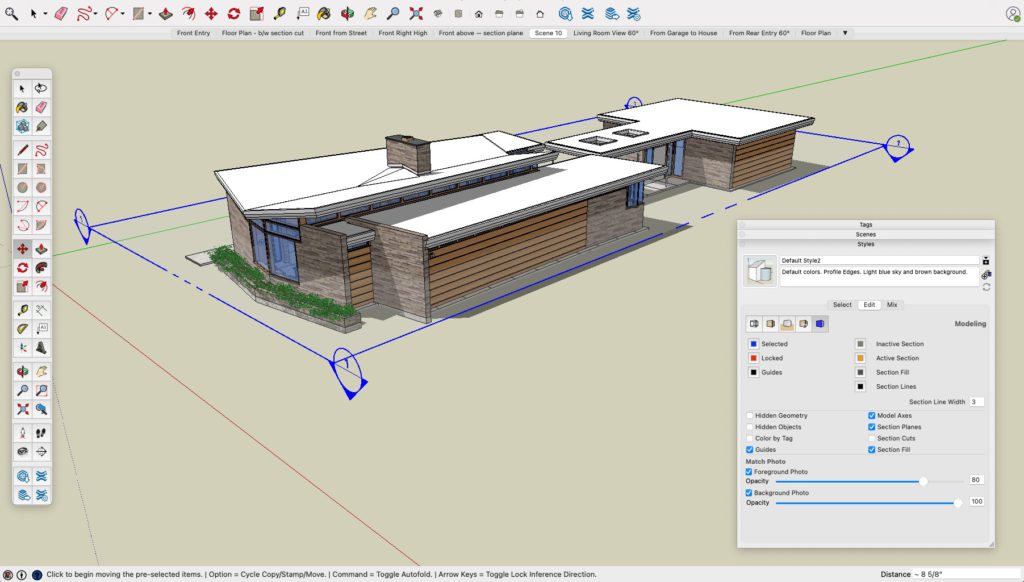 Screenshot of SketchUp Pro displaying a 3D model of a modern flat-roofed house.
Best For: Conceptual design, early-stage visualization, and client presentations.
Key Features:
-
User-friendly 3D modeling tools with push-pull functionality
-
Extensive library of pre-built components through the 3D Warehouse
-
LayOut for creating professional 2D documentation from 3D models
-
Extension Warehouse offering hundreds of specialized plugins
-
Integration with other design and visualization tools
-
Web-based and iPad versions for on-the-go modeling
Limitations: SketchUp lacks the parametric capabilities and detailed construction documentation features of full BIM platforms. Complex geometries can also be challenging to model efficiently.

3. Matterport
Matterport represents the cutting edge of reality capture technology, allowing architects and designers to create immersive digital twins of existing spaces. This innovative platform bridges the gap between physical environments and digital models, offering powerful tools for documentation and visualization.
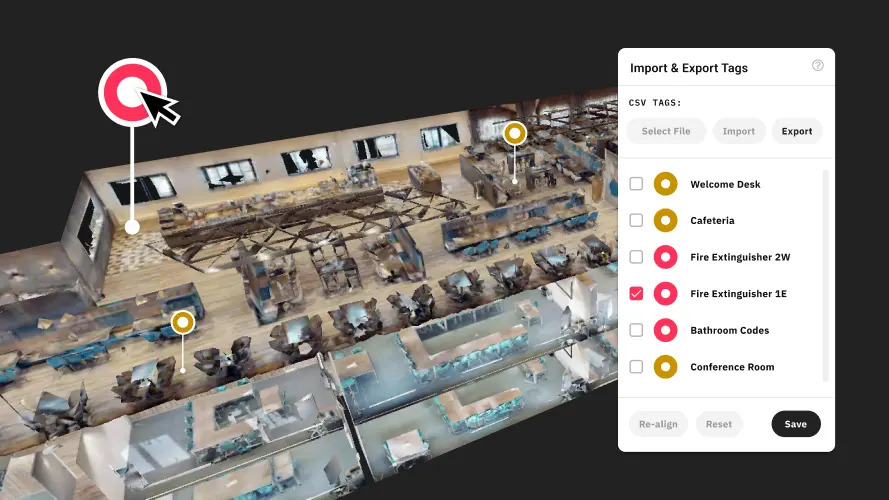 Screenshot of a Matterport 3D virtual tour interface showing an aerial cutaway view of an office space.
Best For: As-built documentation, virtual tours, and existing conditions surveys.
Key Features:
-
3D scanning capabilities using dedicated cameras or mobile devices
-
Creation of navigable, immersive digital twins of real spaces
-
Measurement tools for accurate dimensions of existing conditions
-
Annotation and tagging features for collaboration and documentation
-
Integration with design software like AutoCAD and Revit
-
AI-powered tools for automatic room labeling and object recognition
Limitations: While excellent for capturing existing conditions, Matterport is not a design tool itself and must be used in conjunction with other software for architectural design work.
4. Autodesk Revit
Revit stands as the industry standard for Building Information Modeling (BIM), offering a comprehensive platform for architectural design, documentation, and collaboration. Developed by Autodesk, Revit’s parametric modeling approach has transformed how architects design and document buildings.
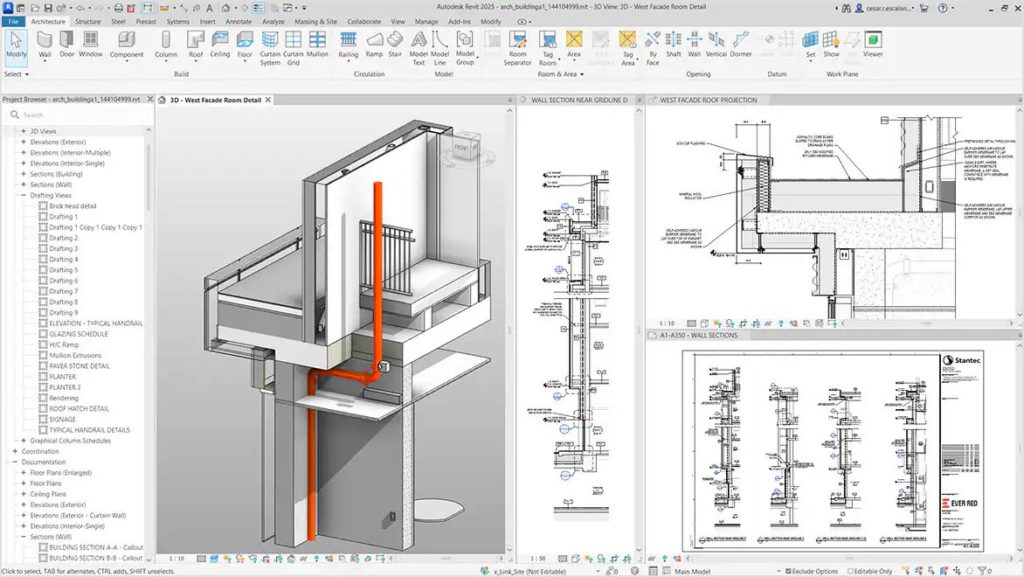 Screenshot of Autodesk Revit 2023 showing a west facade room detail project.
Best For: Comprehensive BIM workflows, construction documentation, and multidisciplinary collaboration.
Key Features:
-
Parametric building components that update automatically when changes are made
-
Integrated tools for architectural, structural, and MEP design
-
Powerful documentation capabilities with automatic sheet generation
-
Collaboration tools for coordinating work across disciplines
-
Analysis features for energy performance, daylighting, and more
-
Cloud-based workflows through Autodesk Construction Cloud
Limitations: Revit has a steep learning curve and requires significant computing resources. Its workflow can feel restrictive for conceptual design and free-form modeling compared to more flexible tools.
5. ArchiCAD
ArchiCAD, developed by Graphisoft (now part of the Nemetschek Group), was one of the first BIM solutions on the market and continues to be a powerful alternative to Revit. Known for its intuitive interface and robust modeling capabilities, ArchiCAD offers a comprehensive platform for architectural design and documentation.
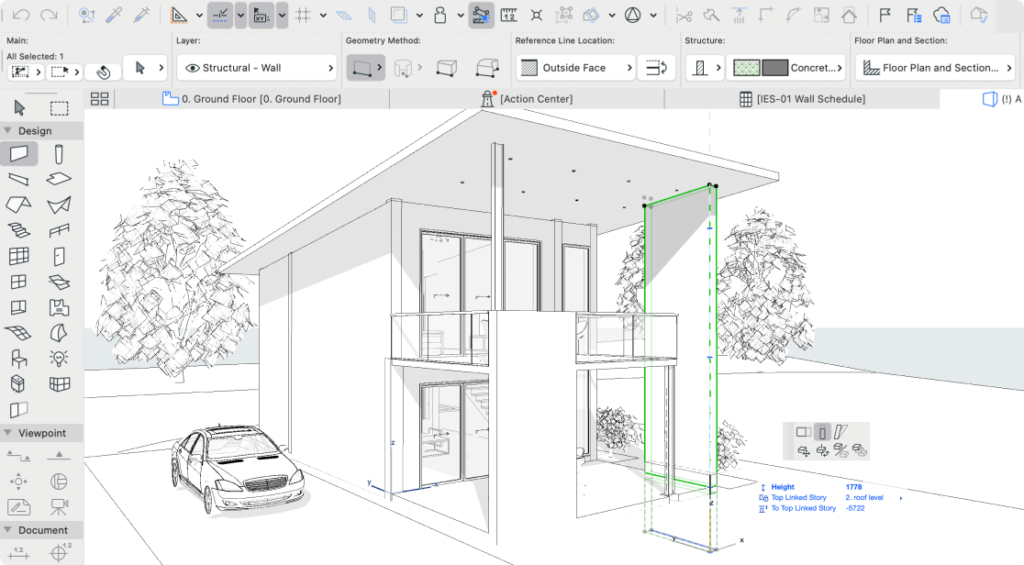 Screenshot of ArchiCAD architectural design software showing a 3D wireframe model.
Best For: BIM workflows with an emphasis on design freedom and visualization.
Key Features:
-
Parametric BIM objects with extensive customization options
-
Powerful 3D modeling tools with a focus on architectural elements
-
BIMcloud for real-time collaboration across teams
-
Integrated 2D and 3D documentation workflows
-
Advanced visualization capabilities with built-in rendering engine
-
Extensive library of architectural components and materials
Limitations: While widely used internationally, ArchiCAD has a smaller market share in North America, which can affect collaboration with consultants who primarily use Revit. Some specialized engineering tools are less integrated compared to Autodesk’s ecosystem.
6. Rhino (Rhinoceros 3D)
Rhino has established itself as the go-to software for complex, free-form 3D modeling in architecture. Developed by Robert McNeel & Associates, Rhino’s NURBS-based modeling approach offers unparalleled flexibility for creating organic forms and complex geometries.
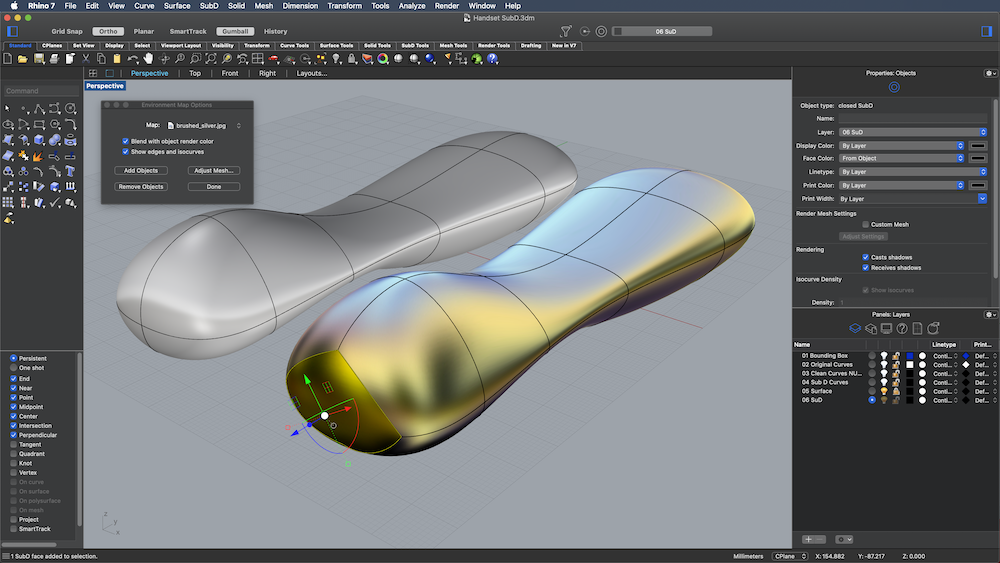 Screenshot of Rhino 3D modeling software interface showing a model being edited in the main viewport.
Best For: Advanced 3D modeling, form-finding, and complex geometries.
Key Features:
-
Precise NURBS modeling for creating any shape imaginable
-
Grasshopper visual programming interface for parametric and algorithmic design
-
Extensive plugin ecosystem for specialized architectural tasks
-
SubD modeling for creating organic forms with control and precision
-
Compatibility with a wide range of file formats for seamless interoperability
-
Rhino.Inside technology for using Rhino tools within other applications like Revit
Limitations: Rhino lacks built-in construction documentation tools and BIM capabilities, requiring integration with other software for complete architectural workflows. Its open-ended nature can also make standardization challenging in larger firms.
7. Chief Architect
Chief Architect specializes in residential and light commercial design, offering a purpose-built solution for architects and designers working in these sectors. The software combines powerful 3D modeling with automated documentation features tailored to residential construction.
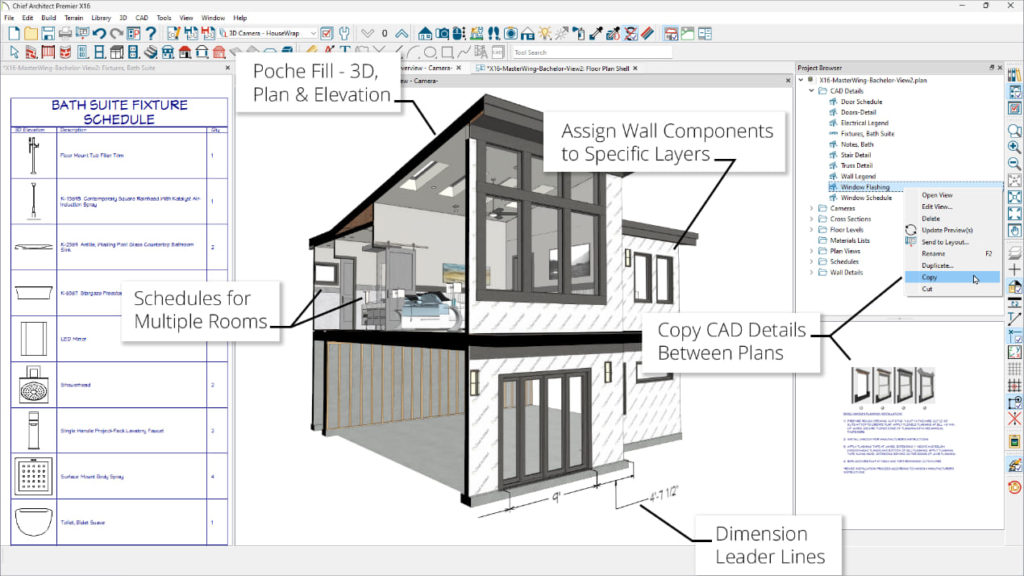 Screenshot of Chief Architect Premier X16 showing an architectural design interface with multiple annotated features.
Best For: Residential architecture, home design, and interior design.
Key Features:
-
Automated building tools for walls, doors, windows, and roofs
-
Intelligent building elements that automatically adjust to their surroundings in the model
-
Automatic transformation from 3D building models into complete 2D construction documentation
-
Detailed construction documents with dimensions and annotations
-
Extensive library of architectural elements and furnishings
-
Realistic 3D rendering and walkthrough capabilities
Limitations: Chief Architect’s specialized focus makes it less suitable for large commercial or institutional projects. Its workflow and object libraries are optimized for residential design, which can be limiting for other types of architecture.
8. Navisworks
Navisworks, part of Autodesk’s AEC portfolio, serves as a powerful project review and coordination tool that brings together models from various disciplines. It plays a crucial role in detecting clashes and resolving conflicts before construction begins.
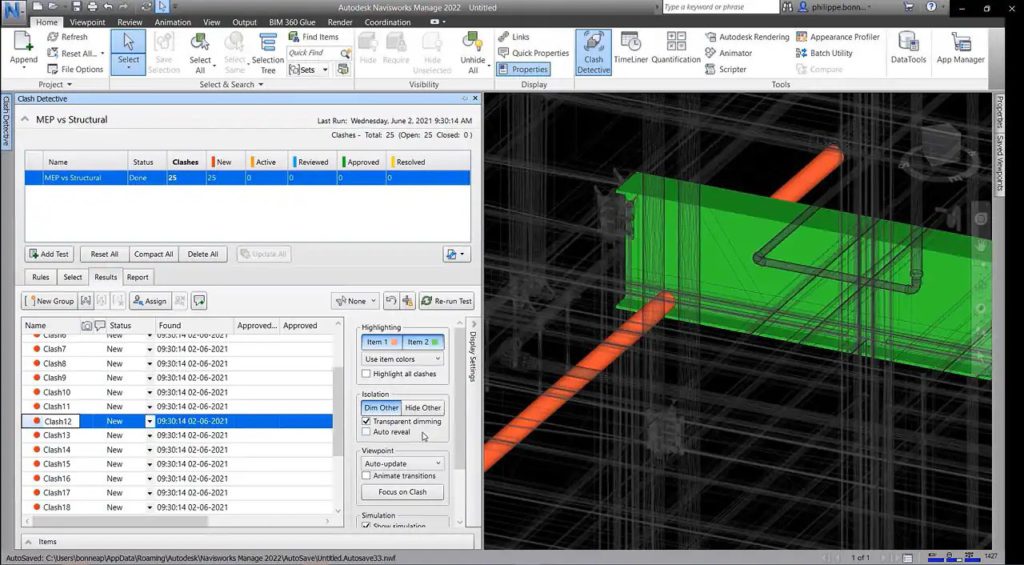 Screenshot of Autodesk Navisworks Manage 2022 showing a 3D model with a detailed clash report.
Best For: Project coordination, clash detection, and construction sequencing.
Key Features:
-
Model aggregation from multiple sources and formats
-
Automated clash detection between architectural, structural, and MEP elements
-
4D construction sequencing and simulation
-
Quantification tools for takeoffs and estimating
-
Photorealistic visualization for project review
-
Annotation and markup tools for communication
Limitations: Navisworks is primarily a review and coordination tool rather than a design platform. Models must be created in other software before being imported for coordination.
9. STAAD.Pro
STAAD.Pro, developed by Bentley Systems, is a comprehensive structural analysis and design software widely used by structural engineers working on architectural projects. It provides essential tools for ensuring the structural integrity of buildings and infrastructure.
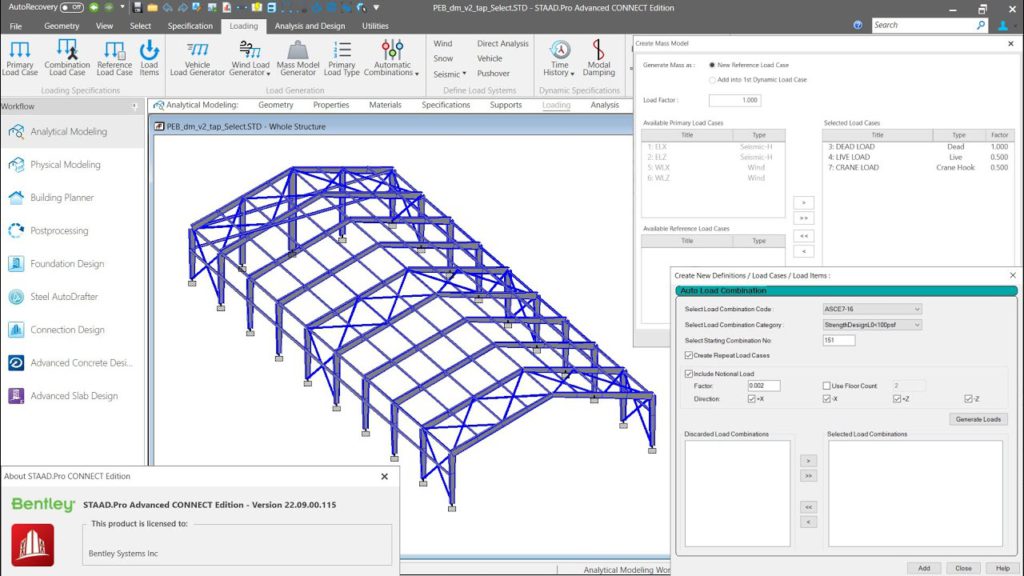 Screenshot of STAAD.Pro showing a 3D model of a blue steel-framed industrial building.
Best For: Structural analysis, engineering calculations, and structural design.
Key Features:
-
Advanced finite element analysis for structural behavior
-
Comprehensive design codes for various materials and regions
-
Dynamic analysis for seismic and wind loading
-
Automated design optimization for efficiency
-
Integration with BIM workflows
-
Detailed reporting and documentation
Limitations: As a specialized structural engineering tool, STAAD.Pro requires expertise in structural principles and is not intended for architectural design. Integration with architectural software may require additional workflow steps.
10. Civil 3D
Autodesk Civil 3D provides specialized tools for site design, civil engineering, and infrastructure planning that are essential for many architectural projects. It bridges the gap between building design and the surrounding site context.
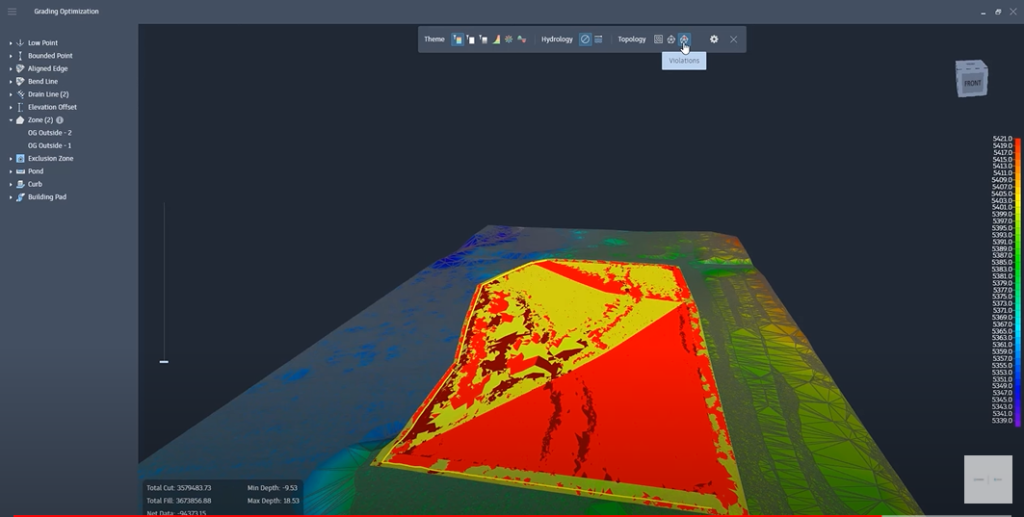 Screenshot of Civil 3D interface showing a grading optimization model with color-coded terrain analysis.
Best For: Site planning, grading, infrastructure design, and land development.
Key Features:
-
Terrain modeling and site analysis tools
-
Road and parking layout capabilities
-
Grading and earthwork calculations
-
Stormwater management and drainage design
-
Utility layout and coordination
-
Integration with BIM workflows for complete project coordination
Limitations: Civil 3D focuses on site and infrastructure rather than building design, requiring integration with architectural software for complete project development. Its specialized nature also means a significant learning curve for architects without civil engineering background.
11. Cedreo
Cedreo offers a cloud-based solution for quick 3D home design and visualization, catering to residential architects, builders, and interior designers who need to create impressive presentations without extensive modeling time.
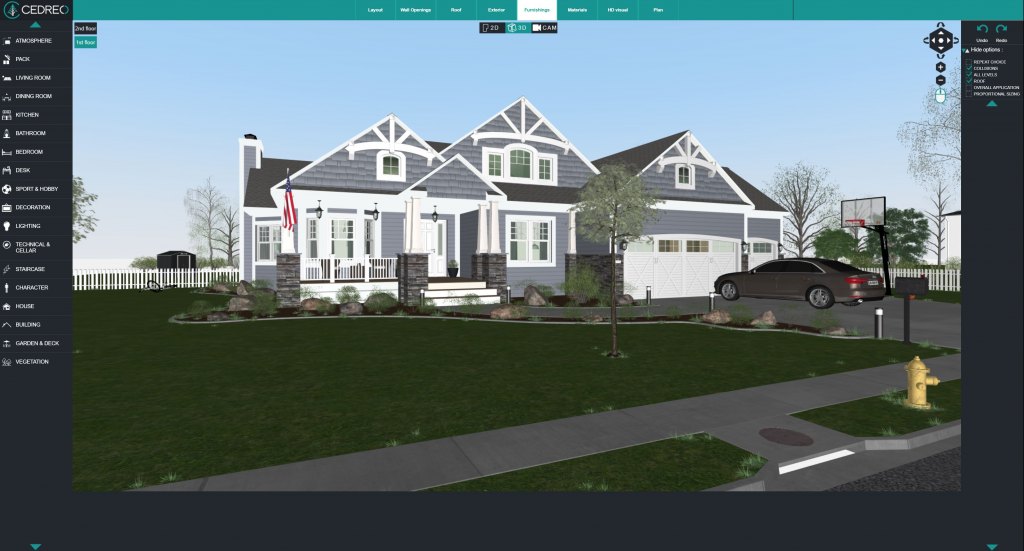 Screenshot of Cedreo interface showing a 3D home design.
Best For: Rapid residential design visualization and client presentations.
Key Features:
-
Intuitive floor plan creation with drag-and-drop functionality
-
Automatic 3D model generation from 2D plans
-
Extensive library of architectural elements and furnishings
-
Realistic rendering with customizable materials and lighting
-
Cloud-based platform accessible from any computer
-
Quick learning curve compared to more complex software
Limitations: Cedreo’s simplicity comes with limitations in customization and complex design capabilities. It’s optimized for residential projects and lacks the advanced features needed for commercial or institutional architecture.
12. 3ds Max
Autodesk 3ds Max is a professional 3D modeling and rendering software widely used in architectural visualization. While not primarily an architectural design tool, it plays a crucial role in creating photorealistic renderings and animations for client presentations.
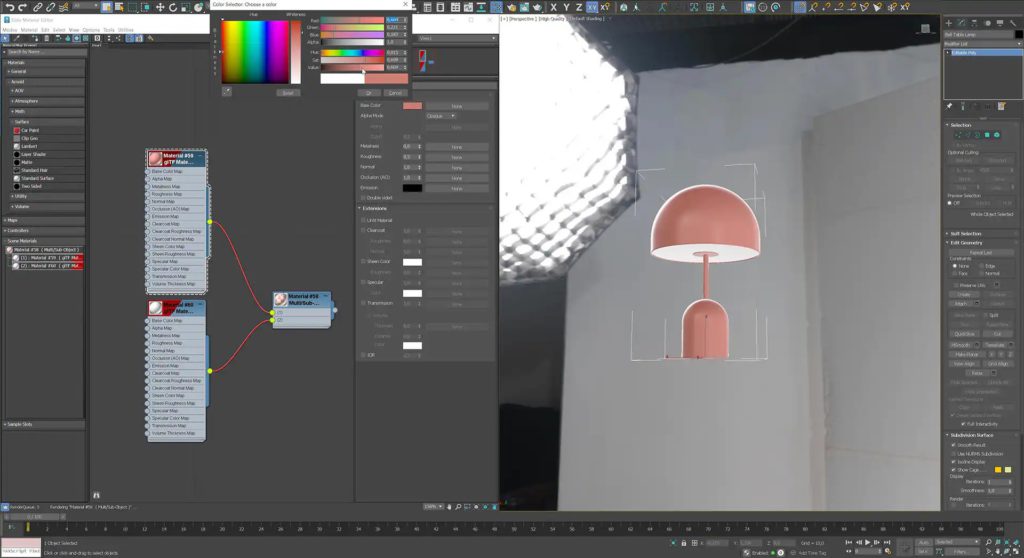 Screenshot of 3ds Max 3D modeling software showing a material editing interface.
Best For: High-end architectural visualization, animation, and photorealistic rendering.
Key Features:
-
Advanced polygon and spline modeling tools
-
Powerful materials and texturing capabilities
-
Sophisticated lighting simulation
-
Animation tools for walkthroughs and presentations
-
Particle systems for environmental effects
-
Extensive plugin ecosystem for specialized visualization tasks
Limitations: 3ds Max is not designed for architectural documentation or BIM workflows. Models are typically created in dedicated architecture software and imported into 3ds Max for visualization, requiring additional workflow steps.
13. Lumion
Lumion has revolutionized architectural visualization with its real-time rendering engine that allows architects to create stunning visualizations with minimal technical expertise. Its user-friendly interface and speed have made it increasingly popular among architecture firms of all sizes.
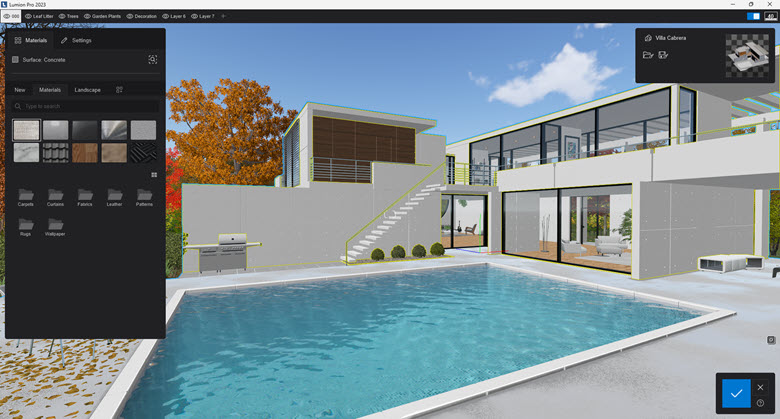 Screenshot of Lumion architectural visualization software showing a 3D rendering of a modern white house.
Best For: Real-time architectural visualization and client presentations.
Key Features:
-
Real-time rendering engine for immediate visual feedback
-
Extensive library of materials, vegetation, people, and objects
-
Atmospheric effects including weather, time of day, and seasons
-
Animation tools for creating walkthroughs and presentations
-
One-click rendering styles for different visualization approaches
-
Direct integration with major architecture software
Limitations: Lumion is purely a visualization tool and requires models to be created in other software. While its rendering quality is impressive, it may not match the photorealism of specialized rendering engines for the most demanding visualization work.
14. Enscape
Enscape has gained popularity as a real-time rendering plugin that integrates directly with major architecture software, providing immediate visualization feedback during the design process. Its seamless workflow has made it a favorite for architects who want to incorporate visualization into their daily design work.
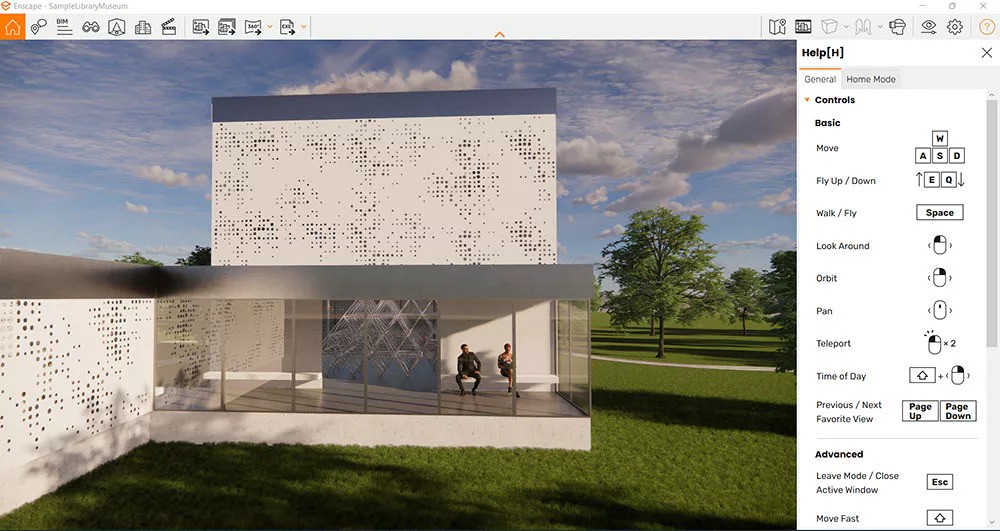 Screenshot of Enscape showing a modern building with perforated facade panels.
Best For: Real-time design visualization and virtual reality presentations.
Key Features:
-
Direct integration with Revit, SketchUp, ArchiCAD, and Rhino
-
One-click real-time rendering within the design environment
-
Virtual reality support for immersive client presentations
-
Extensive material and asset library
-
Automatic lighting analysis and visualization
-
Batch rendering for creating multiple views efficiently
Limitations: As a plugin, Enscape depends on the capabilities of the host software for modeling and documentation. Its rendering quality, while excellent for real-time visualization, may not match specialized offline rendering engines for the highest-end visualization work.
15. V-Ray
V-Ray, developed by Chaos Group, stands as the industry standard for photorealistic architectural rendering. Used by visualization specialists worldwide, V-Ray provides the tools to create stunningly realistic images that can be indistinguishable from photographs.
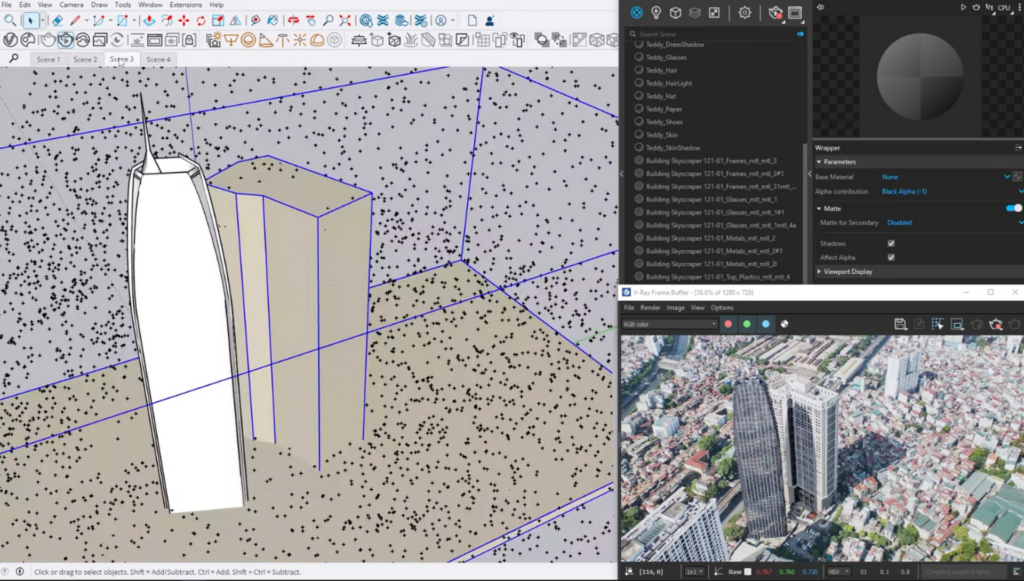 Screenshot of V-Ray rendering software showing a 3D modeling workspace.
Best For: Photorealistic rendering and high-end visualization.
Key Features:
-
Advanced global illumination and lighting simulation
-
Physically accurate materials and textures
-
GPU acceleration for faster rendering
-
Extensive material library and asset ecosystem
-
Integration with major architecture and 3D modeling software
-
Advanced camera controls for photographic effects
Limitations: V-Ray has a steeper learning curve than some visualization tools and requires understanding of lighting, materials, and rendering principles to achieve optimal results. Rendering times can be lengthy for complex scenes, despite GPU acceleration.
Best Architecture Software by Use Case
Different practices search for different things. Here’s how the 15 sort out by the most common needs:
Best Software for Architects (Overall)
For a single anchor tool, Revit leads for documentation-heavy commercial practice, while Archicad is the architect-favorite alternative with a gentler interface. Most firms then add a modeler (SketchUp or Rhino) for concept work and a renderer (Enscape or Lumion) for client visuals. The "best" stack is a BIM core plus modeling and rendering support.
Best Software for Architectural Design and Visualization
For design exploration and client-ready imagery, pair SketchUp or Rhino for modeling with Lumion, Enscape, or V-Ray for rendering. Twinmotion is the best value for firms wanting real-time walkthroughs without V-Ray’s complexity. For pure photorealism, V-Ray remains the benchmark.
Best Architectural CAD Software
For 2D drafting and construction documentation, AutoCAD is the industry standard, DraftSight is the budget DWG-native alternative, and BricsCAD offers DWG compatibility plus BIM at more flexible pricing.
Best Software for Residential and Home Architecture
For homes, remodels, and interiors, Chief Architect leads with automated residential building tools, while Cedreo is the fastest path to client-ready residential concepts. SketchUp is a strong, affordable all-rounder for small residential practices.
Best Architecture Software for Small Firms and Students
Budget-conscious practices and students get the most from Blender (free modeling), SketchUp (affordable and fast), Twinmotion (free/low-cost rendering), and DraftSight (low-cost CAD) — a capable stack at a fraction of an enterprise BIM subscription.
How to Choose the Right Architecture Software
-
Start with your project type. Residential → Chief Architect / Cedreo / SketchUp. Large commercial → Revit / Archicad. Complex geometry → Rhino + Grasshopper.
-
Match BIM depth to documentation needs. If you produce construction docs at scale, a true BIM platform pays for itself; if you’re concept-focused, a modeler plus a renderer may be enough.
-
Check interoperability with partners. If your structural and MEP consultants run Revit, BIM coordination is far smoother on a compatible platform.
-
Factor in the whole stack cost. Few firms run one tool — budget for the modeling + documentation + rendering combination you’ll actually use.
-
Plan for adoption, not just purchase. As AIA research stresses, the firms that win with technology are the ones that invest in training and workflow change, not just licenses.
Where the Software Stops: The Design Review
Every tool above is built for an architect working in the model. But architecture is a collaborative discipline — and the moments that move projects forward are design reviews, client presentations, and consultant coordination, where people gather around the work and make decisions together. The NBS Digital Construction Report 2025 highlights how central real-time, multi-location collaboration has become to modern practice — eight in ten professionals now collaborate on models and documents in the cloud.
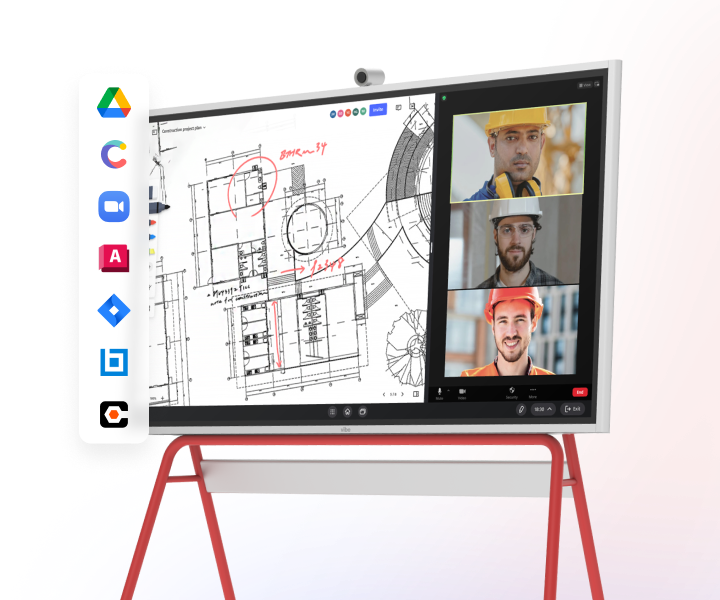 Vibe Board S1 Pro compatible with architecture and construction software for seamless project collaboration
That collaborative layer is where a large interactive display fits into an architecture stack. On a Vibe Board S1 Pro, teams can pull up AutoCAD drawings, SketchUp models, or Matterport scans on a 4K touchscreen and annotate, sketch, and resolve issues together — with remote team members joining the same canvas in real time. It doesn’t replace your design software; it’s where the team gathers to review what the software produced. For firms in architecture and construction, it turns static deliverables into live working sessions and cuts the rework that comes from misread feedback.
Architecture Software FAQ
What is the best software for architects?
For most architects, Revit is the best overall choice for documentation-heavy commercial work, while Archicad is the leading architect-favorite alternative. A complete stack usually adds a modeling tool (SketchUp or Rhino) and a renderer (Enscape or Lumion). The single best tool depends on whether your practice centers on residential, commercial, or visualization work.
What software do architects actually use?
Most architecture firms use a combination: a BIM platform (Revit or Archicad) as the documentation core, a CAD tool (AutoCAD) for 2D drafting, a 3D modeler (SketchUp or Rhino) for concept design, and a renderer (Lumion, Enscape, or V-Ray) for client visuals. BIM is now standard at 95% of large firms, per AIA Firm Survey data.
What is the best free architecture software?
Blender is the most capable free option for 3D modeling and visualization, while SketchUp Free and Twinmotion’s free tier are strong starting points. For students, many vendors (Autodesk, Graphisoft) offer free educational licenses of their professional software.
What is the best architecture software for beginners?
SketchUp is widely considered the most beginner-friendly thanks to its intuitive interface and fast learning curve, making it ideal for students and early-career designers. Chief Architect is a strong starting point for those focused specifically on residential design.
What is the best software for residential architecture?
Chief Architect is purpose-built for residential design with automated tools for homes and remodels, while Cedreo is the fastest for client-ready residential concepts. SketchUp is a flexible, affordable all-rounder for small residential practices.
Is AutoCAD or Revit better for architecture?
AutoCAD is best for 2D drafting and construction documentation, while Revit is a full BIM platform with intelligent 3D modeling and data management. Most firms moving toward modern, coordinated workflows favor Revit (or Archicad) for design and documentation, using AutoCAD where 2D drafting is still required.