Touchscreens are everywhere — your phone, your laptop, airport kiosks, and the interactive displays in modern conference rooms. But the technology underneath each of those screens is surprisingly different. Depending on how a touchscreen is built, it might respond to your bare fingertip, a gloved hand, a stylus, or even a pen cap. It might support one touch point or twenty simultaneously.
This guide explains how each major type of touchscreen technology works, how they compare, and what to look for when choosing a touch display for your workspace or classroom.
What Is a Touchscreen and How Does It Detect Input?
A touchscreen is a display that detects and responds to physical contact on its surface. At its core, every touchscreen solves the same problem: translating a physical touch into a digital coordinate the device’s software can act on.
The mechanism varies by technology type, but all touchscreens share two layers of logic — a sensing layer that detects the touch event, and a controller chip that converts that signal into X/Y coordinates passed to the operating system. What differs is how the sensing layer works: some use electrical resistance, some measure changes in capacitance, and others use light or sound.
The 5 Main Types of Touchscreen Technology
1. Resistive Touchscreens
Resistive touchscreens consist of two flexible conductive layers separated by a small gap. When you press the screen hard enough, the two layers make contact at that point, completing an electrical circuit. The controller reads the change in voltage to determine where you touched.
How it feels: You need to apply deliberate pressure — a light brush won’t register. This is why resistive screens work with virtually any object: a finger, a stylus, or even a gloved hand.
Best for: Industrial terminals, point-of-sale systems, ATMs, and medical equipment where precise stylus input matters more than sensitivity.
Limitations: Single-touch only (no multi-touch gestures), lower display clarity due to multiple overlay layers reflecting ambient light, and the surface can wear over time.
2. Capacitive Touchscreens
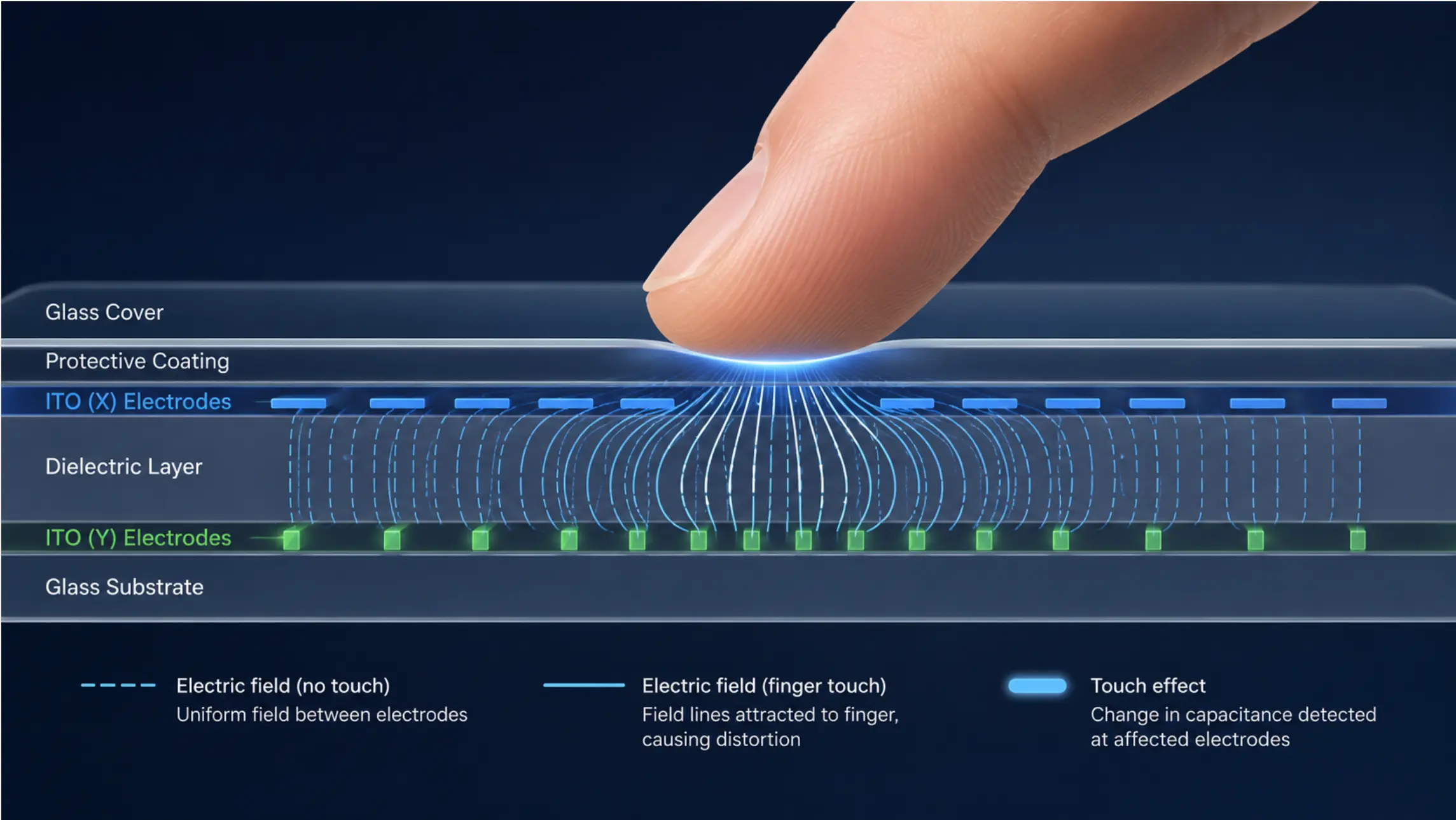 Close-up diagram of a capacitive screen layer showing the electrical field distortion when a finger makes contact
Capacitive technology is what most modern smartphones and tablets use. Rather than requiring pressure, a capacitive screen responds to the electrical properties of your fingertip. The screen carries a uniform electrical charge across a glass surface. When your finger — which conducts electricity — touches it, it draws a small amount of charge to that point, creating a measurable distortion in the field. The controller reads that distortion and calculates the touch location.
Because multiple distortions can be tracked simultaneously, capacitive screens support multi-touch gestures like pinch-to-zoom and two-finger scroll.
Best for: Smartphones, tablets, laptops, and mid-size interactive displays where bare-finger precision and gesture support are priorities.
Limitations: Doesn’t work with gloves, most styluses, or non-conductive objects. Surface scratches reduce accuracy over time.
3. Infrared (IR) Touchscreens
Infrared touch technology works fundamentally differently — it doesn’t rely on the electrical properties of the object touching the screen at all. Instead, an array of IR LEDs and photodetectors lines the bezel around the display, creating an invisible grid of infrared light beams across the screen surface.
When you touch the screen, your finger (or a stylus, pen, or gloved hand) interrupts one or more of these beams. The controller identifies exactly which beams were broken and calculates the precise X/Y touch coordinates from that information.
Why this matters for large displays: Because IR touch doesn’t depend on a conductive overlay on the screen itself, it delivers the highest optical clarity of any touch technology — there’s nothing between you and the display except glass. This makes IR the dominant choice for large-format interactive displays where image quality and brightness matter most.
IR touchscreens also work with any input object regardless of conductivity, and they don’t degrade in sensitivity over time the way surface-contact technologies do.
The Vibe Board S1 uses infrared multi-touch technology with 20 simultaneous touch points, a response time under 8ms, and a 130Hz refresh rate — specifications that make a noticeable difference when multiple people are writing or annotating at the same time.
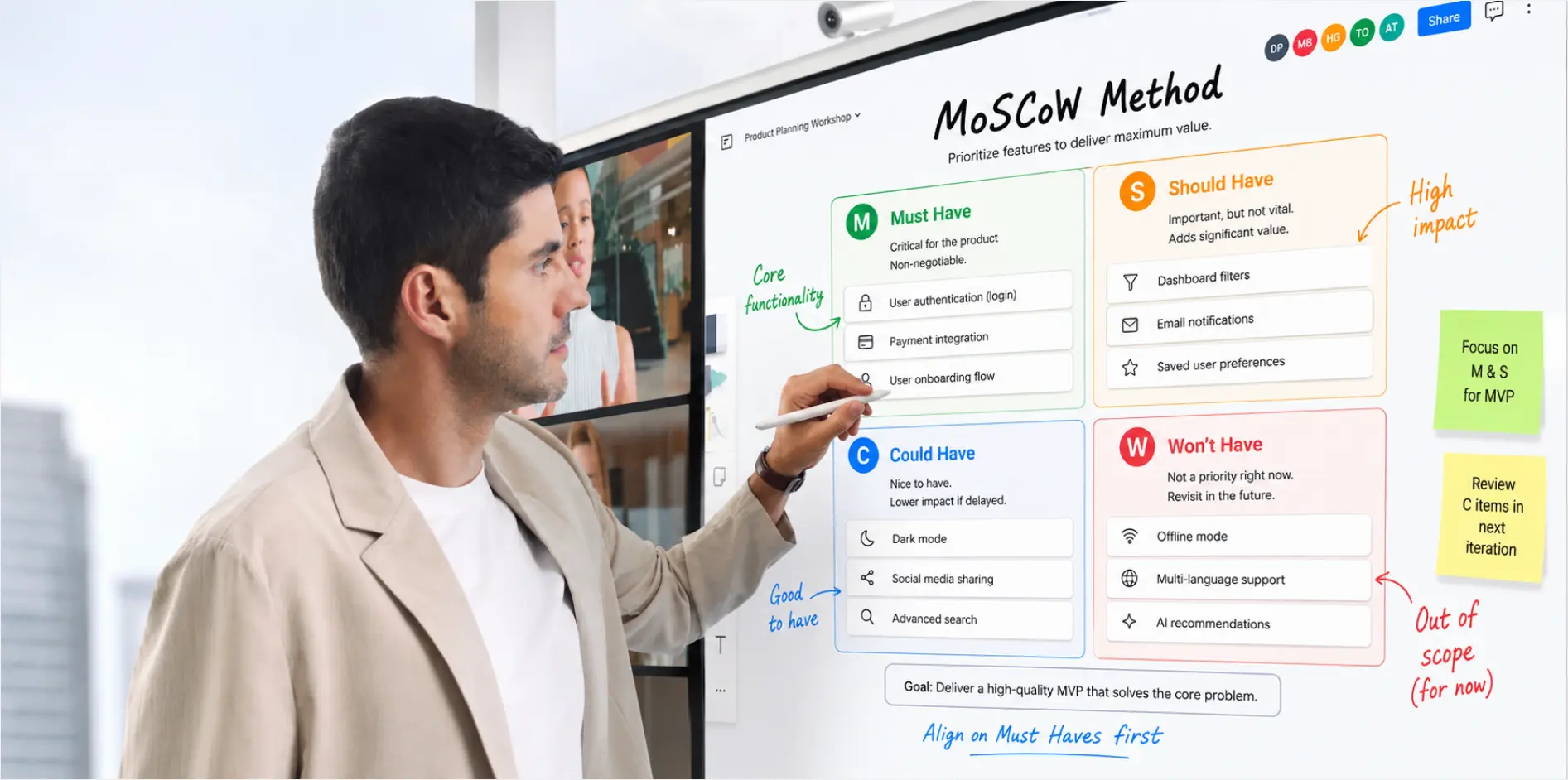 Man annotating on Vibe Canvas provided by Vibe Board in a hybrid meeting
Best for: Large-format interactive displays, collaborative whiteboards, classrooms, and conference rooms where clarity, multi-touch, and input flexibility all matter.
Limitations: Dust or debris accumulating in the bezel sensor area can occasionally cause phantom touches — manageable with regular cleaning, but worth noting in very dusty environments.
4. Surface Acoustic Wave (SAW) Touchscreens
Surface acoustic wave touchscreens use ultrasonic sound waves instead of light or electricity. Transducers at the edges of the screen emit high-frequency sound waves across the glass surface. When you touch the screen, your finger absorbs a portion of the wave energy at that contact point. The controller detects where and how much energy was absorbed and converts that into touch coordinates.
Best for: Public information kiosks, museum installations, and applications where optical clarity is a priority. SAW screens can also detect touch pressure, enabling pressure-sensitive input.
Limitations: Highly sensitive to surface contamination — water droplets or debris can register as phantom touches. Not well-suited for outdoor or high-humidity environments.
5. Near Field Imaging (NFI) Touchscreens
Near field imaging (NFI) works on electromagnetic principles. The screen generates an electromagnetic field across its surface. As your finger approaches or contacts the screen, it disturbs that field — the controller detects the disturbance and registers a touch. Because the sensing mechanism isn’t affected by surface wear, NFI screens are exceptionally durable.
Best for: Military, defense, and heavy industrial applications where ruggedness is the primary requirement.
Limitations: High manufacturing cost makes NFI impractical for most commercial or consumer applications.
Touchscreen Technology Comparison
|
Technology |
Multi-Touch |
Works With Gloves |
Works With Stylus |
Image Clarity |
Durability |
Typical Use
|
|---|---|---|---|---|---|---|
|
Resistive |
No |
Yes |
Yes (any) |
Lower |
Moderate |
ATMs, industrial POS |
|
Capacitive |
Yes |
No |
Conductive only |
High |
Good |
Smartphones, tablets |
|
Infrared (IR) |
Yes (up to 20+) |
Yes |
Yes (any) |
Highest |
Excellent |
Large displays, whiteboards |
|
Surface Acoustic Wave |
Limited |
No |
Soft tip only |
High |
Good |
Kiosks, museums |
|
Near Field Imaging |
Yes |
Yes |
Yes (any) |
High |
Excellent |
Military, industrial |
Why Touchscreen Technology Matters for Large Displays
The differences between touchscreen types become especially significant as screen size increases. A capacitive screen works well at 10 inches — but at 55 or 75 inches, the precision, latency, and multi-touch capacity requirements change substantially. Anyone who has tried to collaborate on a large display with sluggish or imprecise touch response understands the productivity cost.
For collaborative environments — conference rooms, training spaces, and classrooms — infrared touch is the clear choice because it combines the highest image fidelity with unrestricted multi-touch support and input-device flexibility. When multiple people need to write, draw, or annotate simultaneously, single-touch or glove-incompatible technologies simply don’t hold up.
The Vibe Board S1 is available in 55″ and 75″ and uses infrared multi-touch with 20 simultaneous touch points, sub-8ms response time, and anti-glare tempered glass — specifications chosen specifically for multi-person collaborative sessions where both touch performance and display quality matter.

Advantages of Touchscreen Technology
Beyond the specifics of each type, touchscreens share core advantages that explain why they’ve replaced traditional input methods in so many settings:
-
Intuitive interaction: Touching a screen to interact with it matches how people physically engage with the world — less learning curve for new users.
-
Fewer failure points: No physical keys, buttons, or moving parts means fewer mechanical components that can wear out or break.
-
Space efficiency: A touchscreen consolidates input and output into one surface, eliminating separate keyboards, mice, and remotes.
-
Accessibility: Large touch targets and gesture-based navigation can be easier to use than small keys for many users.
-
Collaboration: Multi-touch large-format displays allow several people to interact with shared content at the same time — something impossible with traditional input devices.
Choosing the Right Touchscreen Technology
The right touchscreen technology depends on your use case, environment, and display size:
-
Smartphones and tablets: Capacitive — the right balance of sensitivity, multi-touch, and cost at small screen sizes.
-
Point-of-sale and industrial terminals: Resistive — works with gloves, styluses, and in rough conditions.
-
Conference rooms and classrooms: Infrared — multi-touch, input-device flexibility, and optical clarity at 55–75+ inches.
-
Outdoor kiosks and museums: Surface acoustic wave — good clarity and durability in controlled environments.
-
Military and heavy industrial: NFI — maximum ruggedness where cost is secondary.
For teams equipping a modern meeting room or collaborative workspace, infrared interactive whiteboards offer the combination of touch performance, display quality, and software integration that makes a real difference in how a room functions day to day.
Frequently Asked Questions
How do touchscreens work?
Touchscreens detect where you make contact with the screen by sensing changes in electricity, light, or sound at that point. A controller chip converts that signal into X/Y coordinates, which the device’s operating system interprets as a tap, swipe, or gesture. The specific sensing method — resistive, capacitive, infrared, acoustic wave, or near-field imaging — determines what kinds of touches register and how sensitive the screen is.
What is the most common type of touchscreen technology?
Capacitive touchscreens are the most common in consumer devices like smartphones and tablets, offering good multi-touch sensitivity at a cost that works for small and medium screens. For large-format professional displays — conference rooms, classrooms, and interactive whiteboards — infrared (IR) is the standard choice, delivering superior optical clarity, broad input compatibility, and support for 20 or more simultaneous touch points.
What are the main types of touchscreen technology?
The five main types are: resistive (uses pressure to complete an electrical circuit), capacitive (detects electrical properties of your fingertip), infrared (uses a grid of light beams that your touch interrupts), surface acoustic wave (uses ultrasonic sound waves), and near field imaging (detects electromagnetic field disturbance). Each has different performance characteristics, costs, and ideal use cases — see the comparison table above for a side-by-side breakdown.
How does infrared touchscreen technology work?
Infrared touch uses a grid of IR LEDs and photodetectors embedded in the bezel around the display. The LEDs continuously emit invisible infrared beams across the screen surface. When you touch the screen with any object — finger, pen, or gloved hand — it interrupts one or more beams. The controller identifies which beams were broken and calculates the exact touch position from that data. Because the sensing happens at the bezel rather than on the screen surface, there’s no overlay layer to reduce image brightness or clarity.
Why do large touchscreen displays use infrared technology?
Infrared touch is preferred for large displays because it requires no conductive coating on the screen surface, meaning nothing reduces display brightness or clarity. It supports many simultaneous touch points (20 or more on professional displays), works with any input object regardless of conductivity, and doesn’t lose sensitivity through surface wear — all critical requirements when multiple people are collaborating on a shared 55″ or 75″ display.
Can touchscreens work with gloves?
It depends on the technology. Resistive, infrared, and near-field imaging touchscreens all work reliably with gloved hands. Standard capacitive touchscreens don’t — they require the electrical conductivity of a bare fingertip. Some newer capacitive screens include a sensitivity boost mode for gloves, but this is generally less reliable than technologies designed to work with any input object. For environments where gloved use is common — laboratories, construction sites, or cold storage — infrared or resistive touch is the better choice.