What Is a Smart Board?
A smart board is a large-format interactive touchscreen display that combines the functionality of a traditional whiteboard, a projector, and a computer into a single connected device. Users write, draw, annotate, and manipulate digital content directly on the screen — with a finger, stylus, or other input — and everything is saved, shareable, and cloud-connected in real time.
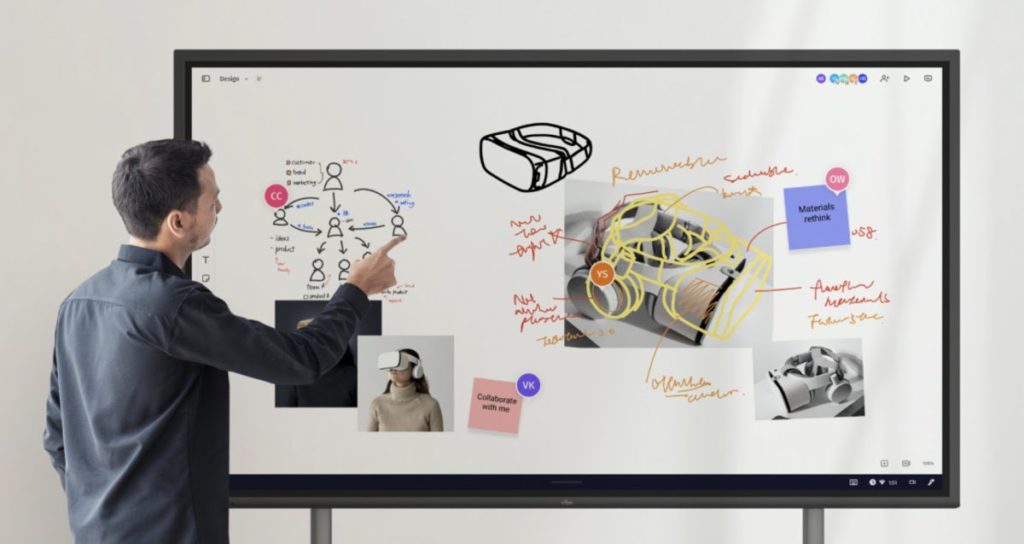 Live annotations on images
The term "smart board" is used two ways. In everyday conversation, it refers to any interactive touchscreen whiteboard. In a more technical sense, SMART Board is a registered trademark belonging to SMART Technologies, the Canadian company that produced the original classroom interactive whiteboard in the early 1990s. For clarity: this guide uses "smart board" (lowercase) to mean any interactive display of this type, not specifically SMART Technologies products.
Modern smart boards have evolved far beyond their classroom origins. Today's devices are all-in-one collaboration hubs: they run full operating systems (Android or Windows), connect wirelessly to laptops and mobile devices, integrate with hundreds of business applications, support multi-user collaboration from anywhere in the world, and increasingly incorporate AI to capture, summarize, and act on what happens during meetings.
The interactive flat-panel display market — the hardware category smart boards belong to — grew from $5.67 billion in 2025 to $6.2 billion in 2026, driven by the replacement of traditional projectors and whiteboards in both corporate and education settings. The commercial segment grew especially fast: according to RUNTO's Q3 2025 data cited in Tenfly's 2026 market analysis, commercial IFPD shipments grew 44.1% year-over-year, while the education market saw a slight dip — signaling that businesses are now the primary growth driver.
Smart Board vs Interactive Whiteboard vs Digital Whiteboard: What's the Difference?
These terms are often used interchangeably, but they describe meaningfully different things:
Traditional whiteboard: A passive, non-digital surface for writing with dry-erase markers. Nothing is saved, nothing is shareable, and remote participants see nothing. Still found in most meeting rooms worldwide.
Online whiteboard (software-only): A software application — Miro, FigJam, Google Jamboard's successor — that runs on any device with a browser or app. Enables digital collaboration but requires each participant to have their own screen. No shared physical surface.
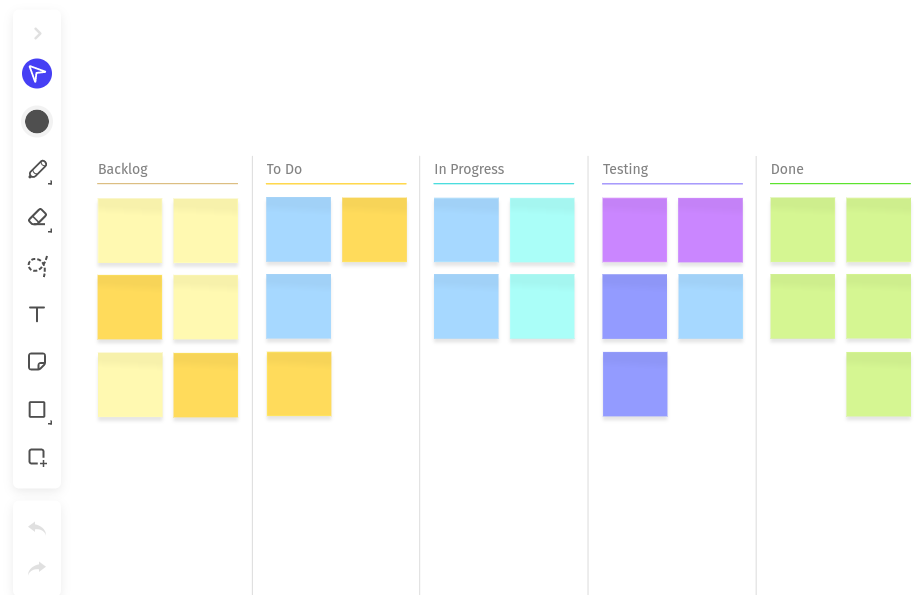 Online whiteboards example
Digital / electric whiteboard (first generation): An early iteration of connected whiteboards that required a projector and external PC to function. The board itself was a passive sensor layer; the computer did the work. Still found in older classrooms and corporate settings.
Interactive whiteboard (modern IFPD): The broad contemporary term for any large-format touch-enabled display that supports writing, annotation, and digital content interaction. Can function as a standalone device or connect to a computer. This category includes smart boards.
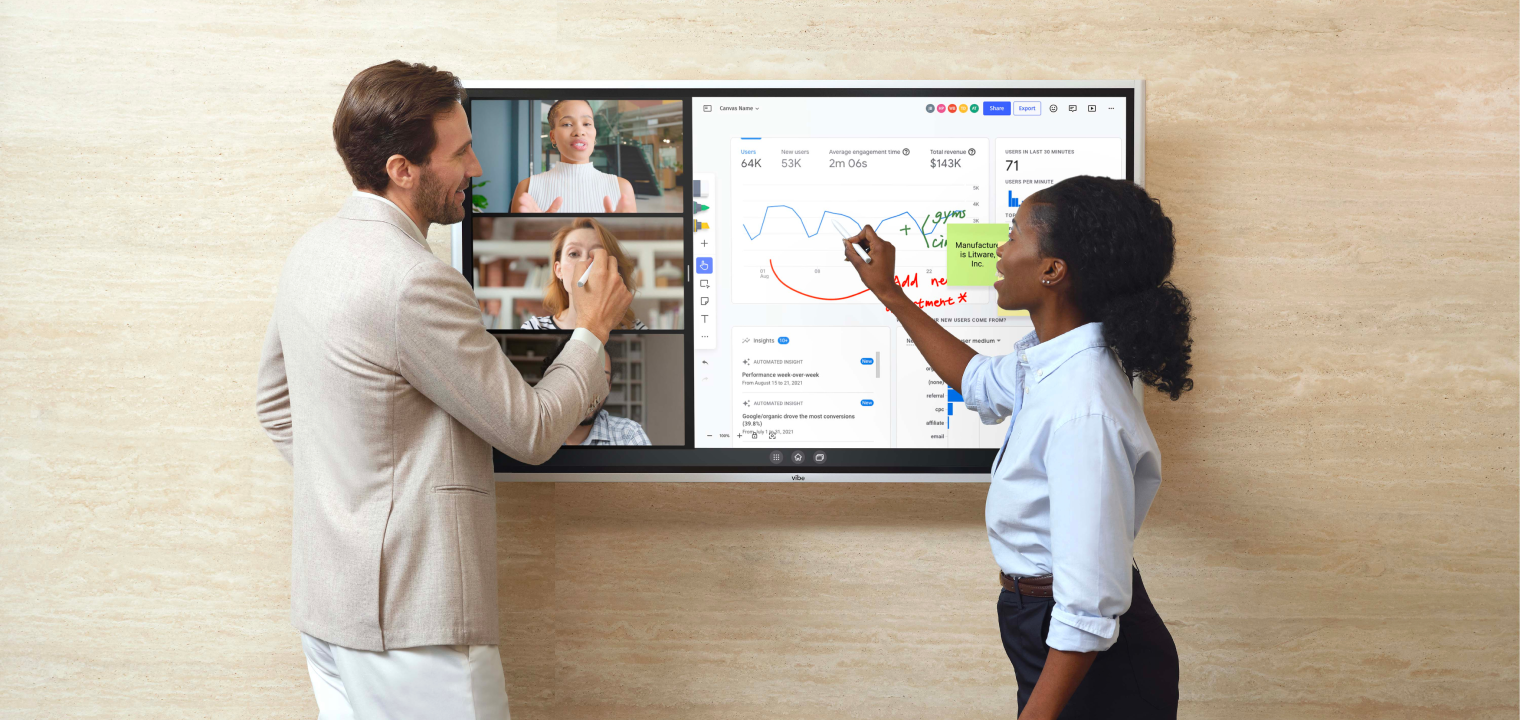 Interactive Whiteboard example
Smart board (modern): The most capable version of an interactive whiteboard. Runs a full operating system independently, connects wirelessly to other devices, integrates with cloud apps, supports video conferencing, and in 2026, increasingly includes AI features for transcription, summarization, and content recognition. A smart board doesn't need a projector or external computer — it is the computer.
The practical distinction: If you're comparing options for a conference room or classroom in 2026, you're almost certainly looking at smart boards (modern IFPDs). The older projector-based and first-generation devices are largely being replaced.
How Does a Smart Board Work?A modern smart board integrates several technologies into one device:
Touchscreen layer: An infrared, capacitive, or electromagnetic sensor grid beneath the screen surface detects finger and stylus input with high precision. Current devices typically support 10-20 simultaneous touch points, enabling multiple people to write and interact at the same time. By Q2 2025, the average interactive flat panel size reached a record 78.7 inches, and larger formats are becoming standard for meeting rooms and classrooms.
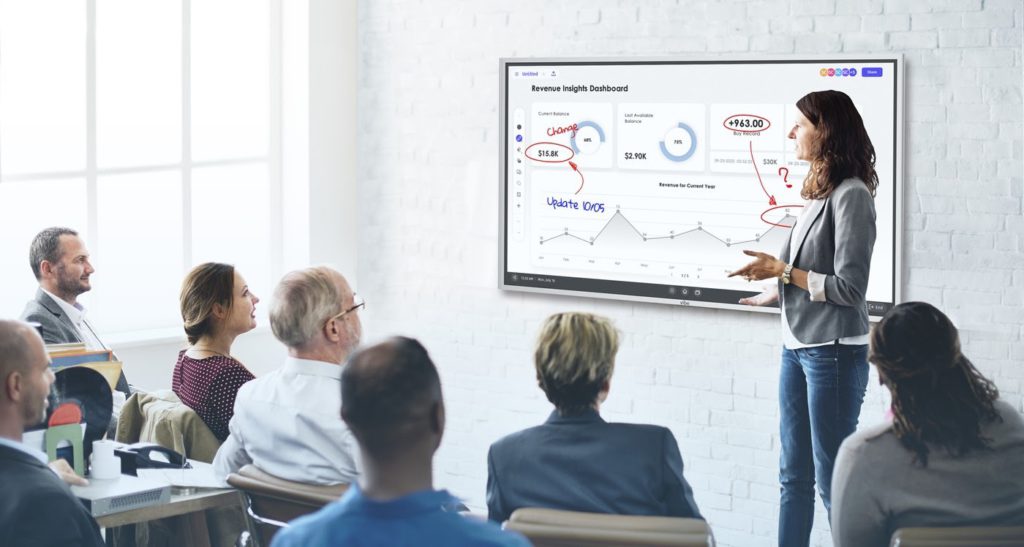 In-room smart board participants
Display: A 4K Ultra HD LED or LCD panel (OLED in premium models) provides the visual surface. High resolution at large screen sizes ensures readability across a full conference room. Most current models include anti-glare coatings as a baseline feature.
Onboard computer: A processor, RAM, and storage run the board's operating system and applications independently. High-end models run Windows; most business and education boards run Android. This means no external computer is required for typical use.
Wireless connectivity: Smart boards connect to local Wi-Fi networks for internet access and to individual devices (laptops, phones, tablets) for screen casting. Most support multiple simultaneous wireless connections, allowing several people to cast content to the shared display at once.
Cloud integration: Content written or created on the board saves automatically to connected cloud storage — Google Drive, OneDrive, Dropbox — and can be exported as PDFs, images, or native files. The "don't erase the whiteboard" problem is solved: everything is preserved and shareable within seconds of the meeting ending.
Application ecosystem: Modern smart boards run Android or Windows app stores, giving access to Zoom, Microsoft Teams, Google Meet, Slack, web browsers, Microsoft 365, Google Workspace, and hundreds of other applications — all from the board's touchscreen interface.
What Is a Smart Board Used For? Key Use Cases
Smart boards are flexible enough to improve almost any scenario where people share information, make decisions, or learn together. Here are the most impactful use cases:
In business and office settings
Meetings and presentations. A smart board replaces the slide-deck-plus-projector setup with a fully interactive presentation environment. Presenters can annotate slides in real time, pull in live data, switch between applications, and engage participants as contributors rather than audience members.
Brainstorming and ideation. The infinite digital canvas lets teams generate, cluster, and develop ideas without the spatial limits of a physical whiteboard. Sticky notes, diagrams, images, and freehand sketches coexist on a single canvas that everyone — in the room or remote — can contribute to simultaneously.
Project planning. Gantt charts, RACI matrices, sprint boards, and timeline visualizations work naturally on a large interactive surface. Teams adjust plans collaboratively in real time, and the updated version is automatically saved and shareable.
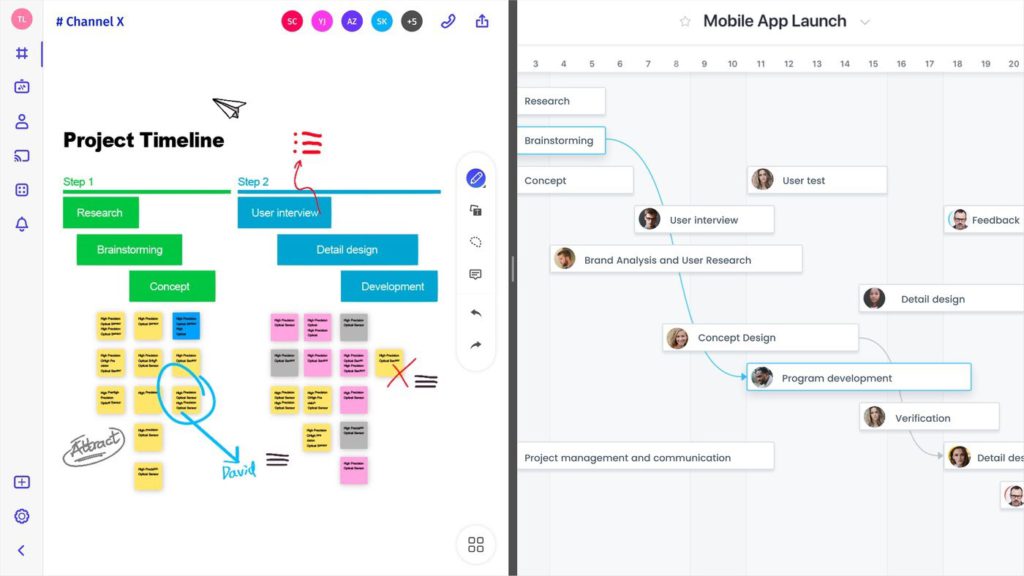 Smart board with native apps on the canvas, split screen
Training and onboarding. Interactive training sessions — where participants annotate, respond, and engage with content rather than passively watching slides — consistently produce better information retention. Smart boards enable this regardless of whether participants are in the room or joining remotely.
Client presentations and workshops. A 75-inch 4K display creates a professional, impressive presentation environment. Live annotation, real-time customization, and the ability to incorporate client feedback directly onto the canvas during a session make smart board-enabled client meetings qualitatively different from laptop-plus-screen setups.
In education
Interactive lessons. Teachers annotate textbook content, highlight key concepts, pull in multimedia, and have students interact directly with the board — individually or in groups.
Virtual field trips and simulations. Large 4K displays with internet connectivity enable immersive visual experiences: 3D anatomy models, geographic maps, historical simulations, scientific data visualizations.
Collaborative student work. Students contribute simultaneously to a shared canvas, useful for group projects, debates, and collaborative problem-solving.
Remote and hybrid classrooms. Smart boards give remote students the same view of the shared canvas that in-person students have, and the same ability to contribute. Used with video conferencing, they bring distributed classes into genuine parity.
Smart Boards for the Office and Hybrid Teams
The most significant shift in the smart board market since 2020 has been the rise of the office as the primary use case. According to RUNTO data analyzed by Tenfly in February 2026, commercial IFPD shipments grew 44.1% year-over-year in Q3 2025 — dramatically outpacing the education segment. The driver: hybrid work.
SurveyMonkey's 2026 workforce research found that 29% of remote and hybrid employees would consider quitting if forced back into the office full-time, and nearly half of employers said workplace flexibility now plays a significant role in retention strategy. The office has to justify itself — and that means being genuinely better for collaboration than working from home.
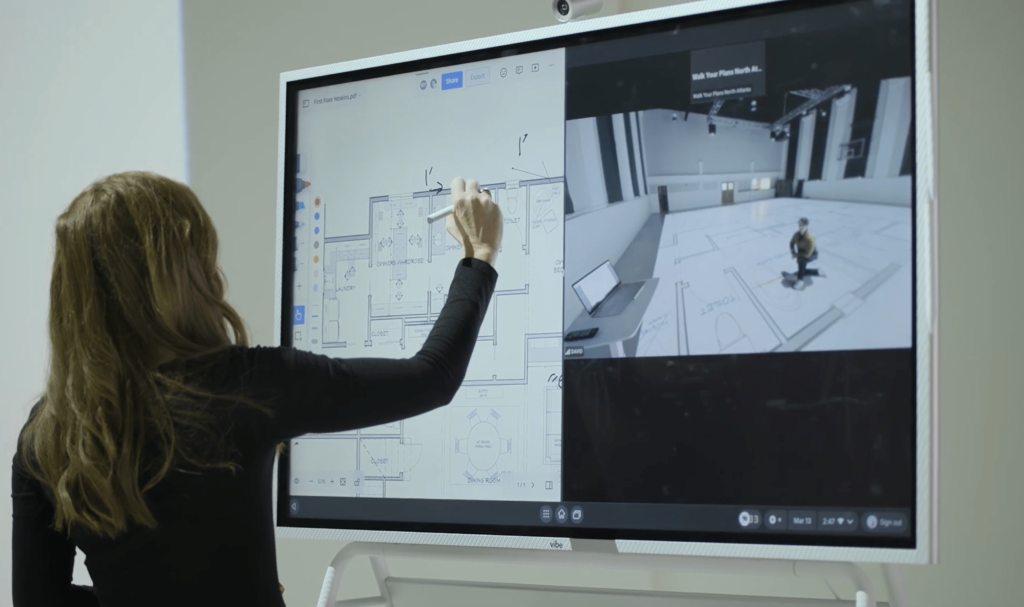
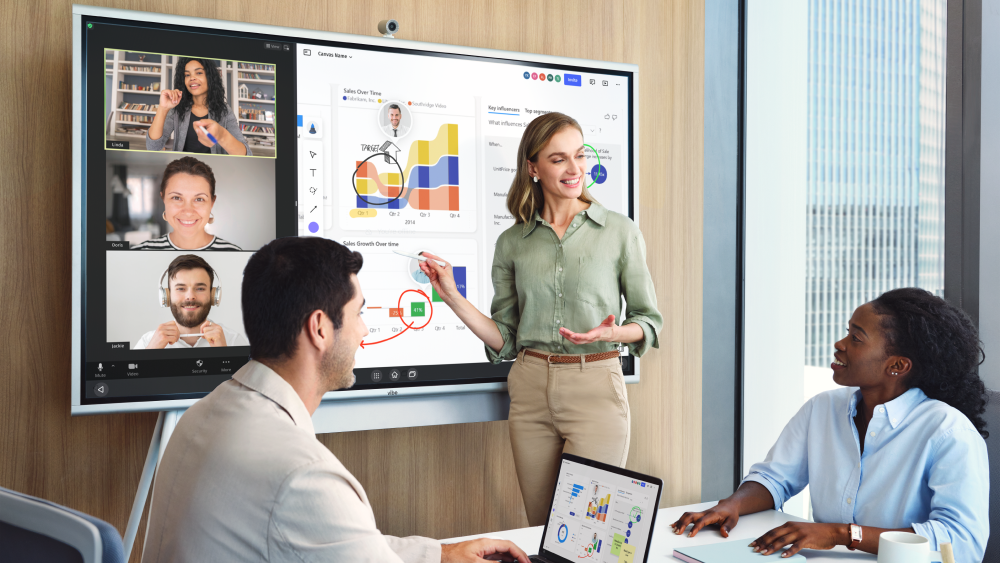 Using Vibe Board to engage with a remote team during a virtual collaboration session.
A smart board is one of the most effective investments in making the office worth the commute. Here's why:
It levels the playing field between in-room and remote participants. When a conference room has a smart board, remote participants see the same shared canvas that in-room participants see — and can contribute to it equally. When a conference room doesn't have one, remote participants watch a blurry laptop camera feed of someone gesturing at a physical whiteboard they can't read.
It eliminates the most common meeting friction. The average worker loses significant time at the start of every meeting finding the right cable, figuring out how to share a screen, and waiting for software to load. A smart board with wireless casting removes this friction entirely — anyone in the room can share their screen in seconds without a cable.
It closes the "post-meeting context loss" loop. Everything on the smart board is automatically saved to the cloud. Decisions, diagrams, action items — all preserved and shareable within seconds of the meeting ending. No more "quick, take a photo of the whiteboard before we leave."
What to look for in an office smart board
For conference rooms and hybrid team environments specifically, prioritize:
-
Open app ecosystem: The board should run the video conferencing platform your team already uses (Zoom, Teams, Google Meet) natively, not through a workaround.
-
Wireless casting: Multiple people should be able to share their screens without cables or dongles.
-
Camera and microphone quality: Built-in AV hardware for hybrid meetings should be adequate for the room. For larger conference rooms, consider supplemental hardware.
-
Cloud integration: Automatic saving to Google Drive, OneDrive, or Dropbox is non-negotiable for post-meeting continuity.
-
Size for the room: 55 inches for small huddle rooms (up to 4-5 people); 75 inches for standard conference rooms (6-12 people); 86 inches or larger for board rooms or training spaces.
Smart Boards for Classrooms
Smart boards remain the most-used interactive technology in education globally. According to Accio's October 2025 interactive smart board trend analysis, the education sector represents the largest end-user segment of the interactive display market, holding a majority of global market share in 2025 — with North America accounting for 34% of that share and the Asia-Pacific region growing fastest at a projected CAGR of 8.69%.
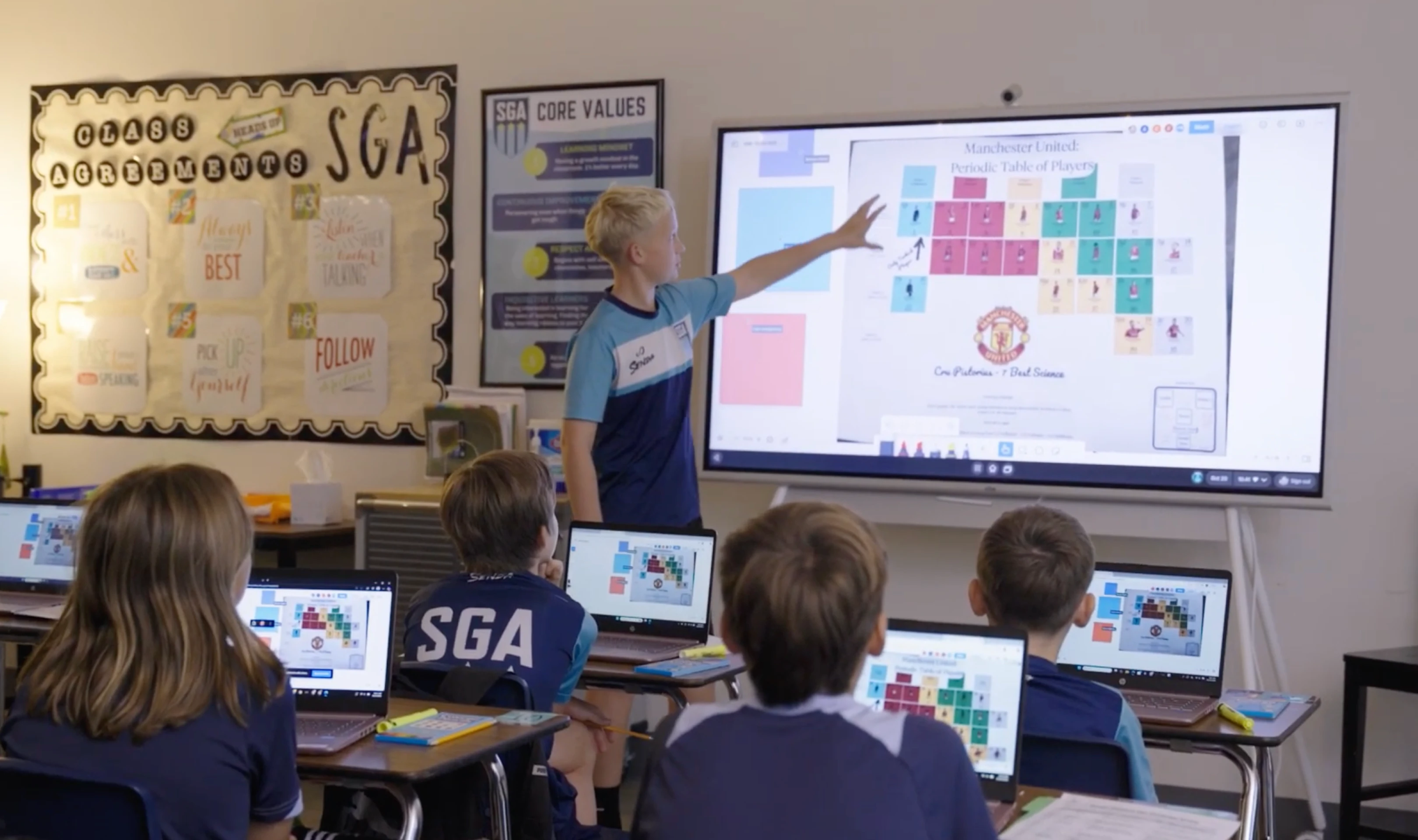 Vibe Smart Board in a Classroom
For classroom applications, the decision criteria differ from office settings:
Durability matters more. Classroom boards receive significantly heavier daily use than conference room boards. Look for scratch-resistant anti-glare glass, reinforced bezels, and multi-year warranty coverage. Pen durability and tip replacement costs are worth investigating.
Content access matters. Classroom boards should provide easy access to subject-specific educational content, curriculum tools, and student-facing applications. Boards running Google-certified Android have access to the full Play Store, including educational apps.
Student interaction features matter. The best classroom smart boards support simultaneous multi-touch from multiple students, enable student device casting so students can share work to the main display, and include annotation and markup tools that work naturally for younger users.
Teacher workflow matters. Can the teacher annotate a PDF of existing lesson materials without rebuilding the lesson from scratch? Can they save the annotated version automatically? Can they seamlessly switch between video conferencing and the whiteboard canvas for hybrid or virtual classes?
Key Features to Look For
Regardless of whether you're equipping a conference room or a classroom, these are the features that separate genuinely useful smart boards from expensive display screens:
4K Ultra HD resolution. Text and diagrams need to be crisp at the edges of a large room. 4K is the baseline for any board 65 inches or larger in 2026 — anything less looks noticeably soft at full size.
Responsive multi-touch. Look for 10-20 touch points and minimal input latency. The difference between 10ms and 50ms latency is significant when writing on a large surface — higher latency makes the experience feel disconnected.
AI handwriting recognition. Current-generation smart boards convert handwritten notes to digital text automatically, clean up hand-drawn shapes into precise geometric forms, and in advanced models, generate structured summaries of written content. This is one of the highest-value AI features in day-to-day use.
Wireless screen sharing. Multiple participants should be able to cast their screens to the board without cables. Look for platforms that support simultaneous multi-device casting, enabling a "split screen from multiple sources" view.
Built-in video conferencing support. The board should run Zoom, Microsoft Teams, or Google Meet as first-class apps, not browser workarounds. Built-in camera and microphone quality varies significantly between models — evaluate this carefully for hybrid meeting use.
Cloud storage integration. Automatic saving to Google Drive, OneDrive, or Dropbox. Manual export is fine for occasional use; automatic sync is what makes smart boards genuinely reliable for day-to-day work.
Open app ecosystem. Boards running Google-certified Android (EDLA certification) or Windows have access to full app stores. Boards running proprietary operating systems lock you into whatever the manufacturer has decided to support — a significant limitation over the 4-6 year lifecycle of a smart board investment.
Anti-glare display. Meeting rooms and classrooms rarely have ideal lighting conditions. Anti-glare treatment significantly affects usability under overhead lighting or near windows.
Smart Board Comparison: Vibe Board S1 vs Samsung WAFX-P vs Google-Based Boards
Note on Microsoft Surface Hub 3: Microsoft announced in April 2026 that it is discontinuing the Surface Hub product line. Existing devices will continue to receive support, but new purchases should consider alternatives.
Vibe Board S1 — Best for: Open-ecosystem business collaboration
Key specs: 75-inch 4K UHD touchscreen; VibeOS (Android-based); 128GB storage; 8GB RAM; 20-point multi-touch; no built-in camera or mic (Smart Camera sold separately); 200+ vetted apps via Vibe Store plus full Google Play access.
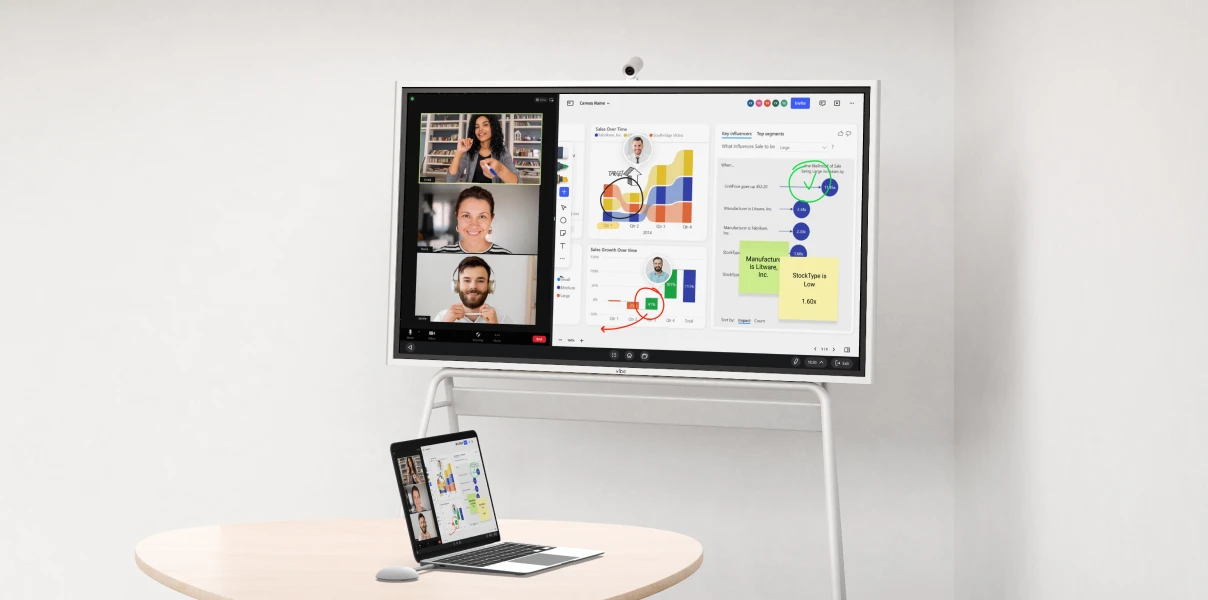 Vibe Board S1 – your interactive display for hybrid meetings
Price: $3,999 (55″) / $7,899 (75″) — check vibe.us for current pricing and promotions.
The Vibe Board S1's defining characteristic is its genuinely open ecosystem. It integrates natively with Google Workspace, Microsoft 365, and 200+ third-party applications via the Vibe Store — which means teams aren't locked into a single productivity stack. The infinite canvas works well for brainstorming and planning sessions, and wireless casting via Vibe Tap supports 4K screencasting without a cable.
For hybrid teams, the S1 runs Zoom, Teams, and Google Meet as full applications. Camera and microphone are modular: the optional Vibe Smart Camera adds a 4K lens and six-mic 3D array to any S1. For teams that also need persistent AI meeting memory across sessions, the S1 pairs naturally with Vibe Bot and Vibe AI (covered below).
Best fit: Small to mid-size businesses, startups, marketing and design agencies, professional services firms, and teams that move between Google Workspace and Microsoft 365.
Samsung WAFX-P (75″) — Best for: All-in-one AV with no-setup video conferencing
Key specs: 4K UHD display; Android 15; Google EDLA certified; 40-point multi-touch; built-in 48MP auto-framing camera; microphone with 10-meter range; dual 20W speakers + woofer; OPS slot for optional Windows expansion.
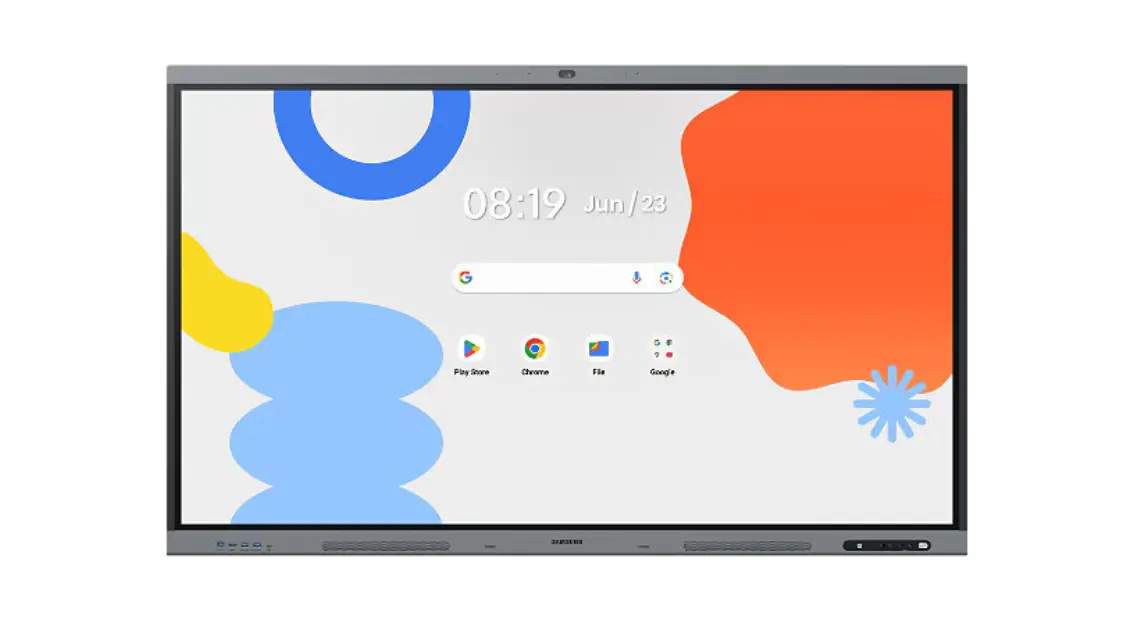 Samsung WAFX-P (75″) – front view
Price: $3,500 (65″) / $4,990 (75″) / $5,990 (86″)
The WAFX-P is Samsung's 2026 flagship interactive display, launched in February 2026 and designed for both education and enterprise meeting rooms. Its standout feature is a fully integrated AV system: the built-in 48MP camera with auto-framing, long-range microphone, and dual speakers mean a conference room needs no additional hardware to run a professional-quality video call.
AI features include digital ink recognition (circle a handwritten word to search the web instantly), handwriting-to-text conversion, and an AI assistant arriving via software update in 2026. The EDLA-certified Android 15 base gives access to Google Play in full, while the OPS slot lets IT teams slot in a Windows compute module when needed.
TechRadar's February 2026 review noted the $4,990 price point puts the 75″ model beyond the reach of smaller organizations — but for enterprise buyers who want zero-cable meeting rooms without purchasing separate camera bars or speaker systems, the all-in hardware cost can be competitive.
Best fit: Enterprise teams and campuses that want a single-device meeting room setup with no external AV hardware; organizations running Google Workspace or Microsoft Teams at scale.
Google-Based IFPD Options (Jamboard replacements) — Best for: Google Workspace teams
Google discontinued Jamboard in 2024. For teams that relied on it, the best replacements in the Google ecosystem are third-party IFPDs running EDLA-certified Android, which provides full access to Google Workspace and the Play Store — effectively making the board a giant Android tablet with direct Google Drive integration.
Best fit: Education institutions and businesses already fully embedded in Google Workspace that want the simplest possible integration with existing tools.
Quick Comparison
|
Vibe Board S1 |
Samsung WAFX-P |
Google-ecosystem IFPD | |
|---|---|---|---|
|
Size options |
55″ / 75″ |
65″ / 75″ / 86″ |
Varies by vendor |
|
Starting price (75″) |
$3,999 |
$4,990 |
~$1,500–$3,500 |
|
OS |
VibeOS (Android-based) |
Android 15 (EDLA certified) |
Android (EDLA certified) |
|
Camera & mic |
Optional (Smart Camera sold separately) |
Built-in 48MP auto-framing camera + 10m-range mic |
Varies by vendor |
|
Touch points |
20-point multi-touch |
40-point multi-touch |
Varies |
|
App ecosystem |
Google + Microsoft + 200+ vetted apps (Vibe Store) |
Google Play (EDLA) + OPS slot for Windows |
Google Workspace native |
|
AI features |
Handwriting recognition; infinite canvas; Vibe AI / Vibe Bot integration |
AI handwriting-to-search; AI assistant (2026 update); auto-framing camera |
Varies by vendor |
|
Video conferencing |
Zoom, Teams, Meet (via app; camera sold separately) |
Zoom, Teams, Meet (fully built-in AV, no extras needed) |
Meet native; Zoom via app |
|
Best for |
Mixed-stack SMB; modular setup; teams pairing with Vibe AI ecosystem |
Enterprise all-in-one AV; Google/Teams orgs wanting zero-cable meeting rooms |
Google-native teams and classrooms |
How AI Is Changing Smart Boards in 2026
The most significant shift in smart boards in the past 18 months is the integration of AI — both within the board hardware itself and in the broader ecosystem of tools that connect to it.
AI features built into current smart boards
Handwriting to text: Real-time conversion of handwritten notes into typed text, enabling instant searchability and copy-paste functionality. Available on most current-generation boards.
Shape recognition: Hand-drawn circles, rectangles, and arrows are automatically cleaned up into precise geometric shapes. Small but genuinely useful for quick diagrams during meetings.
Intelligent summarization: Some boards (and most modern smart board software platforms) can generate a structured summary of whiteboard content — turning a canvas full of sticky notes and sketches into a formatted document. According to Benchmark Technomate's 2026 AI interactive flat panel review, modern IFPs now include AI features such as auto-shapes, handwriting recognition, voice commands, and intelligent summarization as standard capabilities.
Noise cancellation and audio processing: AI-based noise suppression in built-in microphones significantly improves audio quality for remote participants in hybrid meetings.
The gap AI-equipped boards alone don't close — and how Vibe fills it
Even the most AI-capable smart board solves an in-session problem: capturing and organizing what happens during a meeting. What no smart board does natively is carry that context forward — connecting today's discussion to the decision made in last month's planning session, surfacing relevant prior commitments, or building a persistent knowledge base that compounds over time.
This is the problem that Vibe AI addresses directly. Vibe AI is a contextual workspace powered by a proprietary Memory Graph — a living knowledge layer that links decisions, conversations, and documents across sessions into a continuously updated, searchable team record. When you finish a meeting on a Vibe Board, the content doesn't just save to a folder — it connects to the thread of prior discussions, and anyone can query the full history in natural language.
The hardware layer that makes this work in conference rooms is Vibe Bot — a portable in-room AI device with a 360° 4K camera and six-microphone beamforming array. Vibe Bot captures who said what, what was sketched on the board, and what appeared on shared screens — then feeds all of it directly into the Vibe AI Memory Graph. Remote participants on Zoom or Teams see a properly framed, professionally mic'd room. In-room conversations get the same persistent memory treatment as Slack threads and shared documents.
For individual capture — a 1:1 with a client, a side conversation, a voice note on the way to the office — Vibe Dot is a compact AI recorder (Red Dot Design Award winner 2026) that adds ambient audio capture to the same Memory Graph.
The practical outcome: teams using the Vibe ecosystem spend significantly less time at the start of each meeting recapping what was decided before, because the full context from previous sessions is already organized and queryable. The smart board on the wall captures the meeting in real time; Vibe AI carries it forward.
FAQ
What is a smart board?
A smart board is a large-format interactive touchscreen display that combines a whiteboard, projector, and computer in a single connected device. Users write, draw, and interact with digital content directly on the screen. Content saves automatically to the cloud, and all participants — in the room or remote — can view and contribute to the same shared canvas.
What is a smart board used for?
Smart boards are used for meetings, presentations, brainstorming, training, project planning, and education. In business settings, they enable hybrid collaboration by giving remote and in-person participants equal access to a shared interactive canvas. In classrooms, they replace static projector slides with interactive, annotatable content that students can engage with directly.
How does a smart board work?
A smart board detects touch and stylus input through a sensor layer beneath the screen surface. An onboard computer (running Android or Windows) processes the input, displays content, runs applications, and connects to the internet and to participants' devices wirelessly. Everything written or created is saved automatically to connected cloud storage.
What is the difference between a smart board and an interactive whiteboard?
"Interactive whiteboard" is the broader category — any touch-enabled display that lets users interact with digital content. "Smart board" refers to the more capable, self-contained version: a device that runs its own operating system, connects to cloud apps, integrates with video conferencing, and doesn't require a separate computer. A smart board is a type of interactive whiteboard.
Can a smart board be used as a whiteboard?
Yes. Every smart board includes a digital whiteboard mode — an infinite canvas where users can write, draw, and annotate with finger or stylus input, exactly like a physical whiteboard. Unlike a physical whiteboard, everything is saved automatically, shareable via link, and accessible from any connected device.
What are the best smart boards for office use?
For small to mid-size businesses with mixed Google/Microsoft environments, the Vibe Board S1 (from $3,999) offers the broadest open app ecosystem and modular flexibility — add a camera and Vibe AI when you're ready. For enterprise teams that want a zero-cable, all-in-one meeting room setup, the Samsung WAFX-P (75″ at $4,990) includes a built-in 48MP auto-framing camera, microphone, and speakers with no external hardware required. For Google Workspace-native teams, EDLA-certified Android IFPDs provide the tightest Google Drive and Meet integration.
Note: Microsoft discontinued the Surface Hub product line in April 2026. Teams previously using Surface Hub should consider the Vibe Board S1, Samsung WAFX-P, or other alternatives.
What are the best smart boards for classrooms?
For K-12 classrooms, durability, anti-glare display quality, and multi-student touch capability are the primary criteria. Leading education-focused options include Promethean ActivPanel and BenQ's education series, which are designed specifically for classroom use patterns. For higher education and university settings, business-oriented boards like the Vibe Board S1 often work better, as they offer the open ecosystem and video conferencing integration that university environments increasingly require.
Do smart boards need a computer?
No. Modern smart boards are self-contained computers — they have their own processor, RAM, storage, and operating system. For typical use (whiteboarding, video conferencing, web browsing, running productivity apps), no external computer is required. For specialized applications not available in the board's app store, or for workflows that require a specific operating system, most boards support connecting an external computer via USB-C or HDMI.
How much do smart boards cost?
Smart boards for business typically range from $1,500 to $10,000+, depending on screen size, feature set, and brand. Mid-range business boards (55–75 inches, full app ecosystem) generally fall between $2,500 and $4,500. The Vibe Board S1 starts at $3,999 for both the 55-inch and 75-inch models (check vibe.us for current promotions). Samsung's WAFX-P flagship sits at $4,990 for the 75-inch model, which includes a built-in 48MP camera, microphone, and speaker system. Premium enterprise solutions (Cisco Webex Boards and specialized room systems) can exceed $10,000.
What AI features do smart boards have in 2026?
Current-generation smart boards include AI handwriting recognition (converting handwritten notes to typed text), shape recognition (cleaning hand-drawn shapes into precise forms), intelligent content summarization, and AI-powered noise cancellation in built-in microphones. More advanced AI capabilities — cross-session memory, meeting transcription, action-item extraction, and persistent knowledge base building — come from AI platforms that connect to smart boards rather than from the boards themselves. Vibe AI, paired with a Vibe Board S1 and Vibe Bot, provides this deeper layer of meeting intelligence.