Sprint planning can make or break a development cycle. When it goes well, a team walks out of the room with a shared goal, a realistic backlog, and a clear picture of what "done" looks like. When it goes poorly, teams spend two weeks discovering that nobody actually agreed on what was being built.
This guide covers everything you need to run sprint planning effectively: what it is, who attends, how to structure the session in eight steps, and the best practices that separate high-performing teams from those that perpetually slip their sprints.
What is a sprint?
A sprint is a fixed-length work cycle — typically one to four weeks — during which a Scrum team builds and delivers a potentially shippable product increment. Think of it as a focused, time-bounded unit of work: the team commits to a specific goal, executes against it, and then inspects what was built before starting the next cycle.
That rhythmic cadence is the engine of agile development. It creates urgency without chaos, makes progress visible, and gives the team a natural checkpoint to adapt before small problems compound.
What is sprint planning?
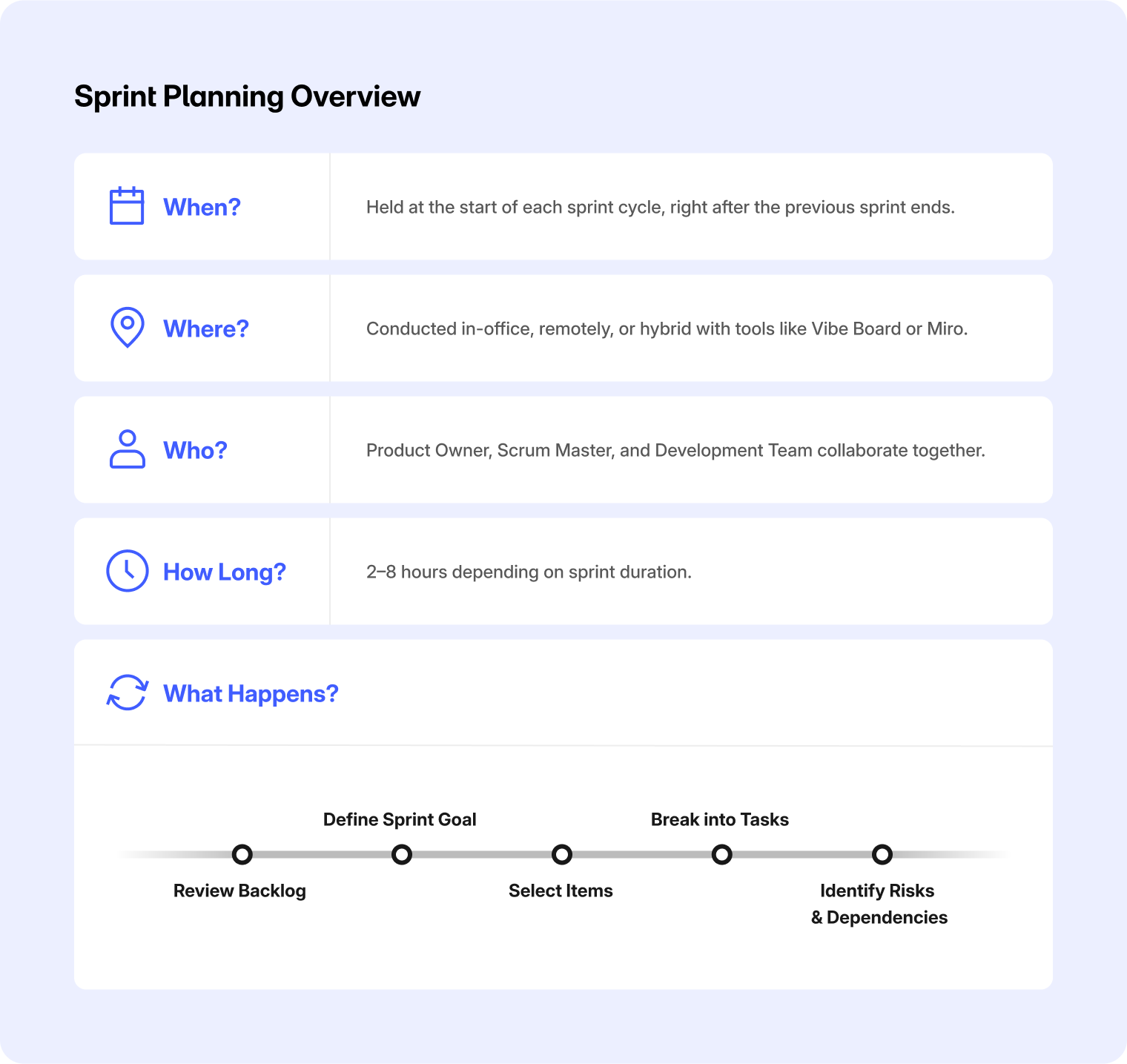
Sprint planning is the Scrum event that kicks off each sprint. The team examines the product backlog, selects items that align with sprint capacity, defines a sprint goal, and lays out enough of a plan to begin executing confidently.

According to the 2020 Scrum Guide, sprint planning addresses three questions:
-
Why is this sprint valuable? The Product Owner proposes how the sprint can increase value; the whole team then collaborates to define a sprint goal.
-
What can be done this sprint? Developers select backlog items they forecast can be completed within the sprint.
-
How will the work get done? The team decomposes selected items into tasks or work items small enough to make daily progress visible.
The Scrum Guide sets a maximum timebox of eight hours for a one-month sprint, with shorter sprints typically requiring proportionally less time. The meeting ends when the sprint goal is set and the team has enough of a plan to start — not when the timebox expires.
Who attends?
Sprint planning requires the full Scrum team: the Product Owner (brings backlog priorities and business context), the Scrum Master (facilitates and keeps the session on track), and the Developers (contribute technical estimates and build the plan). Additional stakeholders or subject-matter experts may be invited to provide advice where needed.
Where and how long?
On-site teams typically meet in a room with a shared visual — a whiteboard, sticky notes, or an interactive display. Remote and hybrid teams need a digital shared surface that lets everyone contribute equally, not just one person driving a screen share while others watch.
On timing: a two-week sprint rarely needs more than three to four hours of planning. If sessions regularly run long, that's usually a signal that the backlog wasn't refined enough beforehand, not that more meeting time is the answer.
How to run a sprint planning meeting in 8 steps
Step 1: Prepare before you walk in
The single biggest time-saver in sprint planning is backlog refinement done before the meeting. Ensure the top backlog items have clear acceptance criteria, are sized, and have been discussed at least once. Arriving with an unrefined backlog forces the team to do refinement and planning simultaneously — which means neither gets done well.
Step 2: Open with context (5–10 min)
Start by briefly reviewing where the product stands: what was completed last sprint, where the team sits relative to the product roadmap, and any business context that might shift priorities. This grounds the discussion and prevents the team from planning in a vacuum.
Step 3: Confirm the sprint goal (10–15 min)
The Product Owner proposes a sprint goal — a single, concise statement of what this sprint is meant to achieve for the user or the business. The Scrum Guide is explicit: the sprint goal must be finalized before sprint planning ends. A good sprint goal is specific enough to guide decisions mid-sprint but flexible enough that the team can negotiate scope if something unexpected comes up.
Step 4: Select backlog items (20–30 min)
With the sprint goal defined, the team selects the backlog items that will best achieve it. This isn't just top-of-backlog by priority — it's a judgment call about what actually fits, considering team capacity, dependencies, and any items already in progress. Developers own this selection; the Product Owner can clarify but shouldn't override.

Step 5: Surface risks and dependencies (5–10 min)
Before the plan is set, explicitly ask: what could derail this? Common blockers — waiting on another team, an unclear technical decision, a team member at reduced capacity — are much cheaper to surface in planning than to discover mid-sprint.
Step 6: Break work into tasks (10–20 min)
For each selected backlog item, the team decomposes the work into tasks small enough that progress is visible on a daily basis. This doesn't need to be exhaustive; the goal is enough detail that Developers can start confidently and the daily Scrum is meaningful. Remaining work can be decomposed as the sprint progresses.
A visual sprint board — whether physical or digital — is the most effective way to run this step. When the team can see the full set of work laid out together, gaps and dependencies become immediately obvious. The Vibe Board S1 works well here for in-person or hybrid teams: its 20-point touchscreen lets multiple team members simultaneously arrange, annotate, and reorganize work items on a shared canvas, with everything saved automatically to the cloud so remote teammates and the next sprint's planning session both start with the full picture.
Step 7: Confirm capacity and commitment (5–10 min)
Cross-check the plan against actual team capacity: days off, context-switching costs, recurring meetings. The Scrum Guide notes that confidence in forecasts comes from understanding past performance, upcoming capacity, and the Definition of Done. If the plan looks too heavy, cut scope now — not on day seven.
Step 8: Confirm the sprint goal and close (5 min)
Restate the sprint goal, confirm everyone understands their immediate first tasks, and establish when the first daily Scrum will occur. End as soon as the purpose is achieved — not when the clock runs out.

Sprint planning best practices
Refine the backlog continuously, not in one big session. Regular refinement — a short session mid-sprint — means backlog items are nearly ready by the time planning comes around, which is what allows sessions to stay short and focused.
Keep the sprint goal to one sentence. A sprint goal that requires a paragraph to explain isn't a sprint goal — it's a list. Teams with a clear, single-sentence goal make better mid-sprint decisions without needing to call a meeting every time something changes.
Timebox strictly. The Scrum Guide specifies a maximum; don't treat it as a target. Teams that end planning once the goal is set and the plan is sufficient tend to produce better work than teams that fill the allotted time regardless.
Plan for capacity, not theoretical hours. A developer with four meetings, two days of support rotation, and a half-day on Friday doesn't have forty hours of sprint capacity. Account for the real week, not an ideal one.
Make hybrid teams first-class participants. With hybrid work now the predominant model for remote-capable employees — Gallup's 2025 data shows hybrid workers spend roughly 2.3 days per week in the office — sprint planning needs to work as well for someone on a laptop as for someone in the room. That means a shared digital workspace where remote team members can contribute directly, not just observe a screen share.
Track velocity, but don't worship it. Velocity is a planning tool, not a performance metric. Use it to calibrate forecasts; resist using it to pressure teams into overcommitting.
Run a short retrospective on planning itself. At the end of each sprint, spend five minutes asking: did our plan reflect reality? If the answer is consistently no, the fix is almost always earlier refinement or more honest capacity estimation, not longer planning sessions.
FAQ
What is sprint planning in agile?
Sprint planning is the Scrum event at the start of each sprint where the team sets a sprint goal, selects backlog items they forecast they can complete, and creates enough of a plan to begin executing. It initiates the sprint by answering why the sprint is valuable, what will be built, and how the team will do it.
How long should a sprint planning meeting be?
The 2020 Scrum Guide caps sprint planning at eight hours for a one-month sprint; shorter sprints typically need proportionally less time. In practice, most two-week sprint planning sessions run two to four hours. If sessions consistently run longer, the most common cause is an unrefined backlog, not a need for more meeting time.
Who runs sprint planning?
The Scrum Master facilitates, the Product Owner provides backlog priorities and proposes the sprint goal, and the Developers select work items and build the plan. All three are required; the Scrum Team collectively owns the outcome.
What's the difference between sprint planning and sprint review?
Sprint planning happens at the start of a sprint to define what will be built and why. Sprint review happens at the end to inspect what was actually completed and gather feedback that informs the next sprint.
What makes sprint planning fail?
The most common causes: an unrefined backlog that forces in-meeting definition work, a sprint goal that's too vague to guide decisions, overcommitting relative to actual team capacity, and remote participants who can't contribute as fully as those in the room.