What Is Video Conferencing Technology?
Video conferencing technology is the combination of hardware, software, network protocols, and compression standards that enables real-time audio and video communication between participants in different locations.
The term covers everything from the codec running on a single participant's laptop to the server infrastructure routing a 500-person all-hands. Understanding the technology layer — not just the platform UI — matters when you're responsible for call quality, network performance, security compliance, or evaluating a major upgrade to your meeting room infrastructure.
This guide is a companion to our video conferencing platform guide, which covers platform selection, AI features, and use-case-specific recommendations. This article goes deeper on the underlying technology: what's actually happening in a video call, which architectural choices matter, and how the stack is evolving in 2026.
How Video Conferencing Works: The Technical Stack
A video call moves through six distinct technical layers. Each is a potential source of degradation — and a potential target for optimization.
Layer 1: Capture
A camera captures video at a defined frame rate (typically 30 fps for standard calls, 60 fps for high-fidelity). A microphone captures audio, typically processed through acoustic echo cancellation (AEC) and noise suppression before encoding. The quality of capture hardware is the first constraint on call quality — no software processing downstream can fully compensate for a poor microphone or a low-resolution camera.
Layer 2: Encoding and Compression
Raw audio and video data are compressed by a codec (coder/decoder) before transmission. Codecs apply mathematical transformations to reduce file size while preserving perceptible quality. The choice of codec determines bandwidth consumption, CPU load, and cross-platform compatibility. This is covered in detail in the section below.
Layer 3: Signaling
Before media can flow, the endpoints need to negotiate capabilities and establish a connection. Signaling handles this: endpoints exchange information about supported codecs, network addresses, and session parameters. The two dominant signaling protocols are:
-
WebRTC (Web Real-Time Communication): Browser-native, open-source, peer-to-peer by default. Used by Zoom, Google Meet, and most modern platforms. Doesn't mandate a specific signaling format — vendors typically use WebSocket or proprietary protocols over WebRTC.
-
SIP (Session Initiation Protocol): The established enterprise telephony standard. Widely used in legacy systems, PBX environments, and carriers. More mature for enterprise call management (call routing, transfer, hold) than WebRTC. Requires dedicated SIP servers.
In most modern deployments, WebRTC handles media transport while SIP handles signaling for legacy interoperability. They're complementary rather than competing, and production enterprise systems frequently run both.
Layer 4: NAT Traversal
Most participants are behind firewalls or Network Address Translation (NAT) routers that don't have publicly accessible IP addresses. Getting media to flow between them requires traversal protocols:
-
STUN (Session Traversal Utilities for NAT): Allows endpoints to discover their public IP address.
-
TURN (Traversal Using Relays around NAT): Routes media through a relay server when direct peer-to-peer connection isn't possible. Adds latency but ensures connectivity.
-
ICE (Interactive Connectivity Establishment): Coordinates STUN and TURN to find the optimal connection path.
When calls fail to connect or suffer unexplained audio drops, ICE/STUN/TURN configuration is a common culprit — especially in enterprise networks with restrictive firewalls.
Layer 5: Transmission
Encoded, packetized media travels across the internet using RTP (Real-time Transport Protocol) over UDP, or SRTP (Secure RTP) for encrypted calls. UDP is preferred over TCP for real-time media because it prioritizes speed over guaranteed delivery — a slightly dropped packet is less disruptive in a video call than the latency added by TCP's retransmission mechanism.
Most platforms use a Selective Forwarding Unit (SFU) server architecture for multi-party calls: each participant sends one stream to the SFU, which selectively forwards streams to other participants based on which speaker is active. This is more bandwidth-efficient than the older MCU (Multipoint Control Unit) architecture, which decoded and re-encoded all streams centrally.
Layer 6: Decoding and Playback
The receiving device decodes the incoming stream and renders it to display and speakers. Jitter buffers smooth out packet arrival variance. Adaptive bitrate algorithms dynamically reduce quality when network conditions degrade, prioritizing continuity of the call over resolution.
Codecs Explained: H.264, VP9, AV1, and What to Use in 2026
The codec is the single biggest variable in the bandwidth-vs-quality trade-off. Here's where each stands in 2026:
H.264 (AVC) — The Universal Standard
H.264 remains the most widely supported codec across devices, browsers, and platforms. Its hardware acceleration is mature and ubiquitous — virtually every device manufactured in the last decade can encode and decode H.264 in hardware. Typical bandwidth consumption for HD (1080p) video conferencing: 1.5–4 Mbps.
For 2026: still the default for maximum compatibility. If you're managing a diverse device fleet — older laptops, embedded room systems, legacy endpoints — H.264 remains the safest choice. Its compression efficiency is outclassed by newer codecs, but its compatibility and CPU efficiency make it hard to displace.
VP9 — Google's Open Standard
VP9, developed by Google, offers roughly 50% better compression than H.264 at equivalent quality. It's royalty-free, which is why Google Meet and YouTube use it extensively. Encoding is more CPU-intensive than H.264, but hardware acceleration is increasingly common in devices from 2020 onward.
For 2026: a strong default for Google-ecosystem deployments. Where hardware acceleration is available, it meaningfully reduces bandwidth on constrained connections.
AV1 — The Future Standard, Not Yet Dominant
AV1 achieves 30–50% better compression than VP9 at equivalent quality. It's royalty-free, developed by the Alliance for Open Media (Google, Microsoft, Netflix, Amazon, Intel). The limitation: encoding complexity is significantly higher than H.264 or VP9 — 5–10× more compute-intensive than VP9. Hardware acceleration support is growing but not yet universal.
Tsahi Levent-Levi's December 2025 WebRTC assessment summarized the consensus: "AV1 will not be the dominant codec in 2026 and may need until around 2028 to reach that status, while VP8 and H.264 stay strong." For most organizations in 2026, AV1 is a codec to watch rather than standardize on.
H.265 (HEVC) — Good Compression, Fragmented Licensing
H.265 offers compression efficiency comparable to VP9, with better performance at 4K and above. The barrier: its patent landscape involves three separate licensing pools (MPEG LA, HEVC Advance, Velos Media), making it a commercial risk. Firefox doesn't support H.265 in WebRTC, which makes it impractical for general cross-platform conferencing despite Apple's heavy use of it in Vision Pro and iOS devices.
Quick Reference
|
Codec |
Compression vs H.264 |
CPU load |
Royalty-free |
Best for |
|---|---|---|---|---|
|
H.264 |
Baseline |
Low (HW accelerated) |
No (but widely licensed) |
Maximum device compatibility |
|
VP9 |
~50% better |
Medium |
Yes |
Google ecosystem; bandwidth-constrained |
|
AV1 |
~50-70% better |
High (improving) |
Yes |
Future standard; high-end hardware |
|
H.265 |
~50% better |
Medium-high |
No (fragmented) |
Apple ecosystem; 4K workflows |
Types of Video Conferencing Systems: Architecture Trade-offs
The architecture of your video conferencing deployment determines cost, control, scalability, and security posture. The options aren't mutually exclusive — most large organizations run a combination.
Cloud-Based Systems (SaaS)
The vendor hosts and operates the infrastructure. You pay per seat or per usage. Updates, scaling, and uptime are the vendor's responsibility.
Best for: Most organizations in 2026. Cloud systems have reached enterprise-grade security and compliance (HIPAA, GDPR, SOC 2 Type II) and eliminate the operational burden of maintaining server infrastructure. Zoom, Teams, Google Meet, and Webex are all cloud-based.
Trade-offs: Data residency control is limited to what the vendor offers. Customization beyond the vendor's API surface is constrained. Uptime depends on the vendor's infrastructure — if Zoom has an outage, so does your meeting.
On-Premise Systems
Installed on servers you own and operate, inside your network perimeter. No data leaves your infrastructure.
Best for: Regulated industries with strict data sovereignty requirements (defense contractors, certain healthcare and financial institutions, government agencies) and organizations whose security posture requires full control of the communication stack.
Trade-offs: Significantly higher upfront cost and ongoing maintenance. Requires dedicated IT resources. Scaling requires hardware procurement. Security patching is your responsibility. Increasingly rare outside highly regulated verticals.
Hybrid / On-Premise + Cloud Federation
On-premise systems for internal sensitive communications, federated with cloud platforms for external calls. Common in large enterprises that need internal security without sacrificing connectivity to the outside world.
WebRTC Browser-Based
No client installation required — participants join from a browser tab. Built on the WebRTC protocol stack natively supported by Chrome, Firefox, Safari, and Edge.
Best for: External-facing meetings where participants may not have a native app installed (client presentations, webinars, public events). Also reduces IT support burden for internal meetings.
Trade-offs: Browser compatibility differences exist across versions and platforms. Feature parity with native apps is improving but not yet complete on all platforms. Some advanced features (background blur, noise cancellation) require more CPU in a browser context.
Hardware-Accelerated Room Systems
Dedicated conference room hardware (cameras, speakerphones, room controllers) running specialized software. Examples: Cisco Room Kit, Poly Studio, Microsoft Teams Rooms certified hardware.
Best for: Dedicated conference rooms where consistent, high-quality audio and video is a priority and the room configuration is stable. Hardware encoding offloads processing from the CPU and delivers better quality than software-only systems on high-throughput calls.
Trade-offs: Higher per-room cost. Requires IT setup and management. Less flexible than BYOD laptop setups.
Network Requirements: Bandwidth, Latency, and QoS
Network conditions are the most common cause of video call degradation. Understanding the requirements — and the levers available — lets you diagnose and address issues systematically.
Bandwidth Requirements Per Participant
|
Quality |
Resolution |
Bandwidth needed |
|---|---|---|
|
Audio only |
— |
100–500 Kbps |
|
Standard video |
480p |
0.5–1 Mbps |
|
HD video |
720p |
1–2.5 Mbps |
|
Full HD video |
1080p |
1.5–4 Mbps |
|
4K video |
2160p |
4–10 Mbps |
These figures apply per participant, for both upload and download. A small office running 10 simultaneous HD calls needs provisioned capacity for 10 × 2.5 Mbps = 25 Mbps upload. For organizations with multiple concurrent calls, a minimum of 100 Mbps is recommended for small offices; larger organizations may need gigabit speeds.
Critical Latency and Jitter Thresholds
-
Latency below 150ms: Calls feel live and natural.
-
150–300ms: Noticeable but manageable delays.
-
Above 300ms: Conversations become awkward; participants talk over each other.
-
Jitter below 30ms: Audio/video stays synchronized.
-
Packet loss below 1%: Calls remain stable. Above 1%, degradation becomes perceptible; above 3%, quality degrades significantly.
Quality of Service (QoS) Configuration
QoS settings allow network administrators to prioritize video conferencing traffic over lower-priority traffic (file downloads, streaming services, cloud backups). Configuring QoS on your router or managed switches is one of the highest-impact interventions for organizations running multiple concurrent calls.
The standard approach: mark video conferencing traffic with DSCP (Differentiated Services Code Point) tags — EF (Expedited Forwarding) for audio, AF41 for video — so QoS-aware routers and switches prioritize it automatically. Most enterprise-grade platforms (Zoom, Teams, Webex) support DSCP marking; enabling it requires coordination between IT and platform administration.
Firewall and Port Configuration
WebRTC and SIP both require specific ports to be open or traversable. Restrictive enterprise firewalls are a common source of connection failures. Key requirements:
-
UDP 3478, 5349 (STUN/TURN)
-
TCP 443 (HTTPS/WSS — fallback for TURN over TLS)
-
Media ports: Platform-specific, typically UDP 10000–60000 range (Zoom, Webex, Teams each have documented ranges)
If calls connect but have poor quality — especially for participants inside the corporate network — firewall rules and QoS misconfiguration are the first things to investigate.
Security at the Technology Layer
Video conferencing security operates at two distinct levels: the platform configuration level (covered in the video conferencing platform guide) and the protocol/encryption level described here.

Encryption Standards
SRTP (Secure Real-time Transport Protocol): The baseline encryption standard for video conferencing media streams. Encrypts audio and video in transit, preventing passive eavesdropping. All major platforms use SRTP as a minimum.
DTLS (Datagram Transport Layer Security): Used alongside SRTP for key exchange in WebRTC. Provides authentication and prevents man-in-the-middle attacks on the media stream.
End-to-end encryption (E2EE): With standard SRTP, the platform's servers can decrypt and re-encrypt media — meaning the platform operator has theoretical access. True E2EE ensures only the call participants hold decryption keys. Zoom offers optional E2EE (note: disables some features including cloud recording). Webex offers always-on E2EE on supported plans. Teams and Google Meet use encryption-in-transit (not E2EE) for standard meetings.
For regulated industries, the distinction between encryption-in-transit and end-to-end encryption is material for compliance purposes.
Common Technical Attack Vectors
Meeting hijacking: Unauthorized participants join via exposed meeting links. Mitigated at the platform configuration level (passwords, waiting rooms).
STUN/TURN server exploitation: Improperly configured TURN servers can be used as open proxies. Enterprise deployments should audit TURN server configurations and restrict relay access to authenticated clients.
Codec vulnerabilities: Older codec implementations have had vulnerabilities exploited in targeted attacks. Keeping platform software and room system firmware updated is the primary mitigation.
Media stream interception: On compromised networks, encrypted streams can't be read — but metadata (call duration, participants, IP addresses) remains visible. VPN or private network routing eliminates this residual exposure for sensitive calls.
How AI Has Changed the Technology Stack
AI has entered the video conferencing stack at multiple layers, not just as a surface-level feature in the platform UI.
At the Media Layer: Real-time Processing
Noise suppression and echo cancellation: Traditional AEC (Acoustic Echo Cancellation) algorithms have largely been replaced by neural network-based models on all major platforms. These AI models separate speech from background noise with significantly better accuracy, especially in challenging acoustic environments (open offices, home kitchens, outdoor spaces).
Video processing and background effects: AI-powered background blur, virtual backgrounds, and auto-framing all run on the local device's GPU or NPU (Neural Processing Unit). Apple Silicon, Qualcomm Snapdragon, and Intel Core Ultra chips all include dedicated AI inference acceleration for these workloads. The result: processing that would have required a high-end GPU in 2020 now runs on a laptop without meaningfully affecting CPU performance.
Adaptive bitrate with AI: Newer implementations use machine learning to predict network congestion and pre-emptively adjust codec parameters, rather than reacting after quality has already degraded.
At the Application Layer: Meeting Intelligence
Transcription and translation: Cloud-based speech recognition (Whisper architecture variants and proprietary models) provide near-real-time transcription. Zoom introduced speech-to-speech audio translation in December 2025, not just subtitles. Webex's real-time translation covers the most languages and has the longest track record for accuracy.
Meeting summarization and action-item extraction: All major platforms now generate post-meeting summaries using LLMs processing the transcript. Quality varies significantly by meeting structure and speaker clarity.
What Platform AI Still Can't Do: The Cross-Session Gap
This is the technically significant limitation that has no solution at the platform level in 2026. Every AI feature described above operates within a single session. The transcript from Monday's product review has no connection to the decision documented in Tuesday's engineering standup. Teams rebuild context from scratch at the start of every call, because no platform natively maintains a persistent, searchable memory that links meeting outputs across sessions.
The problem isn't transcription quality — it's that transcripts are stored in isolation, not connected into a knowledge graph.
Vibe AI is built specifically to close this gap. Its proprietary Memory Graph automatically links meeting recordings, transcripts, uploaded documents, and Slack messages into a continuously updated, queryable knowledge base. Rather than generating a summary that sits in a folder, Vibe AI connects each meeting to the thread of prior discussions it belongs to — so when your team asks "what did we decide about the API architecture last month?", the answer surfaces from the Memory Graph across sessions, not from a single transcript.
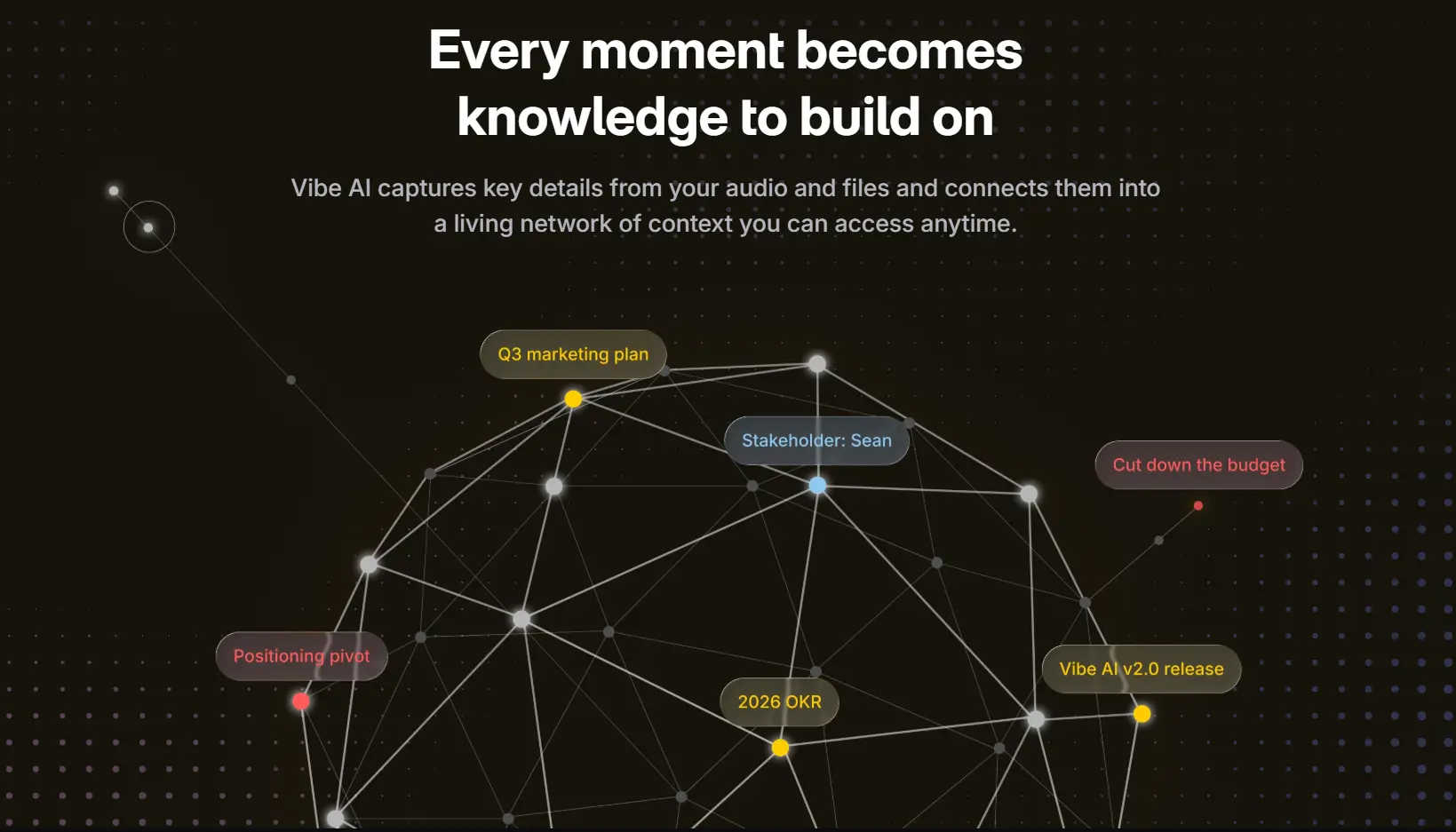
The capture layer matters as much as the software. Vibe Bot is a portable conference room device with a 360° 4K camera and six-microphone beamforming array that feeds in-room audio and video directly into the Vibe AI Memory Graph. It solves one of the most persistent problems in hybrid meetings: the conference room half of the call typically produces a poor audio signal and no speaker attribution — just one laptop microphone capturing a room. Vibe Bot gives the AI the same clear, multi-speaker signal that a remote participant's headset provides.
For individual capture — side conversations, client calls, and impromptu discussions outside a formal meeting room — Vibe Dot is a compact AI recorder (Red Dot Design Award 2026) that adds the same Memory Graph capture to any context.
All audio and video processing in the Vibe ecosystem happens on-device. Nothing is sent to external servers. The platform is SOC 2 compliant and HIPAA-ready — relevant for organizations where compliance requirements extend to meeting capture infrastructure.
When the Stack Breaks: Technical Troubleshooting
Diagnosing video call problems systematically means identifying which layer is failing.
Symptom: Call connects but video is choppy or freezes
Likely layer: Transmission (bandwidth or packet loss)
-
Run a real-time network quality test before the call using the platform's built-in diagnostics (Zoom, Teams, and Webex all have pre-call network tests)
-
Check packet loss: above 1% will cause visible degradation
-
Switch from Wi-Fi to wired Ethernet
-
Enable QoS on your router to prioritize video traffic
-
Close bandwidth-intensive background applications (cloud sync, large file transfers)
Symptom: Audio cuts out or has gaps while video continues
Likely layer: Codec or jitter buffer
-
Audio and video use separate codecs and separate buffers — audio gaps with stable video often indicate jitter above 30ms on the audio path specifically
-
Use wired connection
-
Check if the platform allows separate audio quality settings; some allow forcing higher-bandwidth audio codecs
Symptom: Call fails to connect entirely
Likely layer: Signaling or NAT traversal
-
This is almost always a firewall or network configuration issue in enterprise environments
-
Check whether the platform's required UDP ports are open (platform-specific documentation provides the exact ranges)
-
If behind a strict corporate firewall, TURN over TCP 443 is the fallback path — confirm it's not blocked
-
Verify the platform's STUN/TURN servers are accessible from the affected network
Symptom: Screen sharing works but has significant lag
Likely layer: Encoding (CPU overload) or bandwidth
-
Screen sharing uses a separate video stream and codec configuration from the camera feed
-
High-motion content (video playback, animations) consumes significantly more bandwidth when screen-shared than static slides
-
Close other browser tabs during screen sharing on lower-spec machines — screen encoding is CPU-intensive
Symptom: Consistent audio echo reported by other participants
Likely layer: Capture (echo cancellation)
-
The source of the echo is almost always the participant hearing it — they're playing audio through speakers that feeds back into their microphone
-
Solution: the affected participant should switch to headphones, or enable hardware-level echo cancellation
-
On shared room audio systems, check that the platform's AEC is enabled and correctly configured for the room size
FAQ
What technology is used in video conferencing?
Video conferencing technology combines several layers: capture hardware (cameras, microphones), codecs that compress and encode audio and video (H.264, VP9, AV1), signaling protocols that establish connections (WebRTC or SIP), NAT traversal protocols (STUN/TURN/ICE) that handle firewall traversal, RTP/SRTP for encrypted media transport, and application software (Zoom, Teams, Google Meet) that manages the user interface and collaboration features.
What is the difference between WebRTC and SIP?
WebRTC is an open-source protocol stack built into modern browsers, designed for peer-to-peer real-time audio and video without plugins. SIP (Session Initiation Protocol) is an older, enterprise-grade signaling standard used in VoIP systems, PBX environments, and telephony infrastructure. Most modern video conferencing platforms use WebRTC for media transport; SIP remains important for integration with legacy phone systems and enterprise telephony. Many production deployments use both.
What are the three types of video conferencing systems?
The main architectural types are: cloud-based systems (hosted by the vendor, accessed over the internet — Zoom, Teams, Google Meet), on-premise systems (installed on local servers, full organizational control, required for strict data sovereignty), and browser-based systems (WebRTC, no installation required). Hardware-accelerated room systems are a fourth category optimized for fixed conference room deployments.
How does video conferencing work technically on a computer?
Your computer's camera and microphone capture audio and video. A codec (typically H.264 or VP9) compresses that data into packets. Those packets travel over the internet via RTP/SRTP to the platform's servers (or directly to other participants in P2P mode). The platform's SFU server routes the streams to other participants. Each receiving device decodes the packets and plays them back on speakers and display. The entire process happens in under 100ms on a good network — fast enough to feel synchronous.
What is the best codec for video conferencing in 2026?
H.264 remains the safest default for maximum compatibility across devices and platforms. VP9 is a strong choice for Google-ecosystem deployments and offers better compression where hardware acceleration is available. AV1 delivers superior compression but encoding complexity keeps it impractical as a primary codec for most deployments in 2026; it's expected to become dominant closer to 2028.
What bandwidth is needed for video conferencing?
Standard HD (720p) video conferencing requires approximately 1–2.5 Mbps per participant, upload and download. Full HD (1080p) requires 1.5–4 Mbps. For an office running 10 simultaneous HD calls, provision at least 25 Mbps upload capacity dedicated to video traffic. Enable QoS on your network to prioritize video conferencing traffic and prevent congestion from background applications.
How does video conferencing work on a PC?
On a Windows or macOS PC, the video conferencing application (or browser tab for WebRTC-based systems) accesses your camera and microphone through OS-level device APIs. It encodes the capture in software or hardware (modern Intel and AMD CPUs include dedicated video encoding blocks). The encoded stream connects to the platform via WebRTC or a native protocol. Audio echo cancellation and noise suppression run either in the platform's software or at the OS audio driver level. GPU or NPU resources handle AI-powered background effects and video processing.
What is the difference between cloud-based and on-premise video conferencing?
Cloud-based systems are hosted and maintained by the vendor; you access them over the internet and pay per seat or usage. They scale automatically and require minimal IT management. On-premise systems run on servers you own inside your network; all data stays on your infrastructure, giving you full control over security and data residency. On-premise systems are increasingly rare outside regulated industries (defense, certain healthcare and government sectors) because cloud systems have matured to enterprise-grade compliance standards.
How does AI work in video conferencing technology?
AI operates at multiple layers of the stack. At the media layer: neural network models power noise suppression, echo cancellation, background blur, auto-framing, and adaptive bitrate optimization — all running locally on device GPUs or NPUs. At the application layer: cloud-based LLMs generate meeting transcripts, summaries, and action-item lists from the processed audio stream. The current gap is cross-session memory — platform AI resets after each call. Tools like Vibe AI address this by maintaining a persistent Memory Graph that links meeting outputs across sessions.