Most teams aren't debating whether to collaborate remotely anymore. According to Gallup's 2025 workforce research, roughly 80% of remote-capable U.S. employees now work in hybrid or fully remote arrangements. The question has shifted from "should we do this?" to "how do we do this well?"
Doing it well requires more than signing up for a video call platform. This guide covers what remote collaboration actually involves, the challenges that consistently trip up distributed teams, and the practices and tools that make a measurable difference.
What is remote collaboration?
Remote collaboration is the practice of working together toward shared goals from different physical locations, using digital tools to communicate, plan, and execute. It's not just video calls — it spans the full range of how a team coordinates: messaging, document editing, whiteboarding, project tracking, decision-making, and informal connection.
The core challenge is that physical proximity carries a lot of implicit coordination for free: the overheard conversation that updates context, the quick desk visit to unblock a decision, the whiteboard session that ends with a photo. Remote collaboration works best when teams deliberately design for the things proximity was quietly doing for them.

Why the "how" matters more than the "whether"
McKinsey research found that 83% of employees cite the ability to work more efficiently and productively as a primary benefit of remote work — but also that fully remote companies with the right operating models can outperform in-person peers on organizational health, while those without the right models can't. The operating model is the differentiator, not the location itself.
That's the practical framing: remote collaboration done well is a competitive advantage. Done poorly, it produces miscommunication, slower decisions, and a team that's distributed in location but not truly connected in work.
Common challenges — and what actually causes them
Communication gaps are the most frequently cited problem, but the root cause is usually structural, not interpersonal. When teams don't have clear norms for which channel carries which type of message, important information gets lost in the wrong place. A decision buried in a chat thread that nobody searches is effectively not made.
Meeting overload as a substitute for process is the second most common pattern. When async coordination breaks down, teams default to scheduling calls, which creates calendar density and leaves people who weren't on the call out of the loop.
Unequal participation in hybrid settings. When some team members are in a room together and others are remote, the default flow of conversation favors the room. Without intentional setup, remote participants get a narrower view of the discussion and less opportunity to contribute.

Difficulty building trust and cohesion without the informal interactions that proximity provides. This one compounds over time: teams that never develop trust have harder conversations and make slower decisions.
Security and access. Distributed work means information moves across more networks and devices. Without clear policies on approved tools and access management, sensitive work ends up somewhere it shouldn't be.
10 strategies that make a real difference
1. Define which channel carries which kind of message
Every team needs an explicit communication map: this goes in the project tool, that goes in chat, this gets a meeting, that is documented in the shared drive. Without it, information scatters and people spend time searching instead of working. Write it down; a one-page norm document that gets shared at onboarding is worth more than months of ad-hoc habits.
2. Default to async, protect sync time for what needs it
Synchronous meetings are expensive — they require everyone available at the same moment across time zones and schedules. Reserve them for discussion that genuinely benefits from real-time back-and-forth: decisions with competing perspectives, complex brainstorms, relationship-building. Use async for status updates, information sharing, and work that doesn't require a live exchange.

3. Write things down, explicitly
Remote teams are asynchronous by nature even when they hold meetings. Decisions made verbally in a call evaporate unless they're captured. The team member who joined late, the one in a different time zone, the future person asked to understand context — they're all reading what was written, not what was said. Good documentation is how remote teams scale their coordination.
4. Make hybrid meetings equally good for everyone in them
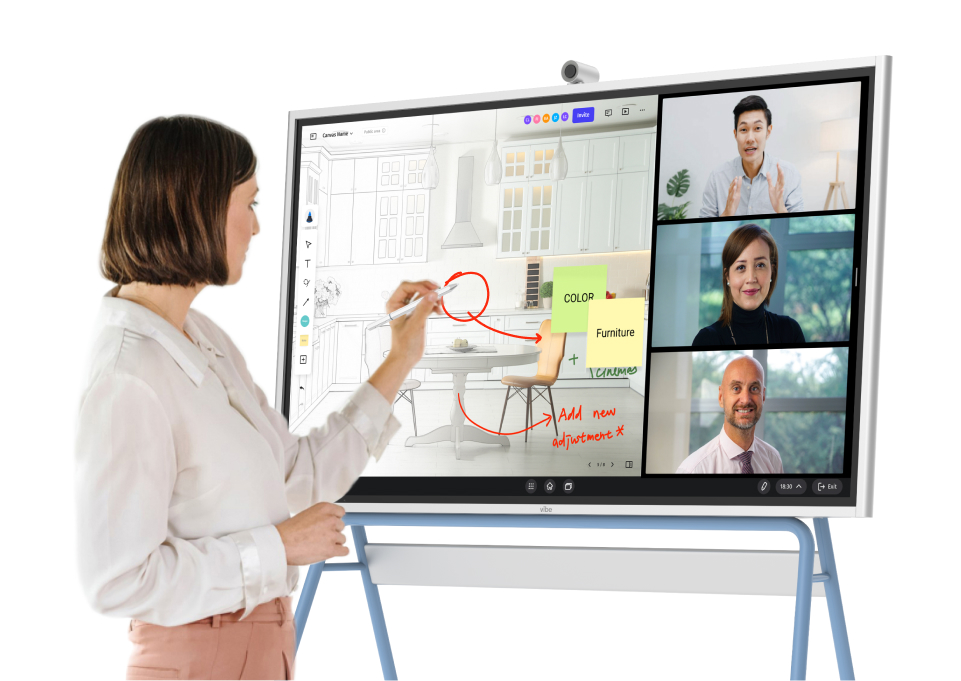
When your team is split across a room and remote screens, default setup almost always privileges the room. Fix this with explicit rules: remote participants on individual video (not a shared room camera pointed at a table), a shared digital workspace that everyone can interact with simultaneously, and an explicit facilitator role that draws remote voices into the conversation. The goal is one meeting, not two parallel experiences.
This is where an interactive display pays for itself in hybrid teams. The Vibe Board S1 lets in-room participants and remote teammates work on the same canvas simultaneously — annotating, moving items, building a shared picture — rather than having remote participants watch a screen share. Everything is saved to the cloud automatically, so team members who couldn't attend can catch up on what was actually worked through, not just a summary.
5. Build individual connection deliberately
Trust doesn't build itself remotely. Budget small amounts of time for non-work conversation — a few minutes at the start of a call, a dedicated channel for non-work topics, occasional one-on-ones that aren't about project status. The teams that skip this find later that they struggle to have honest conversations about problems.
6. Clarify working hours and availability norms
In an office, availability is mostly visible. Remotely, it's invisible unless someone states it. Teams that don't establish shared norms around working hours and response time tend toward two failure modes: people expecting instant responses that interrupt deep work, or people unclear about when they can expect an answer. Both are solvable with simple, explicit agreements.
7. Give everyone equitable access to tools and information
Remote collaboration only works if everyone can actually access what they need to do their work. Audit your tool stack for access gaps: shared drives that not everyone can reach, tools that require specific hardware, or institutional knowledge that lives only in one person's head. Equity of access is a precondition for equity of contribution.
8. Run structured retrospectives on your collaboration itself
The team's ability to collaborate well is itself a skill that can be improved. A short retrospective on how the team is working together — not just what was delivered — catches problems before they calcify. Ask specifically: what's slowing us down? What information didn't reach the right people? What meeting could have been an async update?
 Man annotating on a Vibe Board during an online team meeting.
9. Document and share context proactively
Remote teams suffer more from context gaps than co-located ones, because the hallway conversation that would have filled someone in never happens. Get into the habit of proactively sharing context: why a decision was made, what alternatives were considered, what changed. This is particularly important when onboarding new team members or handoff happens across time zones.
10. Treat your tool stack as a system, not a collection
The most common remote collaboration failure is having good individual tools that don't work together: a project tracker that doesn't connect to where discussions happen, meeting notes that live somewhere nobody looks, files versioned separately from the conversation about them. Periodically audit whether the stack actually supports how work flows through the team, and simplify where things have fragmented.
Tools that support remote collaboration
Tools don't substitute for good practices, but they do make good practices easier to maintain. The core categories most distributed teams need:
Video and meetings — Zoom, Google Meet, and Microsoft Teams remain the standard. What matters more than which platform is how meetings are run inside it.
Async communication — Slack and Microsoft Teams handle most team messaging. The key decision is channel architecture: a clear structure prevents the information scatter that kills async coordination.
Shared documents and knowledge — Google Workspace and Microsoft 365 for live document collaboration; Notion or Confluence for structured knowledge bases where decisions and context get documented.
Project and task tracking — Linear, Jira, Asana, and Trello all work; what matters is that the whole team uses the same system and that tasks have clear owners and states.
Visual collaboration and whiteboards — for brainstorming, planning, and hybrid meeting facilitation. The Vibe Board S1 covers this for teams with at least one physical meeting space: its 55″ or 75″ touchscreen lets in-room and remote participants work on the same canvas in real time, connects to video conferencing through apps like Zoom and Google Meet, and keeps everything in the cloud so nothing needs to be re-explained at the next session.

FAQ
What is remote collaboration?
Remote collaboration is working together on shared goals from different locations, using digital tools for communication, coordination, and execution. It encompasses everything from how a team communicates to how it makes decisions, documents work, and builds relationships across distance.
How can remote teams collaborate effectively?
The most impactful changes are usually structural rather than tool-related: clear communication norms, a default toward async for non-urgent coordination, explicit meeting practices that include remote participants equally, and consistent documentation so context doesn't get lost. Good tools support these practices but don't replace them.
What are the biggest challenges of remote collaboration?
The most common are communication gaps from unclear norms, meeting overload when async breaks down, unequal participation in hybrid settings, difficulty building trust without informal interactions, and information scattered across tools nobody searches.
What's the difference between remote and hybrid collaboration?
Fully remote teams have everyone working from different locations. Hybrid teams have some members in a shared office and others remote, which creates additional complexity: the in-room group has natural advantages in informal communication that require deliberate effort to extend to remote participants.