A sales rep wraps up a strong demo. The decision-maker nodded at the right moments, asked about pricing, and mentioned their procurement timeline. The rep has five more discovery calls that afternoon. This is how sales reps lose deals between meetings: the rep types scattered notes into their CRM, promises themselves they will write a thorough follow-up sequence later, and moves to the next meeting. Two days pass. The follow-up they finally send reads like every other "great talking to you" email in the prospect’s inbox. By then, the competitor who called the next morning already has the deal.
The deal did not die on the call. It died in the 48 hours after, when the precise details that could have kept the prospect engaged evaporated into a vague check-in, not during the scheduled call itself, but in the unstructured hours that follow.
- 80% of successful sales require five or more follow-up contacts to close, yet most reps send far fewer (HubSpot, 2026).
- Memory retention drops from ~58% after 20 minutes to ~33% after 24 hours without review (Murre & Dros, 2015).
- Scheduled-meeting tools capture video calls but miss every off-calendar conversation where deals often shift.
The Follow-Up That Sinks the Deal
In 2026, HubSpot found that 80% of successful sales require five or more follow-up contacts to close. Yet most representatives stop far short of that threshold. The follow-up is where most opportunities stall, not because sellers are lazy, but because the message they send lacks the concrete detail that keeps a prospect engaged.
A templated follow-up feels like a form letter to the recipient. It signals that the rep did not really listen, or that the rep is juggling too many deals to remember what mattered. Either way, the buyer’s attention drifts. A competitor with a sharper memory or a better system steps in.
The problem compounds because precision requires recall. Recall requires notes. Notes require recording at the moment the conversation happens. When the moment passes without documentation, the rep reconstructs from memory later, and reconstruction inevitably flattens detail. The exact objection the prospect raised, the offhand comment about their economic buyer’s priorities, the phrase they used to describe their pain point, all fade into a boilerplate summary.
A strong follow-up does three things that memory cannot. It confirms what the buyer actually said, which builds trust. It demonstrates that the rep paid attention, which differentiates from competitors in the deal cycle. And it advances the pipeline with a concrete next step tied to the decision-maker’s stated priorities. None of this happens when the follow-up reads like a form letter.
Why Your Memory Can’t Be Your Note-Taker
Human memory retention drops from approximately 58% after 20 minutes to approximately 33% after 24 hours without review, according to Murre & Dros, PLOS ONE, 2015, a replication of the classic Ebbinghaus forgetting curve. The details a rep needs to write a compelling follow-up decay within hours of a call ending.
The persistence gap is real. Most representatives stop far short of the follow-up count deals actually require, but the root cause is not effort — it is recall. Account executives cannot personalize outreach they do not remember the details of.
Follow-ups written from memory default to vague "just checking in" messages that do not advance opportunities. The representative knows something important was said, but cannot quite recall what. The email lands, the buyer skims it, and the deal slips away.
The memory problem has a structural cause. An account executive who finishes a call and immediately moves to the next one has no time to synthesize what just occurred. By the time they review their notes back at their desk, multiple conversations have blurred together. The differentiator that distinguished one prospect from another is lost.
The tools most reps rely on do not solve this, they were built for a different problem entirely.
How Sales Reps Lose Deals Between Meetings: The Tool Gap
Sales conversation capture tools split into two categories: software meeting assistants and hardware wearable AI recorders. Software meeting assistants — including Zoom and Microsoft Teams native transcription, Otter.ai, and Fireflies.ai — are built around the scheduled video call. Otter.ai integrates directly with Zoom, Teams, and Google Meet to generate transcripts and AI summaries. Fireflies.ai deploys a meeting bot that joins any calendar-scheduled session to produce transcripts, action items, and CRM syncs. These tools work well within their design scope.
What they do not cover is everything else. The quick phone call the buyer initiates on a commute. The hallway conversation at a trade show. The impromptu check-in after another vendor’s demo revealed a gap. The voicemail that signals renewed interest. These ad-hoc moments shift deals, and they go unrecorded.
In 2026, Salesforce, State of Sales 6th Edition found that sales representatives spend only 30% of their time actually selling. The rest goes to administrative tasks, internal meetings, and coordination. A tool that only captures scheduled video calls misses the conversations that happen in the margins of that 30%, and the engagement work that fills the remaining 70%.
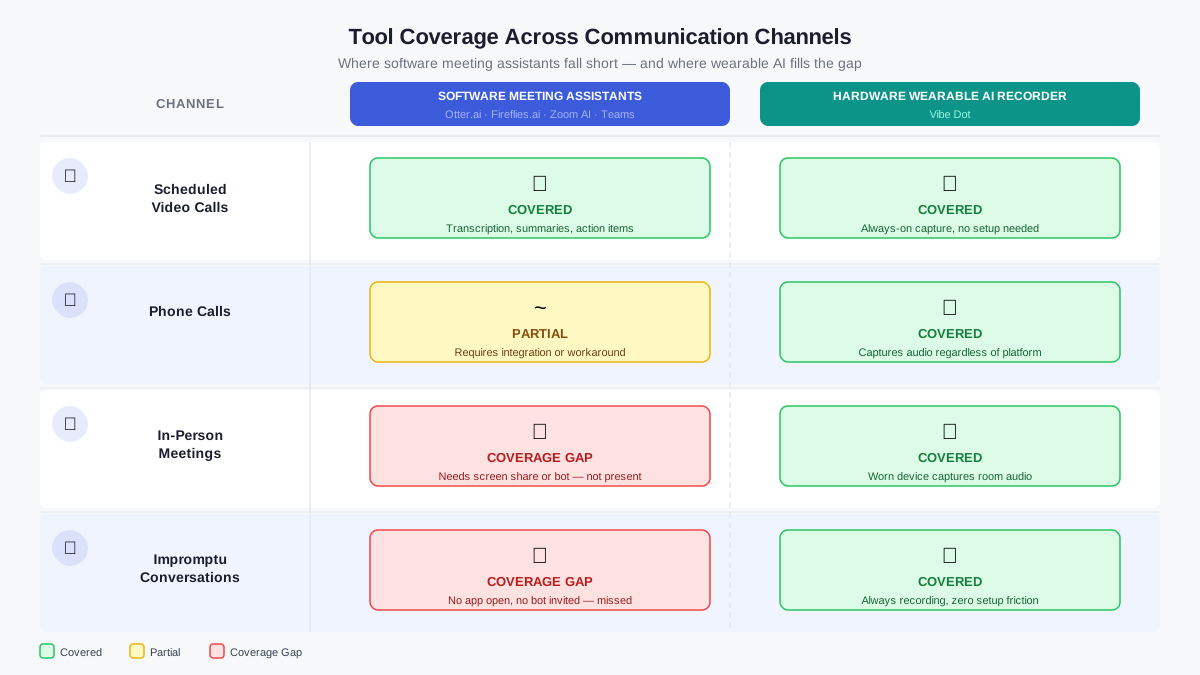 Side-by-side comparison diagram showing tool coverage gaps across communication channels
|
Category |
Examples |
Covers |
Misses |
Requires |
|---|---|---|---|---|
|
Software meeting assistants |
Otter.ai, Fireflies.ai, Zoom / Teams |
Scheduled video calls with a calendar invite |
Phone calls, in-person conversations, off-calendar discussions |
App running or bot invited; calendar sync |
|
Hardware wearable AI recorders |
Vibe Dot |
Any conversation — scheduled, phone, in-person, or impromptu |
Device must be charged and on-person; consent laws vary by jurisdiction |
Device charged; one tap to record |
The shared blind spot is coverage scope, not feature quality. Calendar-dependent tools assume every important sales conversation comes with a meeting invite. In practice, the exchanges that change deals often do not.
Consider the call a prospect initiates on their drive home, after they have had time to think about your demo. That conversation is not on your calendar. It is not in Zoom. It is not recorded by Otter.ai or Fireflies. But it is where they tell you what is actually blocking their purchase decision. Miss that, and you lose competitive advantage.
The 30-Minute Capture Workflow
A concrete post-meeting capture sequence recovers the deal intelligence that memory drops. The protocol has five steps: record, transcribe, extract commitments, verify accuracy, and draft the follow-up from exact phrases. Each step is simple on its own. Together, they form a system that prevents context from evaporating.
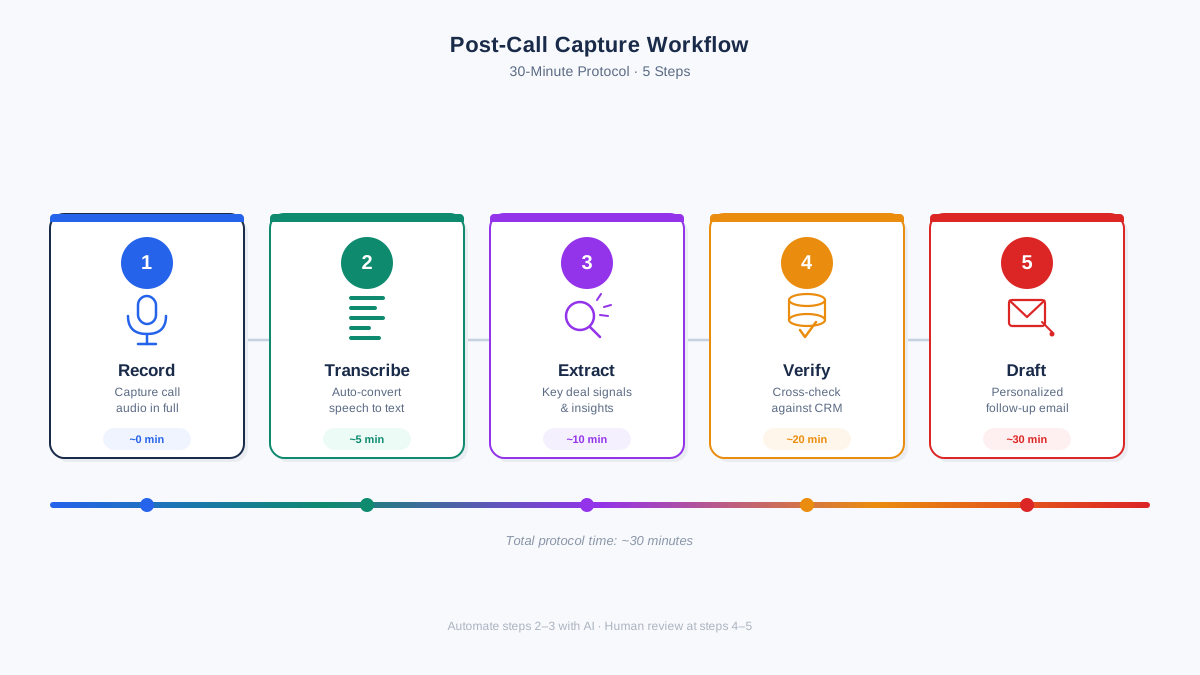 Five-step post-call capture workflow diagram: record, transcribe, extract, verify, draft
Step 1: Record. Document the conversation at the moment it happens. For scheduled video calls, existing tools handle this. For phone calls, in-person meetings, and impromptu conversations, a wearable recorder or phone-based recording app fills the gap. Recording consent laws vary by jurisdiction. Check local requirements before recording any conversation.
Step 2: Transcribe. Convert the recording to text within 30 minutes of the conversation ending. Most AI transcription tools process audio in roughly real-time. A 30-minute call produces a transcript in under five minutes with current tools. The key is acting before memory degrades further.
Step 3: Extract action items. Scan the transcript for commitments the rep made, commitments the prospect made, timeline references, budget signals, and stakeholder names. Mark each. These become the framework of the follow-up. An action item might be "send pricing by Friday" or "introduce to technical evaluator next week."
Step 4: Verify before sending. AI transcripts can misattribute speakers, hallucinate commitments, or garble jargon. Before sending any follow-up, confirm that quoted phrases actually match what the buyer said. Check that dates, pricing references, and stakeholder names are correct. If the audio was noisy or the conversation covered sensitive topics, review the recording rather than trusting the transcript alone.
Step 5: Draft follow-up with exact quotes. Pull phrases the buyer used to describe their problem, their priorities, or their concerns. A follow-up that says, "You mentioned that speed to deployment is a Q3 priority," carries more weight than one that says, "I wanted to check in on your timeline." The exact quote proves you listened. The generic line proves you did not.
Belkins, a B2B outreach agency, analyzed results across their managed campaigns and reported that follow-up sequences can increase reply rates by up to 49% compared to single-touch outreach (Belkins internal benchmark data, 2026). The same analysis found that follow-up emails account for 58.6% of all replies. These are vendor-reported figures, not independently audited research, but the directional signal is consistent with broader send-volume data: a rep who sends one email and stops leaves most potential responses uncollected.
Before and after: what precision looks like in practice. A boilerplate follow-up after a discovery call might read: "Thanks for your time today. Let me know if you have any questions."
A detailed follow-up built from transcript notes reads differently: "You mentioned that Q3 board reporting requires real-time pipeline visibility, and that your current CRM exports take two days to generate. Here is a 90-second walkthrough of how the solution we discussed handles that. Does this match what you need for the October board meeting?"
The second version restates the buyer’s priority in their own words, confirms the pain point, and proposes a concrete next step with a deadline. That level of detail is what moves deals forward.
How Sales Reps Are Closing the Gap
The capability gap is clear. Calendar-synced tools record video calls but miss every ad-hoc conversation. Memory fails within hours. Notes written after the fact flatten nuance. The sellers who close this gap use a recording device that works across all channels, not just scheduled sessions.
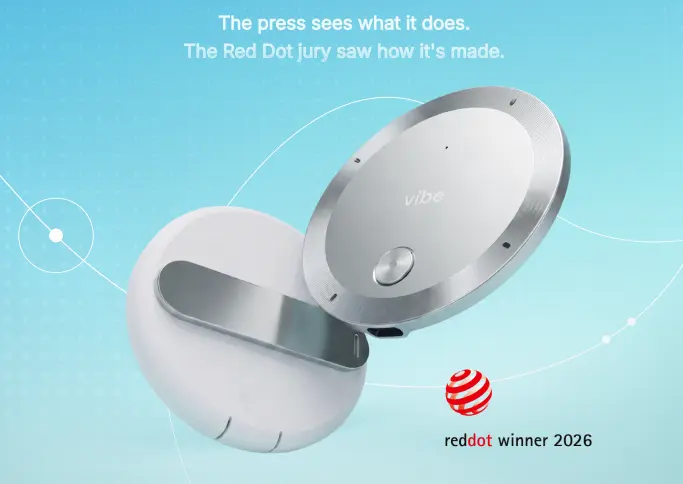
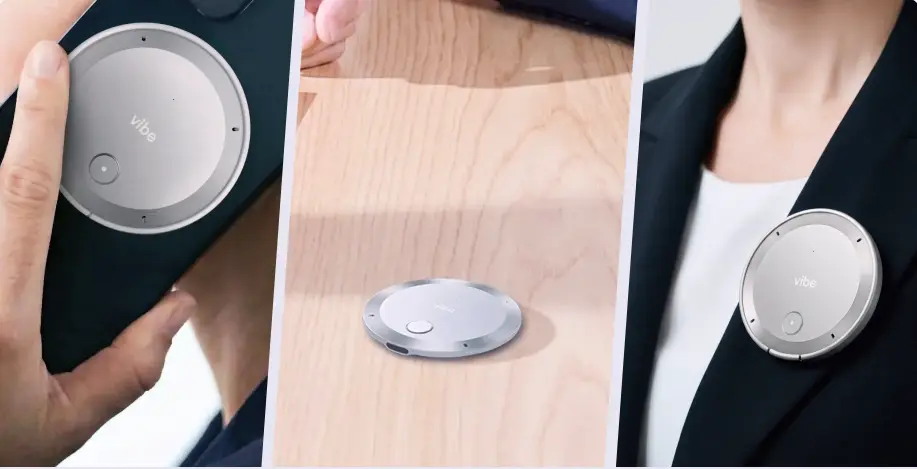 Vibe Dot wearable AI recorder clipped to clothing during a conversation
A wearable AI recorder fills the structural blind spot that software-only tools cannot address. It records any conversation, in-person or remote, planned or impromptu. It produces transcripts, extracts action items, and drafts follow-ups from the actual words spoken.
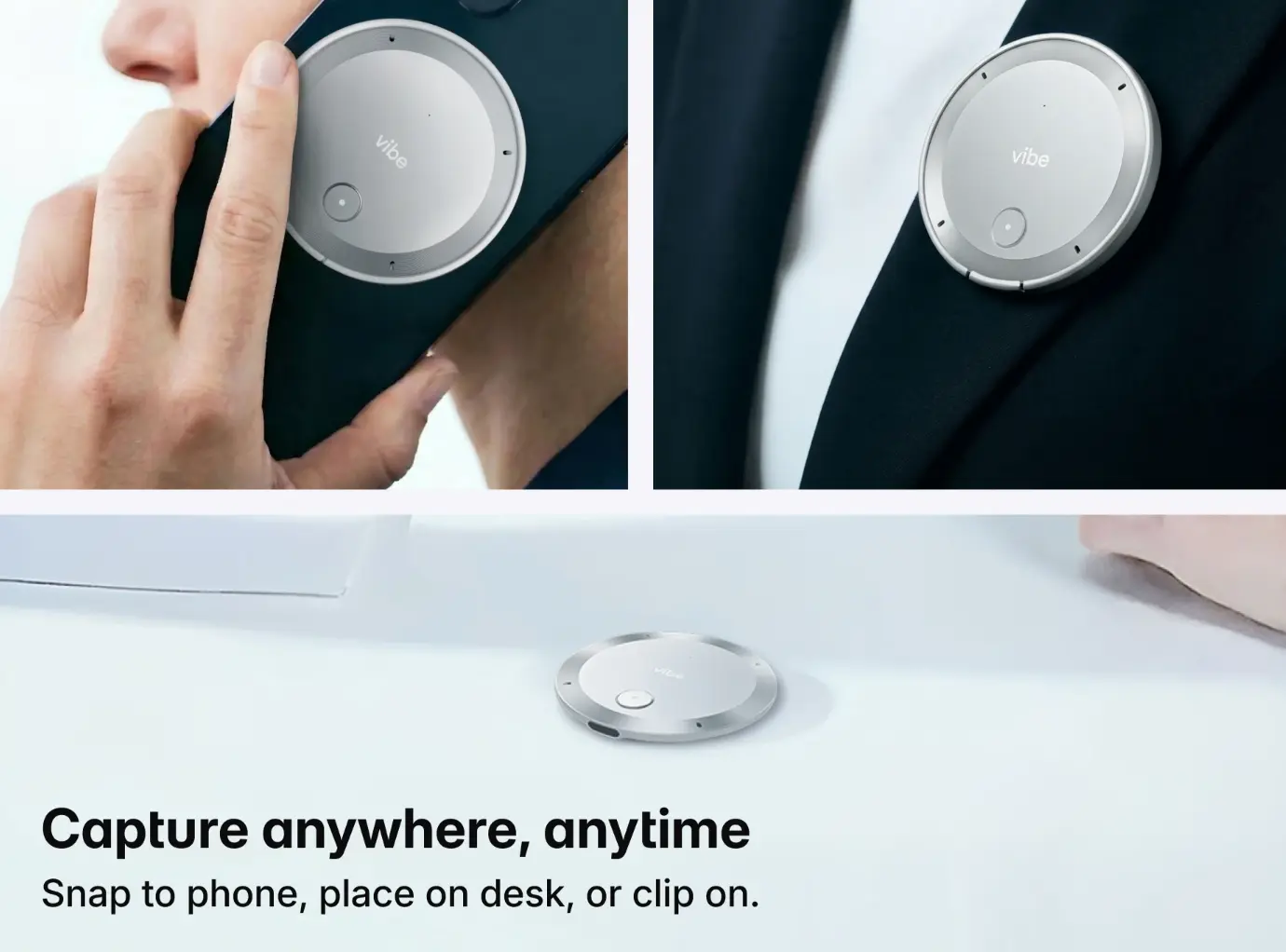
Vibe Dot is a portable capture device designed for this gap. It measures 0.17 inches thick and weighs 0.83 ounces. It snaps to a phone, clips to clothing, or sits on a desk. A 5-microphone system combines four MEMS microphones with one vibration pickup unit for clear audio capture in varied environments. The device records for 30 or more hours continuously on a single charge.
Vibe Dot generates auto-transcripts, action items, and summaries using industry-specific templates. It supports three modes: Spark mode for press-and-hold memos, Tap to Record for deliberate capture, and Auto Capture in Beta for continuous context. The device starts at $199.
The value is not the hardware itself. The value is what the hardware enables. An account executive who records every conversation, not just the scheduled ones, writes follow-ups from a complete record. They remember the objection raised in the hallway. They quote the phrasing from the phone call. They respond to the concern voiced in the parking lot after the formal meeting concluded.
For reps comparing options, the best wearable AI recorders share a common trait: they record conversations that never made it onto a calendar, the very conversations where deals often turn.
Conclusion
Sales deals are lost in the hours between calls, not during the calls themselves. Memory fails within 24 hours. Boilerplate follow-ups fail to re-engage. Scheduled-meeting tools cover only the conversations that appear on a calendar, leaving every off-calendar discussion unrecorded. The reps who close this gap use a recording workflow that logs any conversation, transcribes it promptly, extracts action items, and drafts follow-ups from the prospect’s exact words.
-
80% of successful sales require five or more follow-ups to close (HubSpot, 2026), yet most reps stop far short.
-
Scheduled-meeting tools miss every off-calendar conversation where deals often shift.
-
A concrete recording workflow recovers the exact detail that reconstructed notes flatten.
See how Vibe Dot captures sales conversations anywhere to close the gap between your calls and your closed deals.
FAQs
Why do sales reps lose deals after a successful discovery call?
In 2026, HubSpot found that 80% of successful sales require five or more follow-ups to close, yet most representatives stop far short of that threshold. The gap between what deals need and what reps deliver starts with inadequate recording and ends with templated follow-ups that fail to re-engage the prospect.
How long after a sales call should you send a follow-up?
Sending the first follow-up within 24 hours captures the prospect while the conversation is still fresh for both sides. Delays reduce reply rates and allow competitors to fill the gap. According to Yesware’s platform tracking data across millions of emails, there’s approximately a 25% chance of eventually hearing back even after two unanswered messages (Yesware, vendor-observed platform data, 2026). A follow-up written later from faded notes often lacks the exact detail that makes the first message worth reading.
What should a sales follow-up email include to be effective?
An effective follow-up restates the prospect’s priority in their own words, confirms any commitments made during the call, proposes a clear next step, and includes a specific deadline. Belkins’ managed-campaign benchmarks show follow-up sequences can increase reply rates by up to 49% versus single-touch outreach (Belkins internal benchmark data, 2026).
Can AI tools help sales reps write better follow-up emails?
AI transcription and summarization tools can extract action items and draft follow-ups from conversation text. This reduces reconstruction from memory and improves precision. However, tools that only record scheduled video calls miss the off-calendar conversations where deal context often lives. A wearable AI recorder addresses this gap by recording any conversation, anywhere.
What is the difference between an AI meeting assistant and a wearable AI recorder for sales?
An AI meeting assistant like Otter.ai or Fireflies joins scheduled video meetings and produces transcripts. A wearable AI recorder captures any conversation, including phone calls, in-person meetings, and impromptu discussions, without requiring a calendar invite or active session. In 2026, Salesforce found that reps spend only 30% of their time selling, meaning the majority of sales conversations happen outside formal meeting.