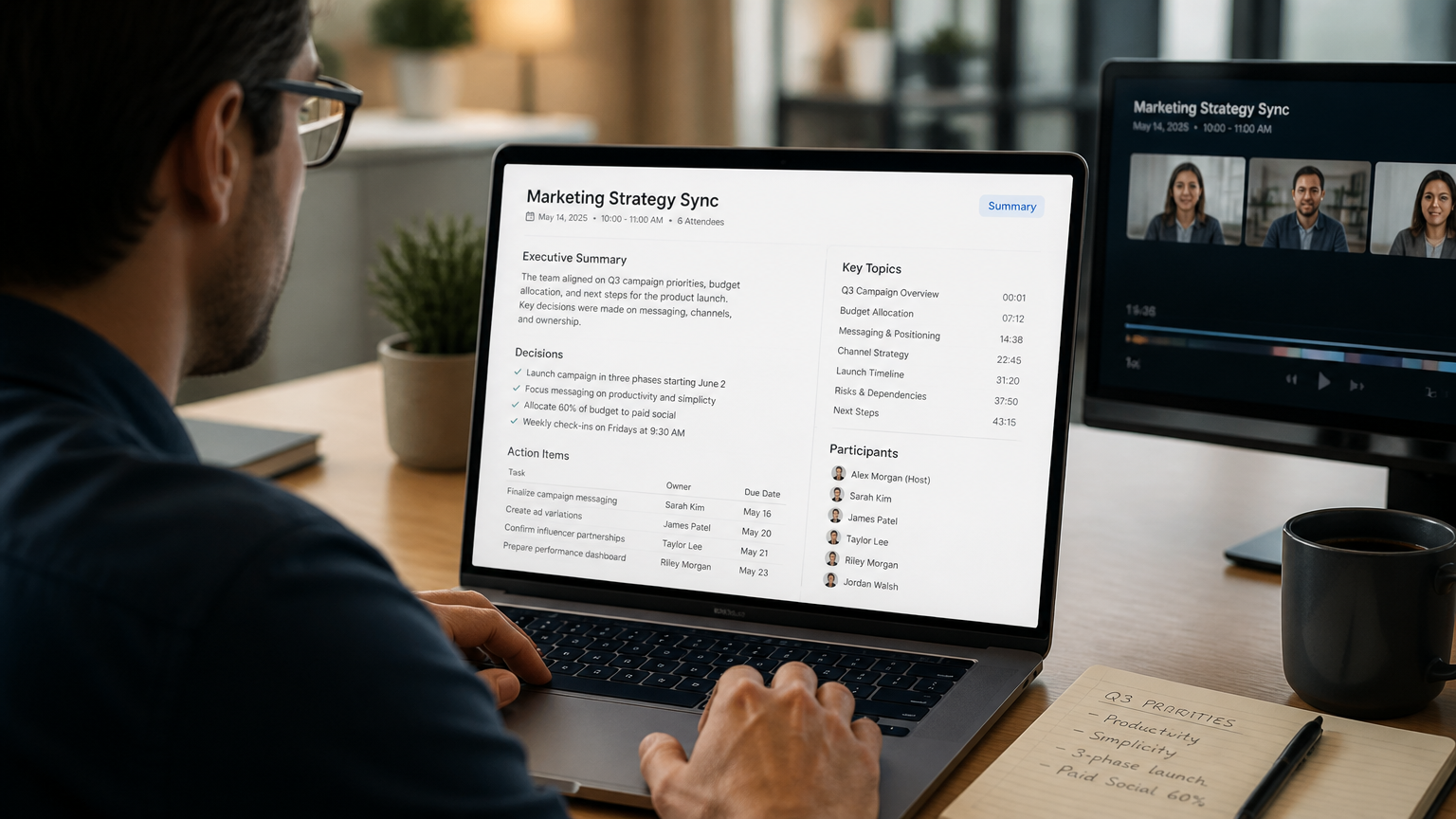
The meeting ends. Everyone nods in agreement, decisions seem clear, and action items feel obvious in the moment. Then the call closes, the conference room empties, and two days pass with no follow-up email.
The details blur, ownership of tasks drifts, and the meeting’s outcomes quietly dissolve as a result.
This is not rare. In their survey of 5,000 knowledge workers, Atlassian found that 54% of workers frequently leave meetings without a clear idea of next steps or who owns which task. Without a written follow-up, that ambiguity persists, assignments stay verbal, and verbal assignments get missed. According to the Laxis State of Meetings 2026 vendor report, 70% of meeting decisions are forgotten within 24 hours without written documentation. The follow-up email is where meeting outcomes survive or disappear. This guide shows how to write a follow-up email after meeting that works, with ready-to-use templates and a clear five-step process.
Why a Follow-Up Email Matters After Every Meeting
A meeting without a written follow-up loses accountability the moment participants leave the room. Verbally assigned action items fade quickly. Without written documentation, nobody owns a specific task, no deadline anchors the work, and no audit trail exists for future reference. For more on making meetings productive, see this guide on running effective ad hoc meetings.
The data reflects this gap. In 2024, Calendly, State of Meetings Report found that 40% of workers identified their least productive meetings as those that lacked follow-up notes or action items. When nothing follows the meeting, nothing gets done.
Written commitments change this. A study from Dominican University (Gail Matthews, Ph.D.) showed that people who wrote their goals accomplished significantly more than those who did not. While Matthews’ research covered personal written goals rather than meeting tasks, the documented link between written commitments and follow-through is consistent with practitioner observations in team settings.
The same principle applies to action items from a meeting: putting them in writing, with names and dates attached, makes follow-through more likely.
Laxis, State of Meetings 2026 reported that teams using AI-generated meeting notes see action-item completion rates climb to 85–95% compared to 50–60% for teams relying on memory or scattered handwritten notes, according to the vendor’s research.
What to Include in a Follow-Up Email
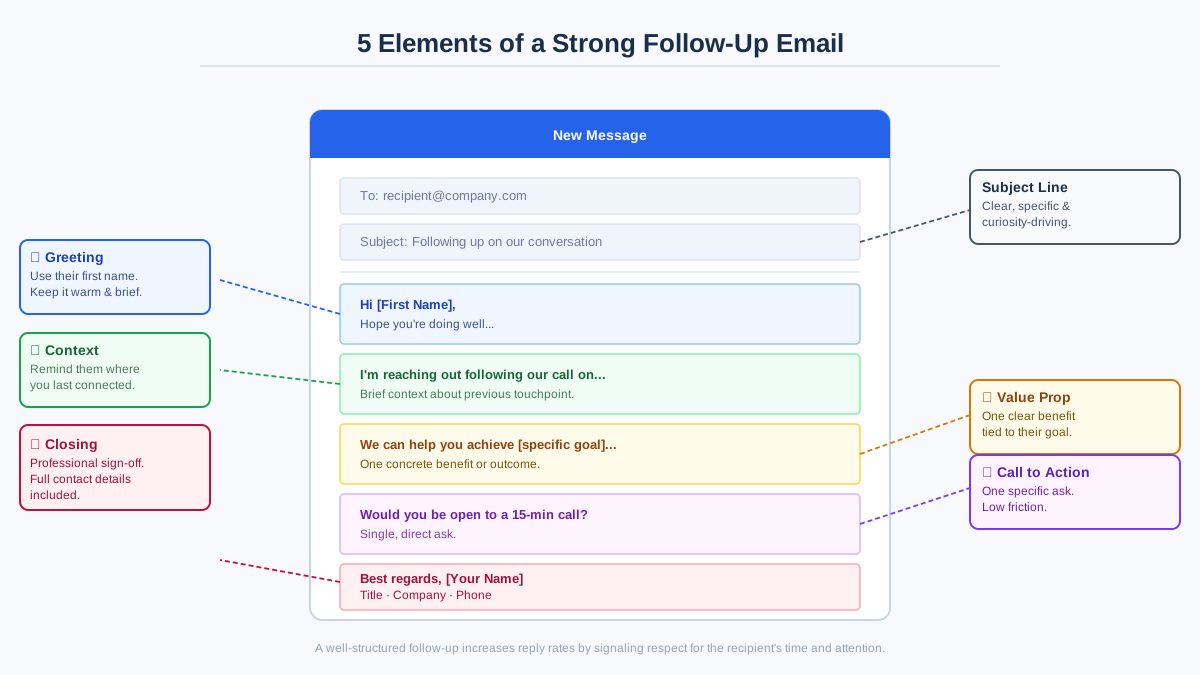 Anatomy of a follow-up email showing the five key elements
A strong follow-up email follows a consistent structure. Five elements appear in nearly every effective follow-up, and skipping any one of them weakens the message.
First, the subject line. This determines whether the email gets opened. A specific subject line referencing the meeting topic and date signals relevance. Research shows personalized subject lines increase open rates by approximately 26% (Campaign Monitor).
Second, a context opener. One sentence anchors the meeting in time and purpose. Skip pleasantries like "I hope this finds you well." State what the meeting covered and why the follow-up matters.
Third, a key-points recap. A concise summary of the main discussion points, organized as three to five bullets. This section is not a transcript. Instead, it highlights decisions, agreements, and open questions.
Fourth, action items with owners and deadlines. Each task has one owner and one due date. This format removes ambiguity about who does what and when. Clear ownership is what turns discussion into execution.
Finally, one clear next step. A single, specific request or action closes the email. Email response rates drop when multiple asks compete for attention.
One thing gets done. Five things get ignored.
How to Write a Follow-Up Email After Meeting
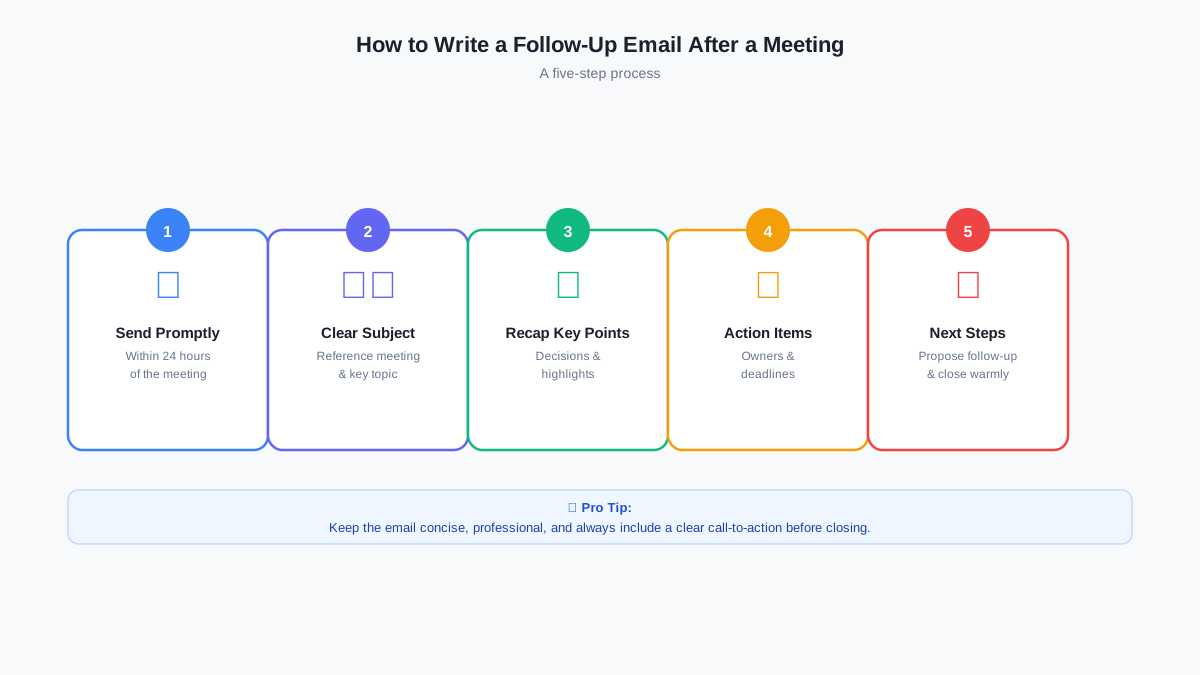 Five-step process for writing a follow-up email
This is the manual method — the foundation every professional should know. It works well when you have five uninterrupted minutes right after a meeting and clear recall of what was said. In practice, both conditions are rare.
The five elements come together quickly when written in order. Below is a step-by-step process that works for any meeting type.
Step 1: Write the Subject Line First
The subject line determines whether the email lands in the priority inbox or drifts into the archive unread. A clear formula works best: "Recap: [Topic] – [Date]." This format anchors the message immediately.
Examples include "Recap: Q3 Planning – August 15" or "Follow-Up: Client Onboarding Kickoff – Aug 18." Specificity increases open rates.
The average email open rate in 2025 was 43.46%, according to MailerLite, Email Performance Benchmarks. A vague subject line like "Meeting notes" performs worse than one that names the topic and date.
Write the subject line before drafting the body. This keeps the subject aligned with the content and prevents last-minute generic placeholders.
Step 2: Open With Context, Not Pleasantries
The first sentence establishes relevance. Skip "Hope you’re doing well" or "Thanks for your time."
The reader already knows a meeting happened. What they need is immediate context.
A strong opener names the meeting, the attendees (if relevant), and the core topic in one sentence. For example: "Yesterday’s product roadmap session with marketing and engineering covered three proposed features for Q4."
This tells the reader exactly what the email addresses within the first three seconds of reading. Context replaces small talk in professional follow-ups. The goal is clarity, not warmth. Warmth lives in the tone and structure, not in filler phrases.
Step 3: Summarize Key Discussion Points
The recap section condenses the meeting into three to five bullets. Each bullet represents a decision, an agreement, or a significant open question.
A useful recap also captures decision rationale, why a choice was made, and flags unresolved items. This makes the email usable as an audit trail, not just a summary. For example: "Decided to postpone launch to Q1 (dependency on vendor API)" works better than "Discussed launch timing."
This section is not a transcript. Instead, it identifies what matters for future action.
Keep the recap under 150 words. In 2026, the Instantly Benchmark Report found that top-performing email campaigns consistently stayed under 80 words. Length dilutes focus.
Write in complete sentences or tight bullet phrases. Avoid restating every comment or side discussion. If a topic generated significant debate, note the resolution, not the back-and-forth. The recap serves as a reference point, not a meeting log.

Step 4: List Action Items With Owners and Deadlines
Action items transform discussion into work. Each item names one person, one task, and one date. For example, the format looks like this:
-
Jordan (owner): Draft the proposal by Friday, August 22.
-
Maya: Schedule the vendor demo for next week (target, pending vendor availability).
-
Team: Review the shared document before the next sync.
For cross-functional work spanning multiple contributors, specify a Directly Responsible Individual (DRI) plus contributors, and call out dependencies. If an item depends on external input, mark the date as "target" rather than hard deadline.
Ownership and deadlines matter. Without them, tasks enter a vague state where everyone assumes someone else will handle it.
In 2025, Zoom, Meeting Statistics reported that 54% of employees want post-meeting summaries and action items, but only 39% receive them. This gap between expectation and delivery is where follow-ups fail. Naming owners and deadlines closes that gap.
Step 5: State One Clear Next Step
The end of the email should include exactly one request or action. Multiple asks dilute urgency.
A clear next step might be a meeting confirmation, a request for feedback on a shared document, or a deadline acknowledgment. Examples include "Please confirm the proposed timeline by Thursday" or "Let me know if the recap missed anything by end of day."
The reader knows exactly what to do, and the email has a purpose beyond documentation.
Timing matters. According to the Laxis State of Meetings 2026 report, meeting outcomes degrade rapidly when follow-up is delayed.
Send the follow-up within 24 hours, ideally while the meeting remains fresh in everyone’s memory. Morning sends in the recipient’s time zone perform best for reply rates, per Belkins, 2025 B2B Email Response Rates.
This five-step process is the baseline. AI meeting tools have now made most of it automatic.
Common Follow-Up Email Mistakes to Avoid
Three patterns account for most follow-up failures: sending too late, hiding action items in prose, and writing a transcript instead of a summary.
Sending too late. Context fades quickly. A follow-up sent 48 or 72 hours after the meeting requires the recipient to reconstruct what happened from memory or separate notes.
Response rates drop as the gap widens. In 2025, Belkins, B2B Email Response Rates found that morning sends (8 AM–12 PM) drove the highest reply rates at 0.54%. Timing is about proximity to the event, not just the hour of the send.
Burying action items in prose. Action items hidden inside paragraphs get missed.
A wall of text without clear formatting forces the reader to scan for tasks. Use bullets, bold owners, and explicit dates. Visual hierarchy makes the next steps obvious at a glance.
Writing a transcript instead of a summary. A follow-up is not a court record. A follow-up is a working document, not a court record. For more on capturing meeting content accurately, see this guide on how to write an objective summary.
Including every side comment, digression, or unresolved debate clutters the message and dilutes the action items. Focus on decisions and next steps, not the full arc of the discussion.
The three failure modes share a common root: the follow-up is treated as an afterthought rather than a scheduled deliverable. Practitioners who build a five-minute post-meeting follow-up block into their calendar immediately after every meeting find that the task gets done. Those who rely on intention find that it doesn’t.
One more consideration: where the work actually lives. A follow-up email is for alignment. Execution happens in project tools.
For action items that require tracking, create tickets in Jira, Asana, or ClickUp. For customer commitments, log them in your CRM. Include a link to the canonical task in your follow-up so there’s no confusion about where the work lives.
Ready-to-Use Follow-Up Email Templates
Below are three templates for common meeting scenarios. Copy, adapt, and send within 24 hours.
Team Sync / Internal Meeting
Subject: Recap: Weekly Team Sync – [Date]
Hi [Team],
Yesterday’s sync covered [main topic]. Here’s a quick recap:
-
[Key point 1]
-
[Key point 2]
-
[Key point 3]
Action items:
-
[Name]: [Task] by [Date]
-
[Name]: [Task] by [Date]
Next step: Please review the shared document by [Date] so we can finalize the plan.
Thanks,
[Your Name]
Client Meeting
Subject: Recap: Client Meeting – [Date]
Hi [Client Name],
Thank you for the conversation yesterday. Here’s a summary of what we discussed:
-
[Key discussion point 1]
-
[Key discussion point 2]
-
[Decision or agreement]
Next steps:
-
[Your team]: [Task] by [Date]
-
[Client’s team]: [Task] by [Date]
Let me know if I missed anything. Looking forward to the next steps.
Best,
[Your Name]
One-on-One Meeting
Subject: Recap: 1:1 with [Name] – [Date]
Hi [Name],
Thanks for the conversation earlier today. Here’s what we covered:
-
[Topic 1]
-
[Topic 2]
-
[Career/project feedback or discussions]
Action items:
-
[You]: [Task] by [Date]
-
[Them]: [Task] by [Date]
Let me know if anything needs adjusting.
Best,
[Your Name]
How AI Tools Take the Work Out of Meeting Follow-Ups
The five-step process above assumes the writer remembers what was said, has time to write immediately, and was present for every moment of the conversation. AI meeting tools change all three assumptions. They capture the full conversation verbatim, extract action items automatically, and deliver a structured summary — without waiting on memory or schedule.
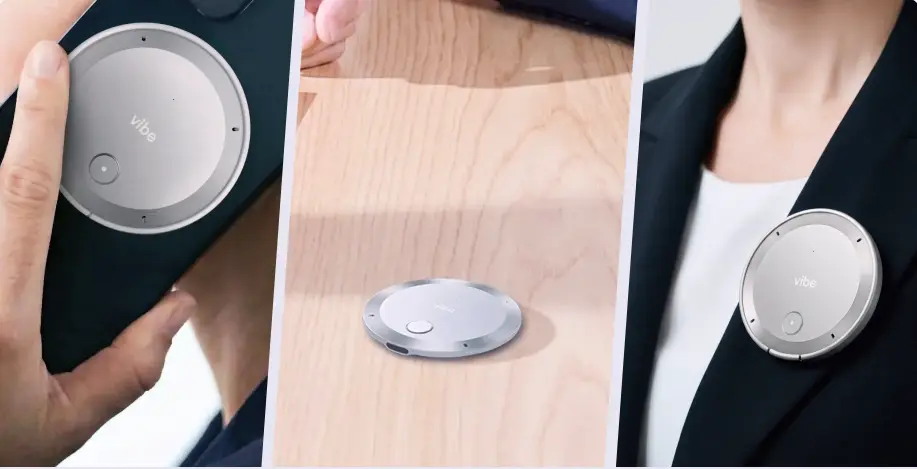 Vibe Dot wearable AI recorder capturing conversations on the go
But before using AI to record, check the rules. Consent and notification requirements vary by jurisdiction, some regions require all-party consent, others only one-party.
Most organizations have policies on recording sensitive discussions. Review company guidelines, notify participants before recording begins, and respect requests to disable recording for confidential topics. For alternatives to Otter.ai and other AI note-taking tools, see this comparison of Otter.ai alternatives.
In 2025, Fellow.ai, AI Notetaker Statistics reported that 75% of professionals now use an AI note-taker in their work meetings. Tools like Otter.ai and Fireflies.ai cover scheduled video calls, transcribing the conversation and extracting summary points. For a broader comparison of AI voice recorders for meetings, see the full guide to AI meeting assistants.
The gap widens for conversations that never enter a calendar system, client site visits, informal check-ins, workshop sessions. Vibe Dot is designed for exactly this shift: a wearable device that records any conversation — client visits, workshops, informal check-ins — transcribes it in full, and surfaces action items and summaries automatically. The follow-up email reflects what was actually said, not a reconstruction from memory written an hour later.
For scheduled meetings running inside conference rooms on Microsoft Teams Rooms, Zoom Rooms, or Google Meet, Vibe Bot handles the same capture at room level. The moment the meeting ends, the summary is ready — no manual notes, no recall gap.
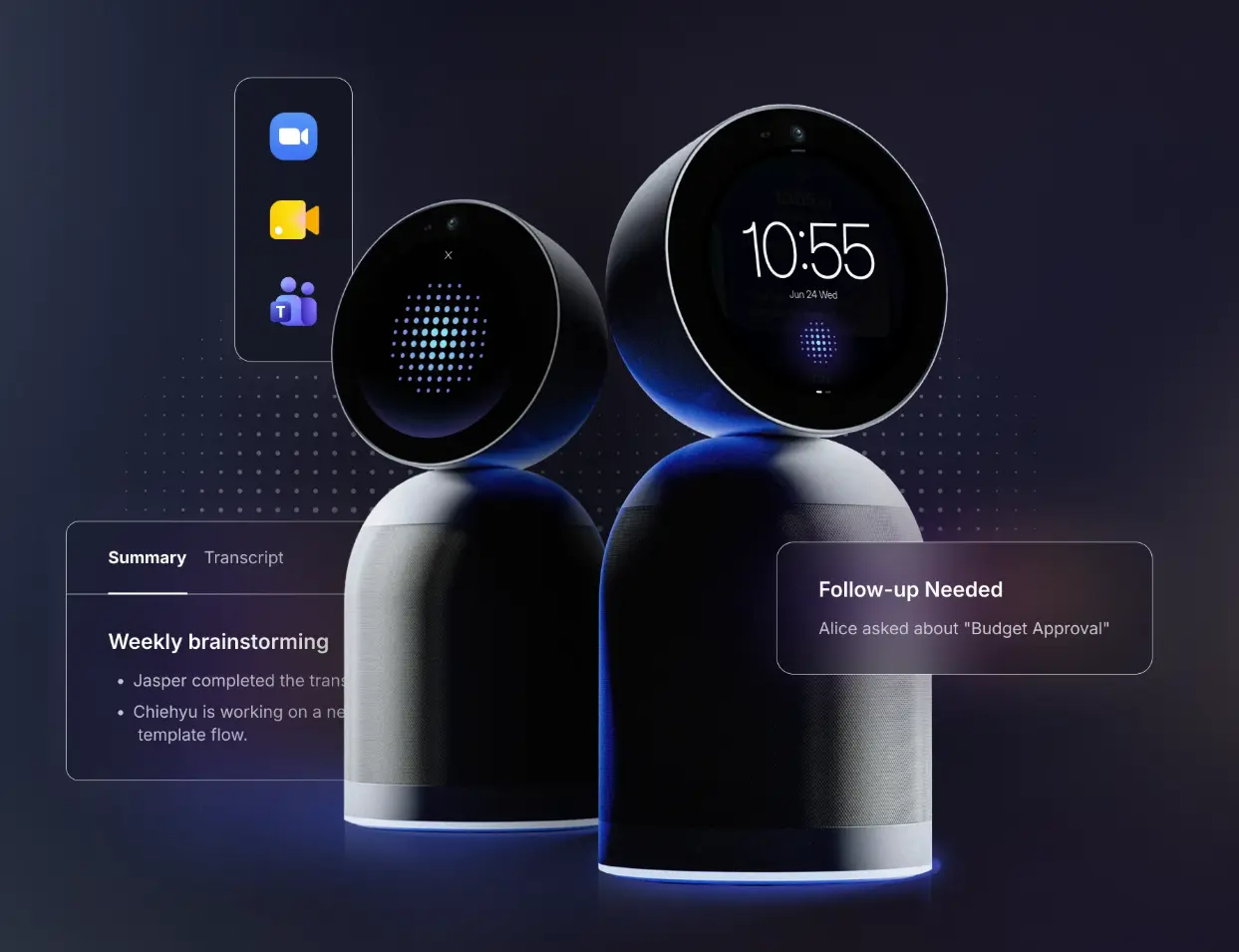 Vibe Bot AI conferencing device in a meeting room running Microsoft Teams
AI meeting assistants are growing fast. The market is projected to expand from $3.67 billion in 2024 to $72.17 billion by 2034, at a CAGR of 34.7%, according to Market.us, AI Meeting Assistant Market Report. In 2024, Otter.ai found that 62% of professionals save four hours or more per week using AI meeting assistants, over one full month of time savings per year.
Conclusion
A follow-up email turns a meeting’s outcomes into written commitments. The structure is straightforward: subject line, context, recap, action items, and one next step. Send within 24 hours, use clear formatting for tasks, and keep the message focused. The templates above handle the most common scenarios.
For professionals juggling multiple meetings, AI tools remove the friction. Vibe Dot captures spontaneously scheduled and in-person conversations, while Vibe Bot handles conference room meetings on Teams, Zoom, or Meet. Both surface the summary and action items so the follow-up writes itself.
-
Write the subject line first and keep it specific.
-
Send within 24 hours while details remain fresh.
-
List action items with one owner and one deadline each.
-
Close with one clear next step, not multiple asks.
FAQs
How long should a follow-up email be?
A follow-up email works best at 75–150 words, excluding action-item bullets. In 2026, the Instantly Benchmark Report found that top-performing email campaigns consistently stayed under 80 words. Longer emails see declining response rates. Focus on the recap and action items, not full context.
How soon should you send a follow-up email after a meeting?
Send within 24 hours. Atlassian’s research of 5,000 knowledge workers found 54% of workers leave meetings without clarity on next steps or ownership, the follow-up email resolves that ambiguity while the conversation is still fresh. In 2026, Laxis, State of Meetings found that 70% of meeting decisions are forgotten without documentation within that window. Waiting longer reduces both recall and response rates. Morning sends (8 AM–12 PM in the recipient’s time zone) perform best for reply rates, per Belkins, 2025 B2B Email Response Rates.
What is a good subject line for a follow-up email?
A good subject line names the meeting topic and date. Research shows personalized subject lines increase open rates by approximately 26% (Campaign Monitor). Use "Recap: [Topic] – [Date]" rather than generic phrases like "Meeting notes" or "Follow-up". For related guidance, see this guide on how to write a follow-up email after meeting.
Can AI automatically send follow-up emails after meetings?
Yes. AI meeting tools like Otter.ai and Fireflies.ai capture scheduled video calls and generate transcripts and summaries. Specialized hardware like Vibe Dot captures off-calendar and in-person conversations, then surfaces action items automatically. This eliminates the recall gap that undermines manual follow-ups.
What if no one responds to the follow-up email?
If no response arrives within two business days, send a brief nudging message referencing the original email. Keep it short and restate the specific request. Response rates improve when the second message arrives within 48–72 hours of the first, before context fades. If still unanswered, escalate through a different channel, chat, call, or in-person, to confirm receipt and move the work forward.