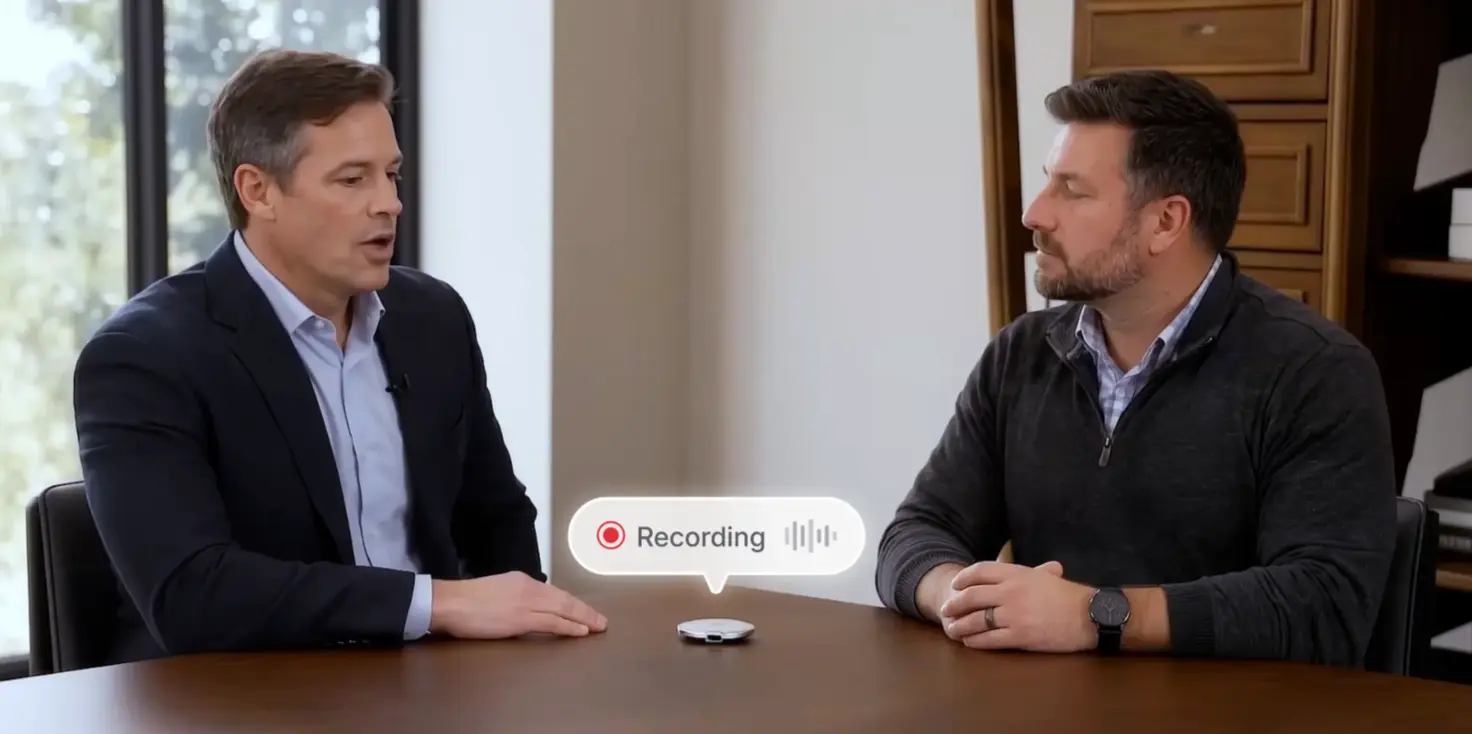

Vibe Dot costs $199, but the price tag on the device is only half the story. Its AI capabilities, from transcripts and summaries to follow-ups it drafts and tasks it creates, come from Vibe AI, which runs on a free plan and two paid plans. This guide breaks down which Vibe Dot capabilities you get the day you unbox it, which ones Pro and Max add, how minutes and AI credits are metered, and what owning a Vibe Dot actually costs in year one.
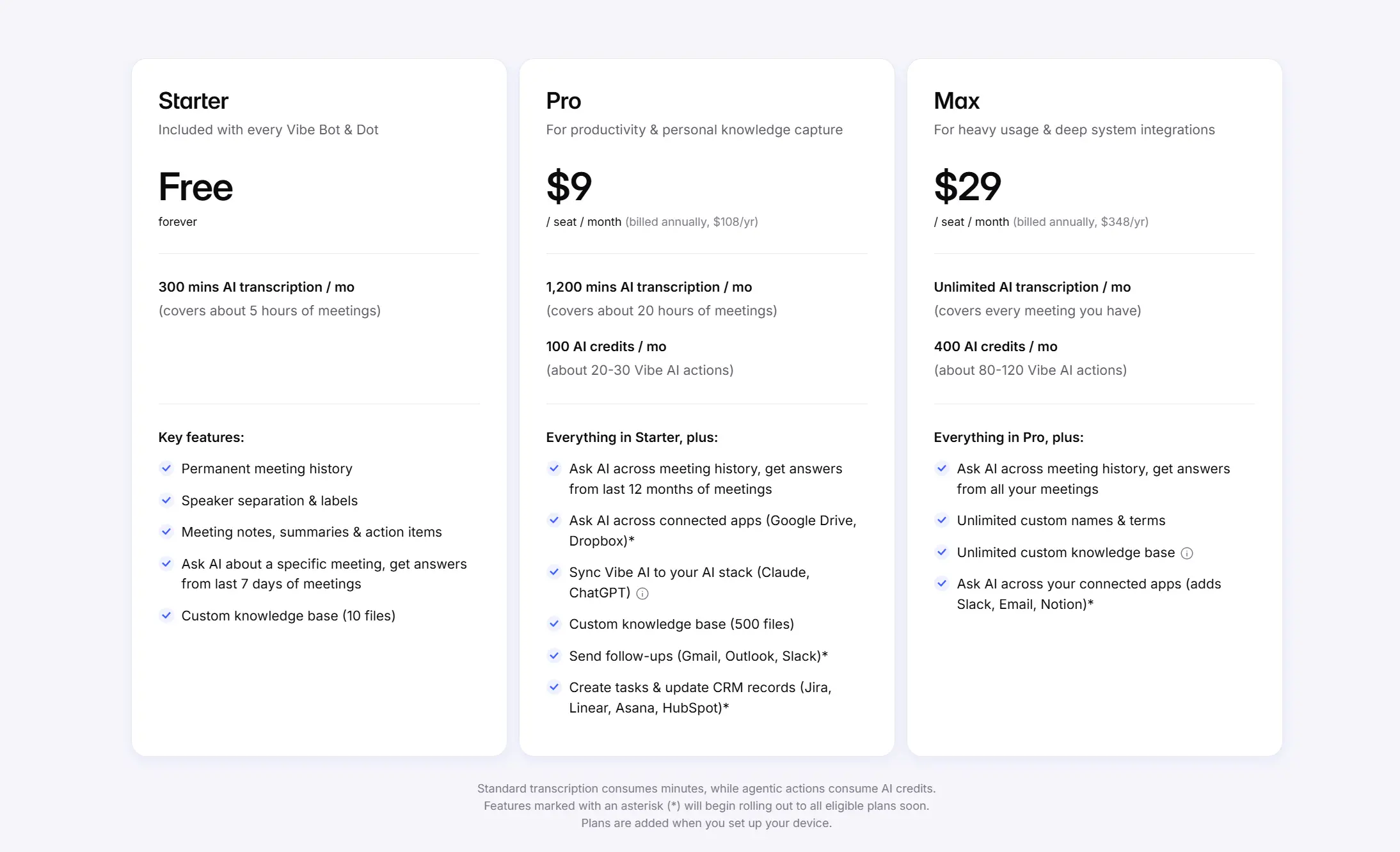
Quick answer: Vibe Dot is a one-time $199 purchase that includes Vibe AI Starter free forever: 300 minutes of transcription a month, plus meeting notes, summaries, and action items. Pro ($9 per seat per month, billed annually) raises that to 1,200 minutes and adds 100 AI credits, about 20–30 actions a month. Max ($29 per seat per month, billed annually) adds unlimited transcription and 400 AI credits, about 80–120 actions. In year one, that puts a Vibe Dot at $199 on Starter, $307 on Pro, or $547 on Max.
 Vibe AI pricing
How Vibe Dot's Pricing Is Structured
Vibe Dot has two price components: the hardware, paid once, and the AI plan, which sets what Vibe Dot can do with what it records.
-
The device ($199, one time). This covers the hardware itself: a 5-mic array, 64GB of onboard storage, 30+ hours of battery, a dedicated hardware encryption chip, and recording modes such as Tap to Record and Auto Capture (Beta). None of these hardware features depend on your plan.
-
The Vibe AI plan (free or paid). This covers everything that happens after a recording: transcription, summaries, Ask AI, memory across meetings, and actions in your other tools. Every Vibe Dot comes with Starter at no cost, and you can move up to Pro or Max.
In other words, the Vibe Dot captures, and Vibe AI decides how much it can understand, remember, and do. Choosing a plan is really choosing how much of Vibe Dot's AI you want working for you.
The Two Meters Behind Vibe Dot's AI
Inside each plan, Vibe Dot's AI capabilities draw on two separate meters, and one does not spend the other. According to the Vibe AI pricing page, standard transcription consumes minutes, while agentic actions consume AI credits.
|
|
Minutes |
AI credits |
|---|---|---|
|
What it powers on Vibe Dot |
Turning Dot recordings into transcripts, summaries, and action items |
Actions Vibe Dot takes in your tools through Vibe AI |
|
Starter |
300 per month |
None |
|
Pro |
1,200 per month |
100 per month |
|
Max |
Unlimited |
400 per month |
|
Approximate size |
300 minutes is about 5 hours of recordings; 1,200 is about 20 hours |
100 credits is about 20–30 actions; 400 is about 80–120 |
The practical effect: a week where you record a lot of meetings on your Dot spends minutes without touching credits, while a week heavy on follow-ups spends credits without adding many minutes.
Vibe Dot AI Capabilities by Plan
Here is what Vibe Dot can do on each plan, capability by capability.
|
|
Starter |
Pro |
Max |
|---|---|---|---|
|
Price |
Free with Vibe Dot |
$9 per seat per month, billed annually ($108 a year) |
$29 per seat per month, billed annually ($348 a year) |
|
Transcription of Vibe Dot recordings |
300 min per month |
1,200 min per month |
Unlimited |
|
Meeting notes, summaries, action items |
Yes |
Yes |
Yes |
|
Ask AI reach (memory retention) |
Last 7 days |
Last 12 months |
All meetings |
|
Ask AI across connected apps |
No |
Google Drive, Dropbox |
Google Drive, Dropbox, plus Slack, Email, Notion |
|
Custom knowledge base |
10 files |
500 files |
Unlimited |
|
Custom names and terms |
5 |
200 |
Unlimited |
|
Sync to Claude and ChatGPT (MCP) |
No |
Yes |
Yes |
|
AI actions in your tools |
No |
Yes, 100 credits per month |
Yes, 400 credits per month |
One point surprises new Vibe Dot owners: memory retention describes how far back Vibe AI reaches when it answers a question, not how long your recordings are kept. Per the pricing FAQ, transcripts, saved threads, and Ask AI history are stored permanently on every plan.
What Vibe Dot Does on Starter (Free)
Starter turns your Vibe Dot into a capable AI recorder with no subscription. You get transcripts, summaries, and action items for up to about five hours of recordings a month, and Ask AI can answer questions about the last seven days. It does not take actions in other apps, so follow-ups and tasks stay with you.
What Pro Adds
Pro is where Vibe Dot starts acting as an AI assistant rather than only a recorder. It quadruples transcription to 1,200 minutes, extends Ask AI to a year of meetings, connects Google Drive and Dropbox, syncs your meeting memory to Claude and ChatGPT over MCP, and adds 100 AI credits so your Vibe Dot can draft follow-ups, create tasks, and book next meetings.
What Max Adds
Max removes the transcription cap, lets Ask AI search every meeting you have recorded, adds Slack, Email, and Notion as sources, lifts the limits on your knowledge base and custom terms, and quadruples AI credits to 400 a month.
Which Vibe Dot AI Capabilities Use Credits
AI credits are spent only when Vibe Dot, through Vibe AI, does something in another tool on your behalf. The pricing page lists five kinds of actions for Pro and Max, and they all draw from the same pool.
|
Action |
Tools |
|---|---|
|
Draft and send follow-ups |
Gmail, Outlook, Slack |
|
Export meeting content |
Google Drive, OneDrive, Google Docs, Notion |
|
Schedule follow-up meetings |
Google Calendar, Outlook Calendar |
|
Create tasks from meetings |
Jira, Linear, Asana |
|
Update CRM records |
HubSpot |
Everything else you do with your Vibe Dot's recordings, such as reading notes, searching meeting history, and asking questions through Ask AI, is not listed as a credit-based action. For a closer look at how these actions work, see What Is an AI Meeting Agent?.
How Far Vibe Dot's AI Credits Go
On Pro, 100 credits works out to roughly one or two actions per workday. On Max, 400 credits is roughly four to six. That is simple arithmetic on Vibe Dot's own ranges, assuming about 20 workdays a month:
-
Pro: 20–30 actions a month is about 1–1.5 a workday.
-
Max: 80–120 actions a month is about 4–6 a workday.
Vibe Dot does not publish a per-action credit cost, and different actions may cost different amounts. The ranges imply that an average action uses roughly 3 to 5 credits, since 100 credits covers 20–30 actions and 400 covers 80–120. Treat that as a planning estimate, not a rate card.
What that looks like for different Vibe Dot owners (illustrative, not a guarantee):
-
A salesperson who clips the Vibe Dot on for five client calls a week. One follow-up email plus one next-call booking per call is about 10 actions a week, or 40 or more a month. That is likely a Max-sized workload if every call gets both.
-
A manager who records weekly team meetings. One recap a week plus a handful of tasks is roughly 8–15 actions a month, which fits comfortably inside Pro.
-
Someone who mainly wants accurate notes. Starter covers notes, summaries, and action items with no credits needed.
What a Vibe Dot Really Costs in Year One
Because the device is a one-time purchase and plans are billed annually, first-year cost is easy to compare.
|
|
Device |
Vibe AI plan (year one) |
First-year total |
Each year after |
|---|---|---|---|---|
|
Vibe Dot + Starter |
$199 |
$0 |
$199 |
$0 |
|
Vibe Dot + Pro |
$199 |
$108 |
$307 |
$108 |
|
Vibe Dot + Max |
$199 |
$348 |
$547 |
$348 |
Two details work in your favor. Vibe offers a "First Month on Us" benefit for new workspaces, applied once per workspace. And a paid plan's term starts when you enter its activation code, not when you check out, so you do not lose subscription time while your Vibe Dot is in transit.
Which Plan Fits Your Vibe Dot?
Pick the plan that matches what you want your Vibe Dot to do after a meeting, not how many meetings you have.
-
Stay on Starter if you want your Vibe Dot to produce notes, summaries, and action items, and you are happy to send the follow-ups yourself.
-
Choose Pro if you want your Vibe Dot to draft follow-ups, create tasks, or schedule next calls at a pace of roughly one or two a day.
-
Choose Max if you do those things many times a day, record more than 20 hours a month, or want Ask AI to search all your meetings and more connected apps.
If you are unsure, start on Starter, which every Vibe Dot includes, and watch how often you reach for follow-ups and tasks. Our guides to sending meeting follow-ups automatically and turning meeting notes into Jira, Linear, or Asana tasks show what those workflows look like day to day.
What Happens When Your Vibe Dot Hits a Limit
Running out of minutes or credits pauses new processing. Your Vibe Dot keeps working as a device, and nothing is deleted. According to the pricing FAQ:
-
Vibe notifies you when you hit your limit for transcription minutes or AI credits.
-
You can still open your existing memory and history.
-
New processing waits until the next billing cycle begins.
-
To continue immediately, you can upgrade your plan or buy a top-up pack.
Limits are per account, not per device and not pooled. If you use a Vibe Dot and a Vibe Bot, or several Vibe Dots, they share your account's minutes and credits, and each teammate in the same workspace has their own.
How Buying and Activation Work
A few details make buying simpler.
-
Plans come with the device. Vibe AI plans come with the purchase of a Vibe Dot or Vibe Bot. Standalone software subscriptions are not available yet, and Team and Enterprise plans are handled through Vibe's sales team.
-
You activate with a code. For paid plans, Vibe emails an activation code to the purchaser when the order ships, and the plan term begins when the code is entered.
-
Cancellation. If you cancel within 30 days, Vibe offers a prorated refund for the remaining fees. After 30 days there is no refund, but you keep paid features until the end of your billing cycle.
Getting More From Your Vibe Dot's Credits
Spend credits on work that leaves your inbox, and let notes handle the rest.
-
Be specific. A clear instruction naming the person, the topic, and the timing means less to correct afterward.
-
Use memos for private reminders. Not everything needs to be an action.
-
Save actions for external work. Follow-ups to clients and tasks in a shared tracker are the most valuable uses.
-
Review before sending. A draft you fix in 30 seconds is cheaper than a message you have to walk back.
To be clear about the limits: credits are a monthly allowance, actions require Pro or Max, and the number of actions you get depends on what each action costs. The ranges above are Vibe's own estimates.
Where This Fits
Pricing is one part of choosing an AI assistant device. For the bigger picture on what Vibe Dot's AI can take off your plate, see What Is an AI Meeting Agent?. If you are still comparing devices, start with the Vibe Dot product page.

Conclusion
Vibe Dot's AI pricing is simple once you separate the device from the plan. The $199 Dot is a one-time purchase that includes Starter free, so notes, summaries, and action items cost nothing more. Pro adds about 20–30 actions a month and a year of memory for $9 a month, and Max adds about 80–120 actions, unlimited transcription, and full memory for $29. Start with what the Dot includes, and upgrade when you want it to follow through for you.
When you are ready, every Vibe Dot comes with Vibe AI, starting free.
Frequently Asked Questions
How much does Vibe Dot cost?
Vibe Dot is a one-time $199 purchase and includes the Vibe AI Starter plan free forever. Optional paid plans are Pro at $9 per seat per month ($108 a year) and Max at $29 per seat per month ($348 a year), both billed annually. First-year cost is $199 on Starter, $307 on Pro, and $547 on Max.
Does Vibe Dot require a subscription?
No. Every Vibe Dot includes Starter at no cost, with 300 minutes of transcription a month plus meeting notes, summaries, and action items. A paid plan is only needed for more minutes, longer Ask AI memory, connected apps, MCP sync, and AI actions.
Which Vibe Dot AI features are free?
On Starter, Vibe Dot transcribes up to 300 minutes a month and produces meeting notes, summaries, and action items, and Ask AI can answer questions about the last 7 days. All hardware features, including recording modes, 64GB storage, and hardware encryption, work on every plan.
What is an AI credit on Vibe Dot?
An AI credit is the unit Vibe AI uses to meter actions your Dot takes in other tools, such as drafting a follow-up, creating a task, scheduling a meeting, exporting content, or updating a CRM record. Transcription uses minutes instead. Pro includes 100 credits a month, about 20–30 actions, and Max includes 400, about 80–120.
What happens if my Vibe Dot runs out of minutes or credits?
Vibe AI notifies you at your limit. You can still open your existing memory and history, but new processing waits until the next billing cycle. To keep going, you can upgrade your plan or buy a top-up pack.
Do I need Max, or is Pro enough for Vibe Dot?
Pro is enough if you want roughly one or two actions a day. Choose Max if you run actions many times a day, record more than 20 hours a month, or want Ask AI to search all your past meetings and more connected apps. If you are unsure, start on Starter and see how often you reach for follow-ups and tasks.