

Imagine you could offload an hour of your work every day and still get the same results. For many teams, that’s already happening. Companies using AI assistants report saving 40–60 minutes per day per user, which has led to measurable productivity gains.
But what is an AI assistant, exactly? An AI assistant is software (or hardware-powered software) that understands requests and takes action, often through natural conversation. These tools can schedule meetings, summarize conversations, automate tasks, retrieve information, and support collaboration in all kinds of work environments. This guide goes over these assistants and how they are changing the workplace as we know it.
- An AI assistant helps people save time by handling repetitive, manual, or coordination-heavy work.
- Modern AI assistants work through natural language, making them easy to use without technical expertise.
- AI assistants span many forms, from chat-based tools to in-room devices that support meetings.
- The biggest gains come when AI assistants connect conversations directly to action.
- AI assistants are becoming core infrastructure for hybrid and remote teams rather than optional add-ons.
How Do AI Assistants Work?
AI assistants work through a simple loop: you make a request, the assistant understands what you mean, takes action, and delivers a result. That request can come from typed text, a voice command, or even a conversation captured during a meeting. Behind the scenes, the assistant uses language understanding and learning models to figure out intent, context, and next steps. The idea is that you don’t have to spell everything out.
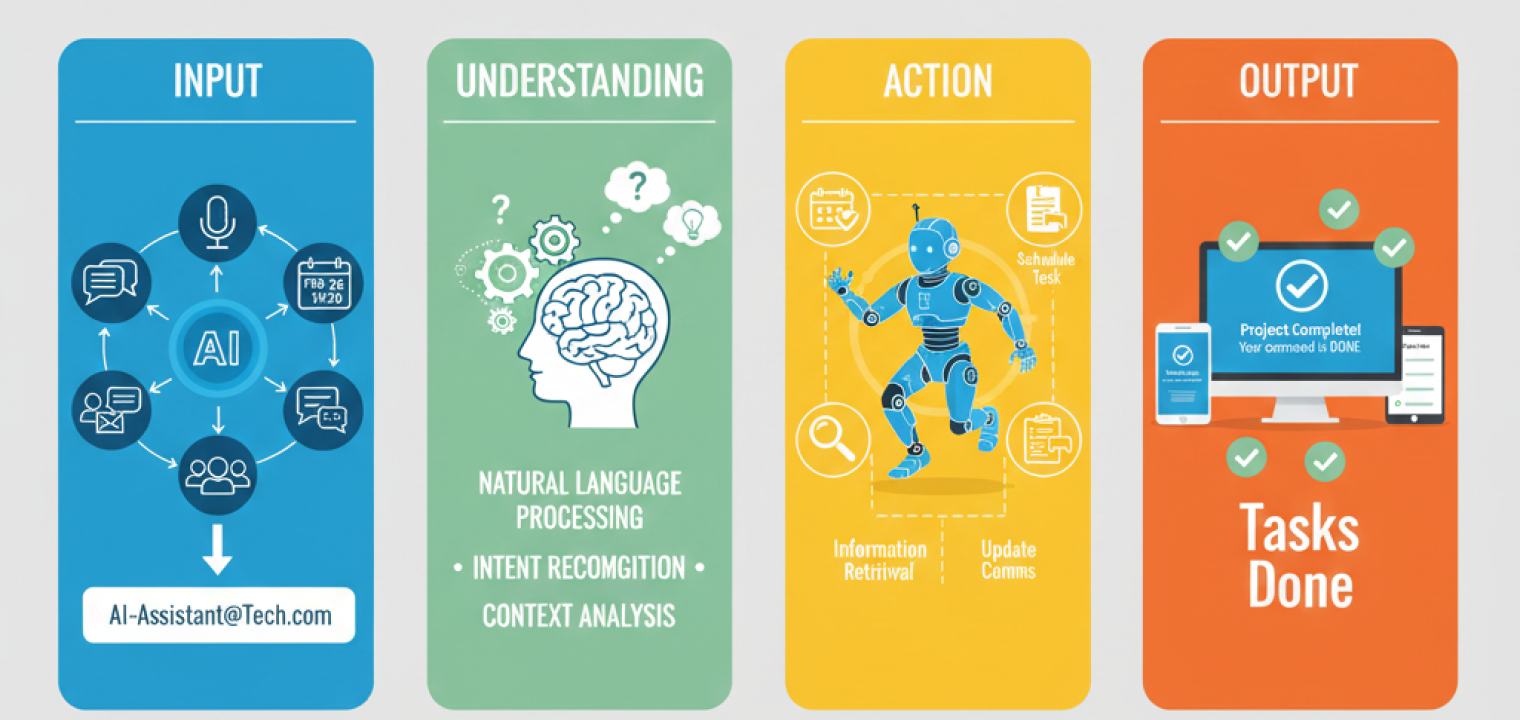
The process usually follows the same four steps:
-
Input: A person provides information through text or voice. This could be a quick prompt like "schedule a check-in," or a longer discussion happening in a huddle room during a meeting.
-
Understanding: The assistant analyzes the request to determine intent, relevant details, and timing. This is where it interprets what you actually want, not just the words you used.
-
Action: Once the intent is clear, the assistant carries out the task. That might include creating calendar events, pulling information, assigning follow-ups, or updating tools used for team communication.
-
Output: The result is delivered back to the user as a summary, confirmation, action item, or completed task—often inside the same collaborative workspace where the work started.
Common Types of AI Assistants
AI assistants show up in different parts of the workday depending on what teams are trying to move forward. Some focus on execution, others on communication, and others on capturing or shaping information as it’s created inside a collaborative workspace.
-
Task-oriented assistants: Handle specific actions like setting reminders, updating tasks, or pulling quick status updates so work doesn’t stall over small but necessary steps.
-
Conversation-oriented assistants: Support natural back-and-forth by answering questions or guiding users through tasks inside collaboration software where team communication already happens.
-
Decision-making assistants: Review data and surface recommendations that help high-performing teams prioritize work, spot patterns, or plan next steps without digging through dashboards.
-
AI writing and content creation assistants: Draft, edit, and refine written content like emails, reports, and presentations, helping teams communicate without starting from a blank page.
-
AI scheduling assistants: Coordinate calendars, book meeting times, and handle reminders, which becomes especially useful when planning a hybrid meeting across time zones.
-
AI email assistants: Organize inboxes by sorting, summarizing, and drafting responses so messages don’t turn into a second full-time job.
-
AI customer service assistants: Respond to common questions and requests through chat or voice, keeping response times short while escalating complex issues to people.
-
AI transcription assistants: Capture spoken conversations and turn them into searchable notes, summaries, and follow-ups during video conferencing or in a smart meeting room.
Each of these assistants solves a different problem, but the strongest setups connect them directly to how teams already work instead of asking people to adopt entirely new systems.
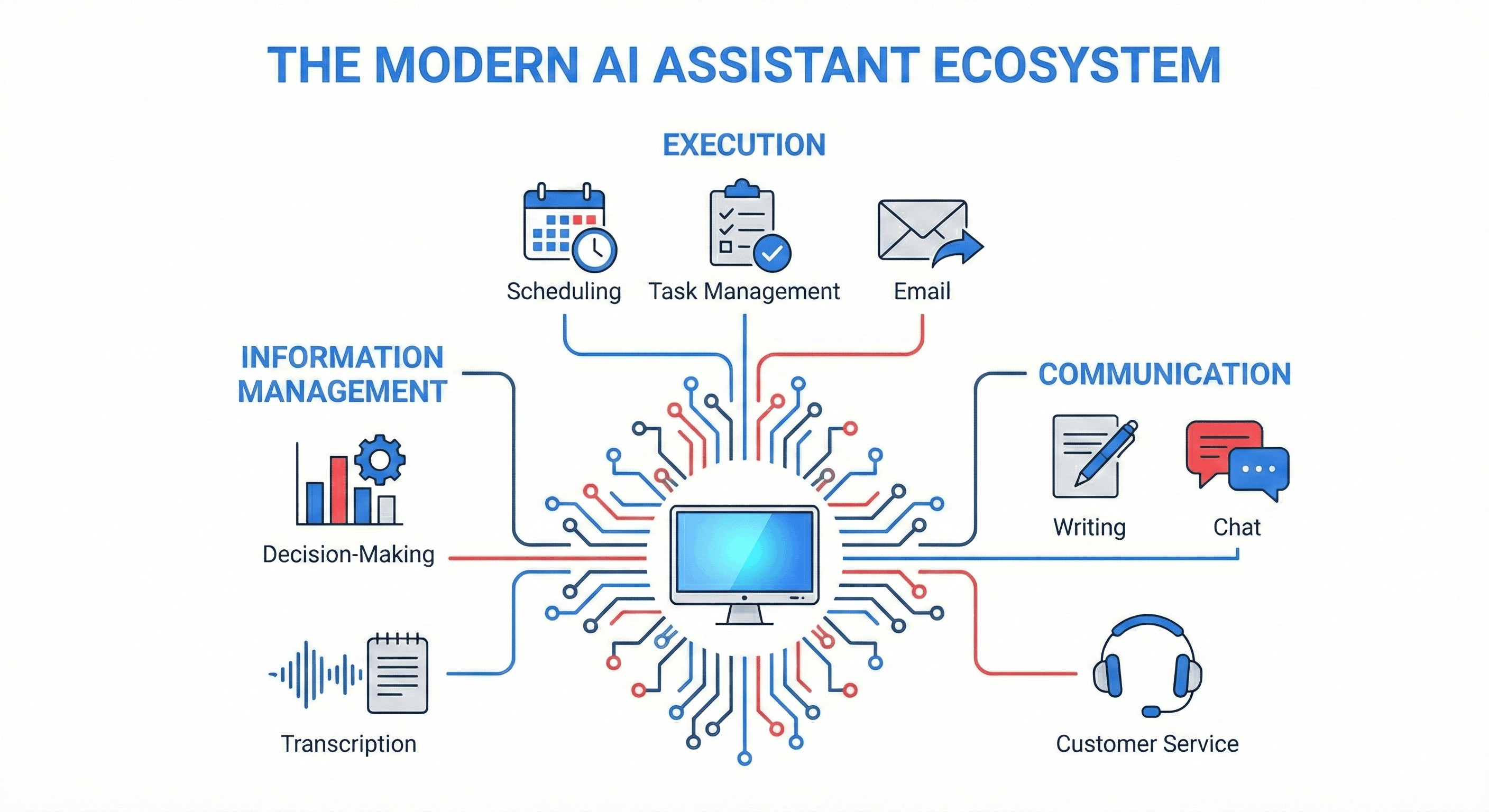 Infographic of the Modern AI Assistant Ecosystem, categorizing AI tools into Execution, Communication, and Information Management workflows.
💡Streamline Your Workflow: The most effective hybrid teams don’t just use AI—they integrate it across execution, communication, and information management.
Key AI Assistant Features and Capabilities
AI assistants feel useful when they work quietly in the background and show up at the right moments. That comes down to a small set of core AI assistant capabilities that let them understand requests, connect information, and take action inside the tools teams already use. Below are the foundational features that make that possible.
Natural Language Processing (NLP)
Natural language processing allows an AI assistant to understand everyday language instead of rigid commands. It looks at intent, context, and phrasing so people don’t have to speak like a system. For example, when someone says "schedule a team sync," the assistant understands timing, participants, and meeting type even if accents or phrasing vary.
Machine Learning (ML)
Machine learning helps AI assistants improve over time by learning from patterns in past interactions. As the assistant sees repeated preferences or behaviors, its responses become more relevant and efficient. A common example is email triage, where the assistant can learn which messages a user typically responds to immediately, which ones get flagged for follow-up, and which can wait, then prioritize and draft responses that reflect those habits without needing explicit instructions.
Data Integration
Data integration connects the assistant to tools like calendars, CRMs, project trackers, and messaging platforms. This creates smoother workflows because information doesn’t live in silos. You see this in action when people can sync meeting notes with task tools so that follow-ups appear automatically.
Information Retrieval
Information retrieval allows an assistant to pull relevant data from connected sources like documents, databases, or the web. The focus is on accuracy and speed, especially during live work. During a call, for instance, an assistant can surface client details or past decisions without interrupting the conversation.
Task Automation
Task automation is how assistants carry out routine or multi-step actions once the intent is clear. Instead of reminding someone to follow up, the assistant can create the task, assign it, and notify the team. This is especially helpful in fast-moving team communication environments.
Personalization
Personalization tailors responses and outputs based on role, habits, and past behavior. The assistant learns what matters to different users and adjusts accordingly. For example, a project lead and an executive might receive different summaries from the same meeting based on what each needs to act on.
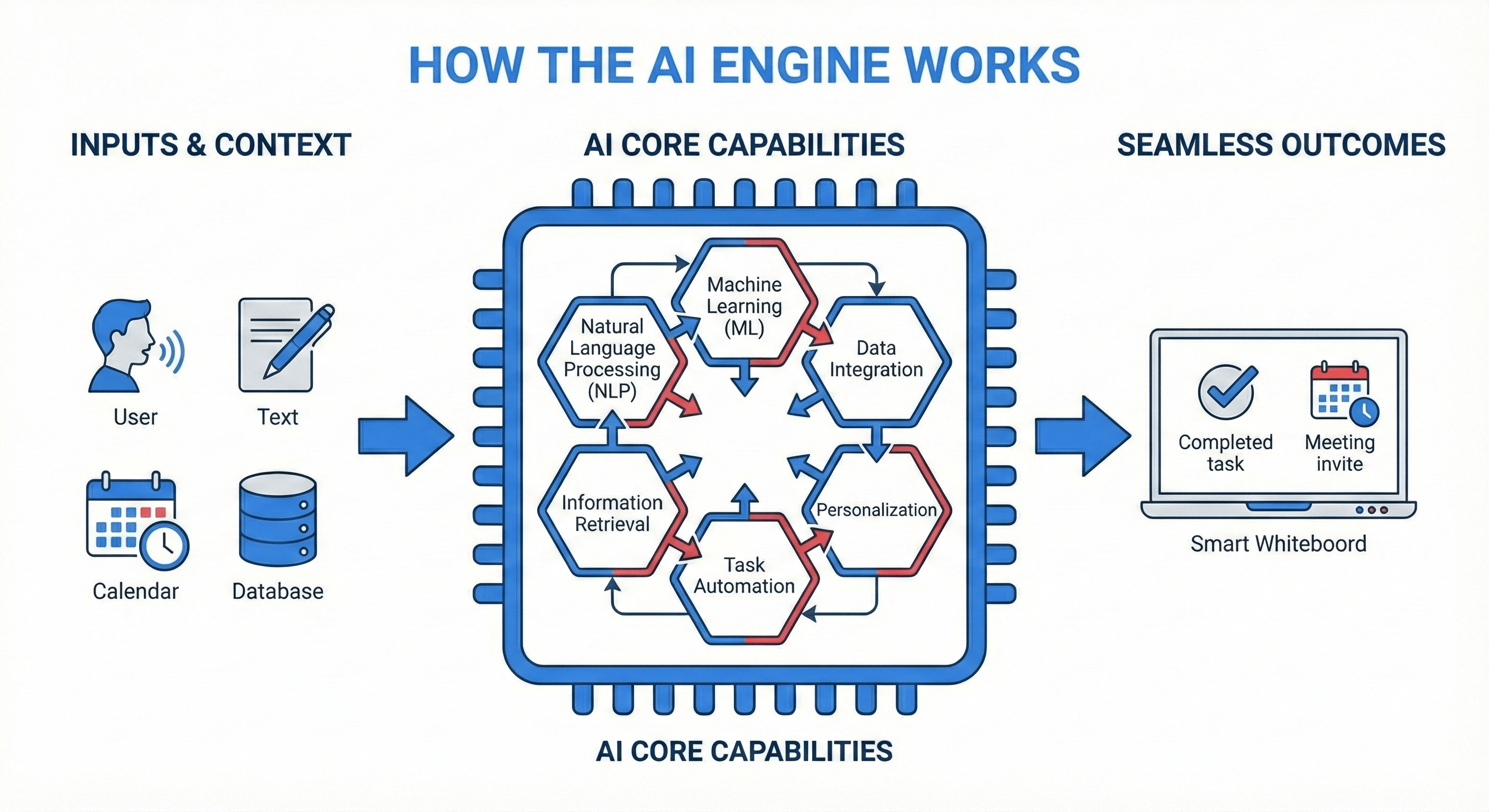 Diagram illustrating the AI assistant processing flow: inputs like voice and data pass through core capabilities (NLP, ML, automation) to create seamless workplace outcomes.
💡Under the Hood: It’s not magic; it’s an integrated engine. These six capabilities work together instantly to turn vague requests into completed tasks.
Benefits of Utilizing AI Assistants
Some of the most valuable benefits of AI assistants are how efficient you can be, particularly for hybrid teams. You can make more of your time, investments, and execution.
Time Savings and Efficiency
High-performing teams consistently save 40–60 minutes per day per person by offloading routine coordination work. AI assistants handle tasks like note-taking, summaries, scheduling, and follow-ups automatically, which cuts down on busywork that quietly eats up the day. That reclaimed time goes back into focused work instead of administrative cleanup.
Improved Productivity
By taking repetitive or manual tasks off people’s plates, AI assistants help teams spend more time on problem-solving and decision-making. Instead of juggling tools or tracking loose ends, work stays organized and easier to move forward.
Reduced Operational Costs
AI assistants scale work without scaling headcount. They reduce rework caused by missed details, minimize handoff errors, and support growing workloads without adding more coordination overhead. Over time, this leads to tighter processes and lower operational drag.
24/7 Availability
AI assistants don’t clock out. They handle requests, surface information, and capture work across time zones, making them especially valuable for remote collaboration and distributed teams. Questions get answered, and work progresses even when teammates are offline.
Accurate and Lasting Data
When assistants pull from connected systems and captured conversations, information stays consistent and traceable. Meeting notes, decisions, and follow-ups don’t disappear into private notebooks or forgotten messages—they remain accessible long after the moment passes.
Creating a digital reserve of knowledge
AI assistants help build a searchable record of conversations, decisions, and context over time. This makes onboarding faster and builds an empowering and self-starter environment. It also means that you can preserve institutional knowledge even as team members change roles or leave.
Closing the loop between talk and task
One of the biggest gains comes from turning conversations into action automatically. AI assistants convert meeting discussions into assigned tasks and reminders, helping teams maintain momentum across handoffs, time zones, and hybrid meetings.
Limitations of AI Assistants
AI assistants can take a lot of work off your plate, but they aren’t flawless. Human reason and creativity will always be necessary and valuable, and understanding where AI assistants fall short helps teams use them more effectively and avoid over-reliance. The limitations below are common and worth planning for.
Training Data Quality and Hallucination
AI assistants can generate incorrect or misleading outputs when their training data is incomplete, biased, or outdated. This shows up most often as confident-sounding answers that aren’t actually correct. Teams reduce risk by choosing platforms with accuracy checks, grounding outputs in trusted data sources, and keeping humans in the loop for critical decisions.
More Complex or Ambiguous Requests
Despite major improvements, AI assistants can struggle with vague or highly nuanced requests. When context is missing or instructions are unclear, results can miss the mark. Clear prompts, defined workflows, and assistants with stronger context awareness help close that gap.
Security and Privacy Concerns
AI assistants often handle sensitive information, which introduces risk if safeguards are weak. Data exposure, access misuse, and compliance gaps can become real issues. Teams should prioritize tools with strong encryption, clear access controls, and compliance standards that match their industry, such as SOC 2 or HIPAA compliance.
Inability for Empathy and Human Touch
AI assistants can respond politely, but they don’t understand emotion or nuance the way people do. Situations that require trust, judgment, or emotional awareness still belong with humans. The most effective setups use AI for routine work and escalate human-centered moments to real people.
Prompt Dependency and Lack of Context Capture
Software-only assistants rely heavily on what users type or say in the moment. Missed context or incomplete input directly will definitely affect your output quality. Teams often address this by pairing AI with hardware or systems that automatically capture full meeting context so that there isn’t so much pressure to perfectly phrase something.
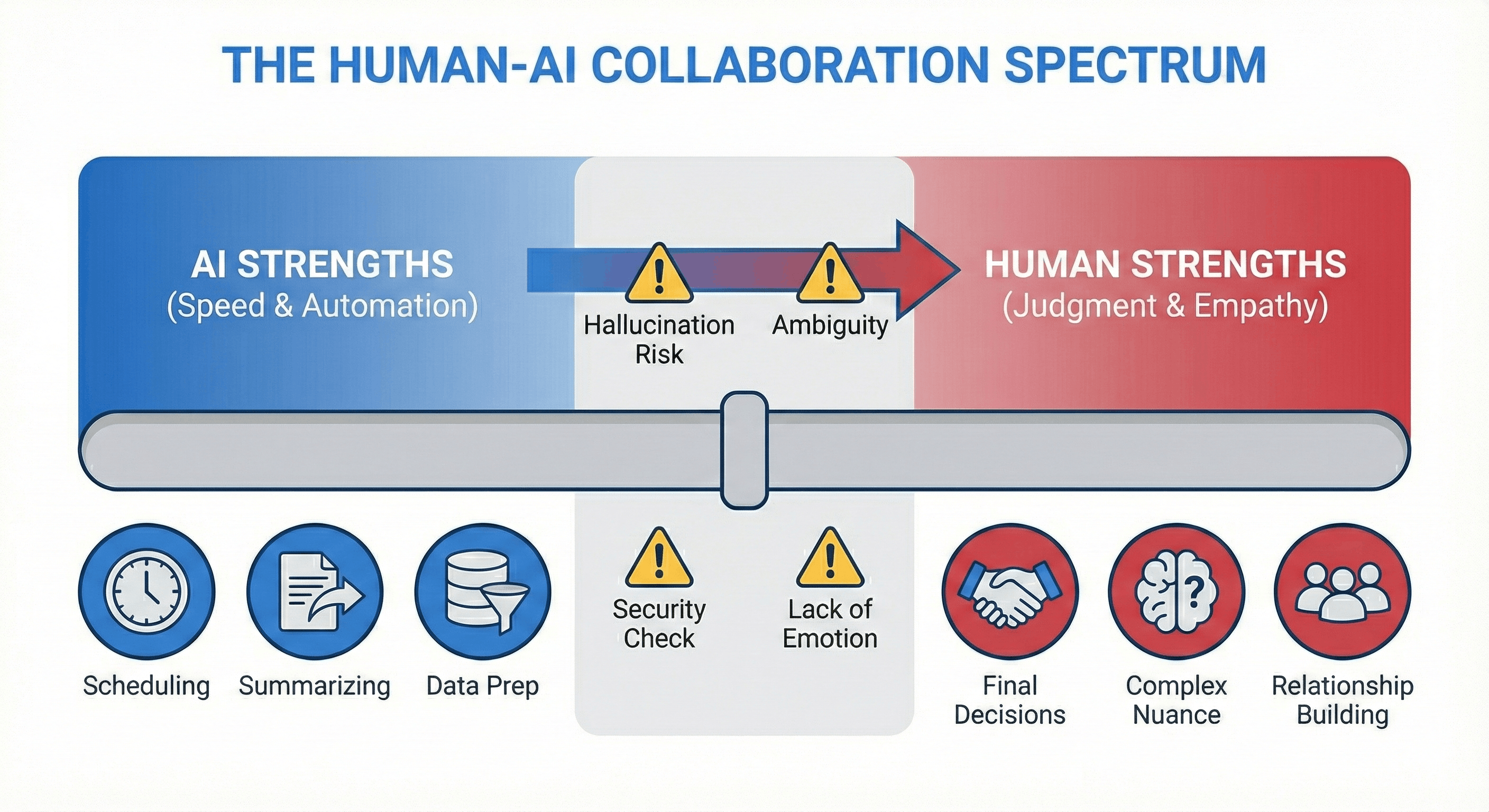 Infographic spectrum showing the division of labor between AI strengths (speed, automation) and human strengths (judgment, empathy), highlighting limitations like hallucinations and ambiguity as handoff points.
💡The Smart Approach: Don’t expect AI to do everything. Use it for speed and scale, but keep humans in the loop for judgment, nuance, and high-stakes decisions.
8 Examples of Popular AI Assistants
AI assistants come in many forms, from consumer staples to enterprise powerhouses. They generally fall into two broad categories: consumer assistants designed for individual convenience, and enterprise assistants built to support structured work, collaboration, and accountability. Consumer tools like Siri, Alexa, and Google Assistant focus on quick tasks such as reminders, search, or device control. Enterprise assistants, on the other hand, operate inside collaborative work environments with greater accuracy and follow-up. These 8 examples showcase AI’s range.
1. Apple’s Siri
Siri is a voice-based AI assistant built into Apple devices to support hands-free task execution and quick information access. It handles phone calls, messages, reminders, alarms, music playback, navigation, device controls, and custom shortcuts across iPhone, iPad, Mac, and Apple Watch. Siri works best for individual users who want fast, voice-driven assistance tightly integrated into the Apple ecosystem, rather than tools designed for shared work, meetings, or team collaboration.
2. Google Assistant
Google Assistant is a versatile AI helper designed for voice and keyboard interactions across Google devices and services. It supports queries, alarms, hardware adjustments, music and games, location-based requests, multi-language interactions, and third-party actions through connected apps. Because it’s deeply tied to Google Search and Android, it excels at surfacing information quickly. Google Assistant is best for Android users who want broad access to information, light scheduling help, and smart home control rather than structured workplace collaboration.
3. Microsoft Co-pilot
Microsoft Copilot is an AI-powered assistant embedded across Microsoft 365 applications to support everyday knowledge work. It helps draft documents in Word, build presentations in PowerPoint, analyze data in Excel, summarize meetings in Teams, and manage emails in Outlook. Copilot works best for enterprise teams already operating inside Microsoft’s ecosystem who want AI support layered directly into existing productivity and collaboration software rather than separate tools.
4. Grammarly
Grammarly is an AI writing assistant focused on improving clarity, tone, and correctness in written communication. It reviews grammar and syntax, suggests rewrites, adjusts tone, improves readability, and offers content restructuring across emails, documents, and messaging platforms. Grammarly is best for individuals and teams that write frequently and want more polished, consistent communication, but it does not manage tasks, meetings, or shared workflows.
5. Lindy
Lindy is a customizable conversational AI designed to automate personal and business workflows without requiring code. It can handle tasks like scheduling meetings, taking notes, generating leads, and responding to emails through connected tools and integrations. Lindy works well for users who want flexible, no-code automation for individual workflows, though it is less focused on capturing shared meeting context or supporting in-room collaboration.
6. Cursor
Cursor is an AI-native code editor built on top of VS Code to support faster software development. It provides inline code suggestions, bug detection, refactoring help, and explanations using multiple AI models, all within the coding environment. Cursor is best for developers who want AI assistance tightly integrated into writing and debugging code.
7. Amazon Alexa
Amazon Alexa is a voice-activated AI assistant designed primarily for smart home management and everyday personal tasks. It supports music and podcast playback, lists, reminders, routines, device controls, and personalized responses through Echo devices. Alexa works best in home or light office environments and is not designed to support structured meetings, documentation, or shared team workflows.
8. Vibe Bot and AI
Vibe Bot is an in-room AI assistant built specifically for meetings and team collaboration. It captures live conversations, generates real-time transcription, summaries, and action items, and supports voice commands for hands-free use. Vibe Bot integrates directly with Zoom, Google Meet, and Microsoft Teams, making it especially useful for hybrid teams that want meetings to translate into clear outcomes, shared documentation, and consistent follow-through inside a smart workspace.
How to Choose the Right AI Assistant Tools
The right tool should support how your team already works rather than add another system to manage. This quick framework keeps the focus on real-world use.
-
Define goals: Identify the core problem you want to solve, like task automation, scheduling, or meeting follow-through.
-
Check core capabilities: Confirm support for language understanding, integrations, and reliable output.
-
Confirm system compatibility: Make sure it connects with existing tools like calendars, CRMs, and communication platforms.
-
Review total cost: Factor in setup, usage, and long-term maintenance.
-
Assess security standards: Look for strong access controls and compliance that match your industry.
-
Evaluate usability: Adoption depends on how easy the tool is for teams to use daily.
-
Test in real workflows: Trial the assistant in live scenarios, not demos.
-
Plan for scale: Confirm it can handle increased usage as teams and workloads grow.
Why Vibe Bot is the Missing Link in Your AI Stack
Vibe Bot is built for the meeting room. It runs as a standalone device with its own operating system, so there’s no laptop required, and it can connect to a TV or monitor when you want a larger display. Setup is simple and designed for in-room use, which means teams can walk in, tap once, and start working.
During meetings, Vibe Bot captures what’s said in real time, turns conversations into transcripts, summaries, and assigned action items, and keeps track of time automatically. It supports quick voice commands with strong microphone pickup, joins Zoom, Google Meet, or Microsoft Teams with a single tap, and sends daily summaries that teams can use for tracking work or billing time.
For teams running hybrid meetings who want fewer dropped balls and less manual work, Vibe Bot does the unglamorous part so people don’t have to. Schedule a demo to experience the difference of an AI assistant that lives in your software.
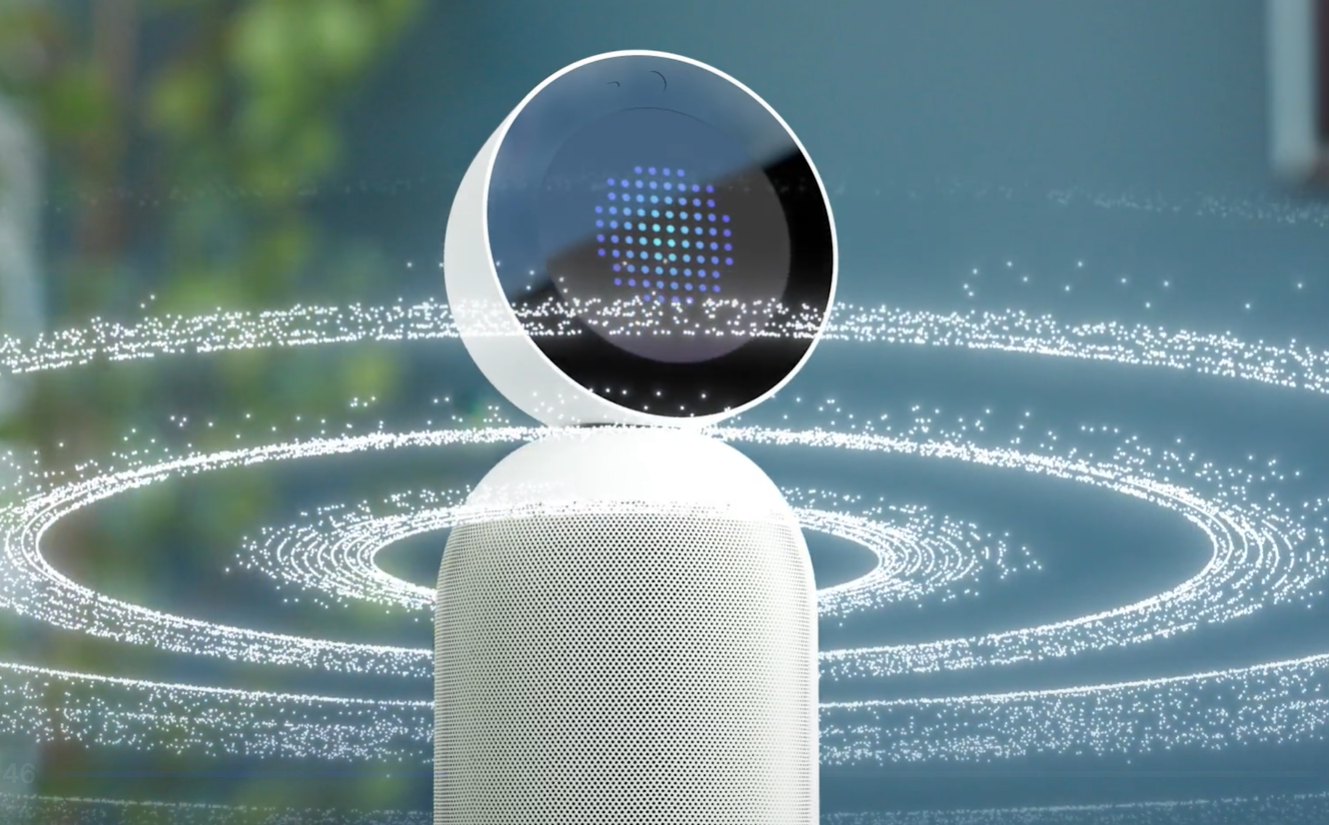
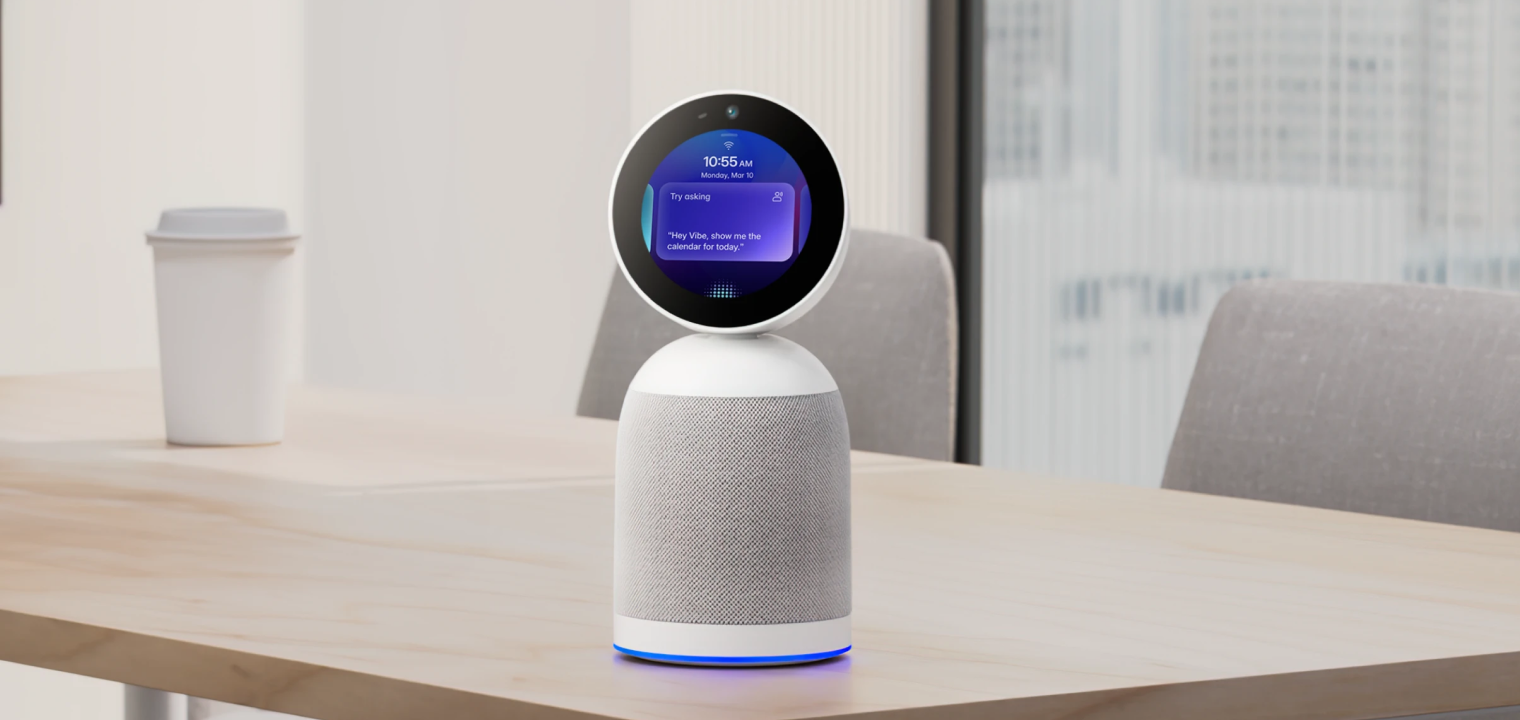 Vibe Bot, an AI-powered meeting assistant device on a modern office desk.
AI Assistant FAQs
Why do businesses need an in-room AI assistant instead of just software?
Software-only assistants rely on people to remember to start them, prompt them correctly, and capture context. An in-room AI assistant automatically captures conversations, decisions, and timing as meetings happen.
What does an AI assistant do?
An AI assistant helps people complete tasks by understanding requests, taking action, and delivering results. Depending on the tool, this can include scheduling, summarizing conversations, retrieving information, or turning discussions into action items.
Is ChatGPT an AI assistant?
ChatGPT is an AI assistant, but it’s software-based and prompt-driven. It works well for drafting, answering questions, and idea generation, but it doesn’t automatically capture meetings or shared context without manual input.
How do AI assistants improve productivity?
AI assistants reduce time spent on coordination, note-taking, and repetitive tasks. By handling that work in the background, they help teams focus on decisions and execution instead of cleanup.
What is the difference between an AI assistant and an AI agent?
An AI assistant responds to requests and helps complete tasks when asked. An AI agent operates more independently, taking actions on its own based on rules or goals, often with less direct user input.